阅读视图

没有被看见的斩杀线,其实就在身边

  美国的斩杀线,最近被讨论的足够多,但状况却是多年前持续到现在的,只是以前大家都被别人的滤镜或自己有意无意的滤镜给骗了而已。如今没什么人讨论我国的斩杀线,也并不意味着我国没有斩杀线,如果到全民讨论的那一天,那可能就是已经严重到万劫不复了。也可能这种负能量天生和国内的网络媒体环境不符,发出来没什么好处,或者发不出来。

  我不去分析那些大数据,就凭自己的亲身经历以及道听途说,说说我所感受的斩杀线。

  斩杀线不是说非得把一个人弄死才叫斩杀,而是一种重大的生活水平坠落,而且可见的时间内没有恢复的可能。

斩杀线1: 医疗

  国内的斩杀线,首当其冲是医疗。大家都说美国的天价医疗费,但是中国的情况虽然不同但也有特定情况下的天价医疗费,而且中国人传统上的重情重义,导致一个人的病情拖垮全家三代人的生活的例子也不鲜见。

  解放前的中国人,得了重病的情况下大部分和在家等死差不多,叫个郎中过来开几副药,能不能吃好就看命了。比如我母亲有时候也会说,她要是得了要花几十万去看的病,那她就自己跳到河里死了算了。最近几十年,中国人的经济和生活水平坐了火箭一样的提升,人渐渐都开始惜命了。

  我们每个人一定都见过朋友圈里的水滴筹、轻松筹等等,那可能就是一个个的斩杀线的案例,如果他们筹到了除掉筹款中介和平台的抽成之后还足够用的医疗费,那他们还算好的了。还有那些没有去公众筹款的人呢,大家看不见。在知乎上,我见过好几个网友现身说法,家里的一个老人病重,还没到八九十那种离上帝很近的老,可能在退休线附近的,年轻不算年轻,老又不算太老,家人肯定是不舍得放弃的。如果放弃,不仅有情感上的不舍,也有道德负罪感,而且就算某个人的心里有放弃的想法,也必然不敢先说出来,谁也不愿意也不敢先当这个坏人,结局基本上只有一个,那就是花光所有的积蓄,可能再卖房卖车或借钱,到最后再也拿不出钱来了为止。

  以前有一个同事,是家里的独生子,好大学毕业,进了外企,光鲜亮丽。一场癌症袭来,就掏空了一切。住院两年期间,公司仍然足额发工资,还给了几十万补助金,同事捐款也有几十万,他自己家里也从小康之家变得一无所有,卖了房,借了债。最终的结果,天不遂人愿,他还是没能撑过去。他算是解脱了,他父母没了半分养老钱,还要赚钱还债。可能我们作为外人,会觉得不应该这么不计代价,但没有谁能够算明白代价到底应该到哪一步是刚刚好。

  重病对普通人就是不留情面的。当一个家庭从富余突然变得穷困,引发的副作用远比贫困本身更大,可能是抗风险能力的归零,锐意进取的心态崩溃,夫妻感情与亲子关系的破裂等等。站在事后诸葛或上帝视角,我们或许能够对他人的境遇留有一丝客观,发生到自己头上的时候,就不是那么回事了。

  我个人可能是更偏向残酷的理想主义者,我偏向于国家免费治疗,并且禁止家庭超出收入能力的医疗支出,比如说国家兜底100万的治疗额度,家庭可以动用50%资产用于自费医疗,就算家庭想投入更多钱治疗也被法律禁止。法律一方面是要尽可能照顾更多人,另一方面也通过明确规则解除家庭成员放弃治疗的道德负担。这个数字我是随口一说,不用较真,意思是那么个意思。

斩杀线2: 超前消费

  除了医疗,还有一个斩杀线,就是超前消费。现在已经挺严重,但正在变得更严重。

  第一波,是上杠杆买房的人,碰上经济放缓的大环境。极度的乐观,到极度的悲观,只隔了短短数年。这些人之中,绝大多数并不是炒房客,只是憧憬美好生活的普通人,当收入降低,还贷压力很可能会让一个家庭喘不过气来,甚至再也没有翻身的机会,因为你后续赚的每一分钱都第一时间要去还贷而不能用于继续投资,不论是投资创业还是个人成长。

  第二波,是超前消费贷的人。现在即使不买房,也有很多人习惯了超前消费,各种消费贷让人应接不暇唾手可得,越来越常听见刚从学校毕业没多久的年轻人就欠了大几万甚至几十万网贷的事情了。一部分年轻人,正在从上一辈的极尽节俭,走向另一个极端,掉进资本编织的消费陷阱。解决方案是什么,不知道,低消费躺平肯定不是。

自省

  就我自己而言,也是属于上杠杆买房的人,多方面的原因买了学区房,现在也是负担比较重的,虽说有些资产但是没什么活钱,如果有个什么意外,那这一切都是镜花水月,一夜归零。为了对抗这些意外,就买了较高的保险,而保险费反过来又增加了负担。现在,银行的贷款,就是我的斩杀线吧。

  所以,能怎么办呢?调整心态,生死面前都是小事。

  开心享受美好生活,好好对待身边的人,现在的日子可能是最好的。

  •  

推荐一位朋友编写的益智小游戏:横冲直撞

  “横冲直撞”,是朋友皮卡丘编写的益智小游戏,挺久之前的作品了,最近跟他又聊到这个游戏,把链接收录到了我的站点上,这里做个小小的推荐。

横冲直撞

  玩法比较经典了,应该有人玩过类似的,只需要让小精灵在棋盘格内上下左右的滑动(键盘方向键、鼠标或触摸滑动),借助各种道具(石头、弹板、井盖、木桶等),最终滑动到目标格(梯子标记的格子)。

  游戏功能做的挺完善的,支持各种设备,有玩法介绍,历史记录,自带300个关卡,还能够根据自选难度生成随机谜题,解不出来的难题还可以使用自动提示功能。

  点击上面的图片或者这里就可以开始玩了。

  这里搭个便车推荐一下自己的小游戏。最近把本站的Games页面更新了一下,带上了缩略图和一句话简介,页面上列出了13个自编小游戏,有兴趣的朋友可以移步Games页面瞅瞅。

  •  

关于程序员高广辉猝死所想到的

  程序员高广辉猝死的新闻,是上周听说的。当时听说这事,在我内心并没有很大的波澜,这样的事情也听说过多次了。

  程序员可能未必是比其他职业更容易猝死,应该所有高强度工作都有这样的危险。但程序员群体之间产生的交集会更多,会在网上探讨技术问题,共享技术成果,所以同行之间的距离感比较近,同行猝死的冲击就比较大。程序员的工作非常讲究时效性,在线服务出问题了往往要第一时间解决,不论大厂小厂,加班往往是常态。

  以前看过的一个剧《凡人歌》,里面的男主的弟弟那隽就是程序员,也是非常真实的复现了程序员加班的场景,公司里有人被救护车拉走,他自己也一度出现短暂失聪。可笑的是,剧中公司厕所安装计时器的桥段,在现实中也是存在的,新闻能搜到一大把。

  就我自己而言,熬夜也是经常,写代码或者解决技术问题有时候是工作需要,有时候是兴趣使然,反正不会感到烦躁厌倦,但是累是真的会累,有时候熬的太晚了第二天睡到中午。在家的时候,夜深人静的环境,脑子更加能够专注,时间就会不知不觉的流逝几个小时。

  看网上晒出的高广辉和妻子的微信聊天记录,我感觉也挺离谱,每隔几天一次对话,每次的对话几乎都仅有妻子催他回家而无其他内容,他多数也并不回复,或者只是短短回复“要晚点”之类。

高广辉和妻子的微信聊天记录

  这样的人是不正常的,不仅仅是没有生活,甚至是几乎没有人类情感了,实在无法理解。有没有可能他在和妻子面对面的时候是正常人类情感呢?我认为可能性不大。一个人的性格,往往是贯穿其行为的。

  我不理解那些通宵达旦打麻将的人,觉得他们比加班还累,为什么他们自己乐此不疲呢,即使从生理方面来说他们真的很累,但他们的大脑就像是磕了兴奋剂。这样的适当娱乐我是喜欢的,但是那么累的娱乐我是干不下去的。

  看高广辉的github issues里面好多人发“R.I.P”,不明所以,网上查了一下,才知道是英文“Rest in Peace”的缩写,意为逝者安息的意思,学到了。但我想说,咱能别那么省事吗?

  最后希望所有努力养家糊口的牛马们,合理安排工作,多一点自己的生活,祝身体健康!

  •  

溜冰场内年龄最大、技术最差、但最勇敢的人

  周末跟女儿去滑冰了,离上次去滑冰,有近一个月了。滑冰场在商城里面,地铁直达,很是方便。来滑冰的多数是小朋友,看起来四五岁的都不少,还有少部分年轻人和滑冰教练。环视全场,我这个年龄的,恐怕就没有第二人了,跟我年龄接近的都在场边的家长休息区。我是抱着借机运动一下、来都来了、重在参与的思想下的场。

滑冰场

  这次刚进场的时候,我感到明显生疏了,只能挨着边上慢速的滑,滑一段就要扶着旁边的栏杆停下来,转弯和减速都不会了。滑了半个小时后,才找到一点平衡感了,不过也轻微摔了两次。我是全场技术最差的人之一了,看别人各种花式动作那么溜,真是佩服。休息了十分钟之后,又滑了半个小时,出了一身汗。运动完就在旁边的食通天吃午饭,等餐的时候女儿拿餐巾纸折了个千纸鹤。

午餐

千纸鹤

  女儿并不热衷于运动,虽然也愿意在家长的带动下出来运动,但如果给她自由选,她肯定选宅在家里做作业或者打游戏。爬山、打球、滑冰等等,我就只能以身入局了哈哈。珍惜现在的机会吧,随着她的长大,我的老去,这将越来越难得。

  当天没啥感觉,到周一的时候开始觉得大腿酸,周二也还腿酸,到周三才消失。平时我这胳膊腿的运动量确实太少了,希望今年加强一下。

  •  

年会没中奖,是不是等于没参加年会?

  公司年会已经过去十来天了,现在来回忆一下。

  这两年的年会,公司都是租的会展中心的场馆,弄的恢弘大气。对我个人来说,最大的区别是,去年身体不好心情不好,今年身体好心情也好。最大的共同点是,我都没有中奖!每年上千个抽奖名额,我连续两年没中,那只能理解为幸运点数都用在别的地方去了吧。

  随着年龄的增长,对待年会的心态也产生了很大的变化。今年的年会当天直到中午,我都没意识到当天是年会时间,脑子里以为是下周,后来偶然的看了一眼企业微信才知道。

  刚工作的头几年在小公司的时候,并没有年会,遇到抠门的老板连个聚餐都没有。后来去了稍微大一点的公司,虽然没有年会,但是会有尾牙宴,也是其乐融融。去杭州工作的时候,是大一点的外企,也有了比较正式的年会,会有歌舞节目,会在酒店聚餐,会抽奖,会为同事的节目表演嗨起来喊,会被年会上讲话的人感动。

  现在公司规模不小,每年的年会也规模不小,两千多人的大厅,热闹非凡。大领导们意气风发豪言壮语,美女帅哥们歌舞升平。前几年我还觉得要去吃饱喝足的,这几年对年会上大同小异的餐食也没多大兴趣了,最期待的恐怕就是那个抽奖环节了,可能是因为凭运气取得的收获更能让普通人兴奋吧。哪怕一年里发生了再多不愉快的事情,只要年会幸运中奖,就会觉得这一年是以大幸运完美结束的。而没有中奖,就多少感到遗憾的,这就是我的小格局哈哈,格局大的都在台上给大家抽奖。

  几年前的我,在年会抽奖节目的时候,脑袋里想的是这个抽奖程序应该如何实现更好,需要考虑哪些关键点,如何更好的互动抽奖等等。现在的我,已经不会再去多思考这些了。我看其他同事也很直接,当一等奖的名单完全揭晓之后,大家就开始起身离席了,哪怕服务员的菜还没上完,哪怕舞台上还有人讲话或表演。今年年会的菜品味道真是退步了,炒面还有没炒熟的,但那么大的量,恐怕也确实是没办法做好。

  顺路吐槽一下年会的“小品”表演,每年都是可劲的霍霍四大名著或者白娘子法海,穿越搞笑,其实我对这种节目是一丁点儿兴趣都没有,感觉过于低俗搞笑了而且还并不太好笑。歌舞节目是我最喜爱的,每年都能见到几个虽不认识但已脸熟的面孔,她们的舞蹈也许比专业的差的远,但已经足够展示出热情与美丽了。现在的孩子们,在多才多艺这方面,真是比我这辈强太多了。

年会

  2025 已归档,2026 已新建文件夹。

  •  

小区绿化带里,有人种菜用粪水施肥

  这两天业主群里在吵一个事,有某位老人家在绿化带种菜的时候使用了粪水,导致芳香四溢,引起周围业主不满,要求物业处理,物业表示已经联系了老人的子女进行沟通,要求以后不再发生类似行为,但也做不了太多实际行动。群里一堆人在表达不满,不仅仅是这次的,据说以前经常有施肥的气味。其实这老小区的微型绿化带,要我说不如直接拆掉,糊上水泥就行了,就那不到一米宽的绿化带没有什么用,还挤占空间。

  网上一搜,类似的事件其实挺普遍的,全国各地都有发生。网上有个梗,说中国人的种菜基因是刻在DNA里的,去哪里都要种菜,比如在楼房室内用瓶瓶罐罐也种菜,移民海外也种菜,南极科考站种菜,空间站里也种菜。这更多是个调侃,不过也说明种菜的现象确实挺多。小区里种菜是挺容易引起纠纷的,毕竟是公共空间占为私用了,而且还有对其他人的生活造成直接影响。

  我在深圳住过的好几个地方有遇到过种菜的,也经常看到老小区的楼顶上有菜园。以前租过的一个小区的楼顶上就有,种上了好几种菜,黄瓜长的尤其好。那阵子心情低谷,经常一个人去楼顶发呆,看着脚边那些长势旺盛的蔬菜,给人满满的生命力之感,有助于缓解负面情绪。

  这次小区里种菜的,是在一楼绿化带位置,尽管整个小区的绿化带几乎全都变成菜地了。但是,浇大粪施肥的,就过分了。我第一反应是好奇他从哪弄到的这些“肥料”,后来好像物业说是有人从排污井打捞的。。。

小区里种菜
(图片来自AI)

  种菜本身并没有什么不好,只是这个场合不合适罢了。老人若是有心种菜,何不替老人弄个农家小院,让老人安心种菜呢,除了交通不便,其它都是优点。对于以前长期在农村生活过、现在已经退休的老人,又不是很有精力和体力干其他事情,回农村生活,倒是一个很好的选项。虽然现在政策还有障碍,不能轻易在农村买地,但是租还是能够租到的,只不过这些信息不会上网,得靠熟人信息吧。如果能够在老人家的子女工作的城市近郊农村,给老人弄块农家院,就很完美。我也想有这样的退休环境,只不过我可能没那么勤快种菜,即使种菜恐怕也是“草盛豆苗稀”。

  •  

再记父母之间的矛盾与相处

前言

  想记录一下这个话题很久了,但是总觉得很多事情还没太了解到,包括父母的结婚具体时间以及早期的相处情况都不大了解。之前写过一篇《闲说父母(3)—— 父母的关系》,也很笼统。

媒妁之言,优势互补

  父母相差两岁,小时候就同村,二十三岁左右经同村亲戚介绍结婚,婚前应该没有多少机会相互了解。那时候亲戚或媒人介绍,还是主流的婚姻途径。那时候政治运动接连不断,自然灾害也频发,农村里谁家都是穷的叮当响,父母结婚的时候有一间小小砖瓦房之外,其它就一无所有了。但两个人都是智商在线的,父亲是那个年代少有的高中生,能写会算,各种农具机械的技术维修都很擅长,母亲虽不识字,但既会做重体力的农活,也会各种各样的厨房技能,做鞋绣花衣服缝补也都拿得出手。

君子动口,也动手!

  在我记事前,不知道他们相处的怎么样。但从我记事起,就是他们经常吵架、打架的印象。他们吵架和打架的频率非常高,隔三差五吧,烈度也是相当高的,远远不止拌嘴那种,而是互相骂亲戚祖宗互相抄家伙动手的程度。

  父亲是老三届的高中毕业生,这在当时环境下绝对算得上是比90%的人更有文化水平了,可惜并没有因此成为一个温和谦逊的人。母亲虽没有读过书,基本不识字,但与外人相处都很和善得体,唯独与父亲相处例外。为什么呢,我想,一定是父亲总是触碰到她的底线神经了。父亲是个嘴很毒的人,经常语气很冲、口不择言,母亲很受不了这个,就会辩解或还击,父亲则会因此感受到权威受到挑战而暴怒,矛盾如此螺旋升级。

  他们都属于活干的不少,但绝不会嘴甜说一句好听的话的人。情绪价值,对他们而言,完全给对方提供不了一点。父亲贬损起母亲来,语言恶毒,经常还会拿母亲亲戚那边的事情为由来骂。母亲也不是软柿子,也算是能说会道,父亲本人和父亲这边的亲戚也都是有各种问题的,母亲在嘴仗中往往不落下风。真到抄家伙动手的时候,往往母亲还是吃亏多些。

  两个人从二十多岁,闹到七十岁,父亲还是能够随口骂出极难听的话,母亲则是会喋喋不休的戳父亲的神经。两个人可能也是因为有这种锻炼,现在七十岁讲话还是中气十足,吵起架来,声闻百米,要不是老家那边邻里房屋隔的远,邻居都要耳鸣了。

  过年回老家,年终大戏就是他俩的对手戏,大吵一架好过年,只是现在这个年龄已经不太抄家伙了,我早习以为常了。

斗而不破,互为依赖

  他们都善良和勤劳,不图占别人便宜,乐意帮助有需要的亲朋,承受长时间高强度的劳动。尤其母亲的勤劳更胜于父亲,不仅承担绝大部分的家务,做饭洗衣打扫,孩子的照顾,一个大菜园的种植采收,还有所有外出的高强度劳动,与父亲一同参与所有几乎只有男性劳动力才会参与的劳动,比如挑上百斤的担子,分担的重活不比男人少。可以说家里的事情母亲做了90%,外面的事情跟父亲各做一半。他们通常有再激烈的争吵,也会在第二天一起下地干活。

  母亲每每向我控诉起父亲来,似乎三天三夜也说不完,说着说着就会哭了。父亲说起对母亲的不满来,也是一副生无可恋的样子。他们都非常接受不了对方的样子,但他们也更无法面对没有对方的样子。父亲在生活上非常依赖母亲,母亲在精神上又很依赖父亲,就是这种既恨的咬牙切齿,又觉得非对方不可的状态。我曾经让母亲跟我来城里短暂生活,显然她对城市生活也没那么舒适自在,因为她不识字,她感觉在城里像个傻子,而我又没法有很多时间陪在她的身边。大概只有她帮我带女儿两岁多的那段时间是她最开心的时候吧。后来女儿大了再接她来过的时候,她天天惦记的还是我爸的生活和家里的那些活计。父亲一个人在家里就吃了上顿没下顿,他自己懒得做饭,况且一个人的量也确实不好做饭。

  现在他们就是一对相厌相依的老人,我同情他们,但能力有限,情商也有限,无能为力,介入不了他们的因果。

我的反思

  我一直认为父母的性格真的是不适合的人,从小到大亲历他们的争吵打斗无数,我真心觉得他们俩人就算不离婚而只是分开过,也会彼此都会减少90%的头疼。可能是受此影响,我走向了另一个极端。我曾经对于家庭争吵非常恐惧和回避,在我的婚姻里,我往往宁愿牺牲其它而回避争吵,比如放弃自认正确的选择,或接受长期冷战的状态,而忽略了更重要的是解决问题,而不是回避问题。其实,哪怕争吵也是一种多少有点信息的沟通,总比不沟通要好,就算沟通不了,吵都吵不下去,那就分手也是一条路。

  从上一段婚姻里走出来之后,我想的比以前明白了。失败的婚姻并没有让我恐惧婚姻,就像我提交了一份不及格的答卷,并不会恐惧考试,那是我自己的知识问题,而不是考卷题目出的不好。如果以后我女儿和我聊起来,我会很乐意跟她分享我的教训和经验。

  以史为鉴,知兴替,以人为鉴,明得失。

  •  

如此有才的秀恩爱

  秀恩爱见的多,如此有才的秀恩爱却少见,看看我朋友夫妻俩在文学刊物上发文给对方致信及回信。

  彼岸和马哥是夫妻,一对十分有才情的夫妻,在我小小的朋友圈里算是才气值最高的了。忘记了是几个月以前,得知他俩作品发表到刊物了便向其索书,彼岸说等期刊出来之后寄我两本,我就等着了,期间还问过一两次书出来没,最近终于出来了,我如愿收到。她还收集了几片美丽的银杏叶赠我,刻意找纯黄无瑕疵的叶子,用精致的小相框夹好了。真是有心!

神泉&银杏

  马哥与我并未谋面,只见于彼岸的叙述里。马哥是一位职业画家,作画是个辛苦活,还经常要去外地好多天,我见过他的工笔花鸟画,虽然我不懂但也能感到十分惊艳。彼岸跟我是快二十年的老朋友了,当时在厦门认识的,也是我的湖北老乡,比我小好几岁。那时的她就已经展露她的才气了,圈子里颇有名气。我们有一些共同的朋友,她在家“大宴宾客”的时候,我也蹭过饭。这么些年了,还能保持联系,属实不容易的,除了珍视友谊,也还需要一些幸运的。

  收到书的第一天就仔细读了马哥的长文《写给妻子的一封信》,又搁了几天读了彼岸的回信《雨天回马先生家书》,还有马哥的几首小诗。十分赞叹他俩文笔,也十分钦佩他俩的十多年的感情,还有他俩对人生的态度。文字版的全文发在《房县文艺》公众号,本文末尾有链接。

  丈夫马哥《写给妻子的一封信》的开头和结尾两段拿出来感受一下。

当我就着窗外的月光将这些承载着心意的文字轻轻叠合,忽然发现每一次倾诉里,都藏着我们灵魂共振的频率。原来爱从不是单向的奔赴,而是两颗心在时光里互为镜像,温柔生长。
……
……
往后的日子,愿你、我,还有我们的小小马继续在时光里种满“一起”的故事,用理解作帆,信任为锚,让每一个现在都成为未来回忆里的糖。那时的我们或许不知道,这缕月光会一路照亮小院的蔷薇、房县的街巷、郊外的蓝天碧草山山水水,以及此刻“一起”生长的时光。你看,春天在发芽,夏天在开花,而我们,正在彼此的生命里,长成最美好的模样。

  妻子彼岸的回信《雨天回马先生家书》也摘录两段与诸君共赏。

你说“云与天空的诀别”,这般意象美得令人心头发紧——原来每一场雨都是云朵写给苍穹的绝笔诗啊。而人间所有未尽的言语,大抵也都化作氤氲水汽升腾至九霄,只待某日倾盆而下,淋湿某个猝不及防的归人。
……
……
“月有阴晴圆缺”恰是道不尽的东方智慧。你看此时窗外那被雨水洗过的月亮,残缺时清辉更甚圆满。若把人生看作长卷,彼此分隔两地的时光不过是留白处的题跋,而所有未完成的句点,终将在回忆里长出新的枝桠。恰如你笔下的云,纵使消散成雨,亦会以朝露的姿态重返花瓣,以薄雾的形貌再吻青山。

《写给妻子的一封信》1

《写给妻子的一封信》2

《雨天回马先生家书》

  十多年的夫妻,仍然有这样的感情浓度,甜不甜,醇不醇,羡慕不羡慕?最好的感情,不是520的红包,不是节日礼物的仪式感,不是18万的彩礼,而是真正感恩对方的付出,心里总是装着对方。他们生活在小县城,经济条件并不是十分优越,家里也无法助力,凭借两个人的努力工作和对生活的热爱,虽然辛苦,也过得幸福美满。

  多年夫妻,过得仍然相安无事的就算凤毛麟角了,多数是一地鸡毛,就如我自己也是痛苦拉扯分手收场的反面典型。上乘的婚姻不需要经营,因为双方契合有格局,各自按照自己的方式自然而然的生活,就能过得很幸福。中等的婚姻需要经营,需要至少一方有能力和智慧,克服人性的弱点,扬长避短获取生活的幸福,然而大多数人都是不具备这项能力的。

  婚姻这么重要而且需要艺术的事情,我们往往是未经任何学习和研究就茫然入场了。起初只看到了爱情的光芒,以为自己也能以爱情为矛,刺破所有挡路的盾,待到跌跌撞撞伤痕累累才知自己曾经多么傲慢无知。当然也有许多人并不知自我反思反而归咎于外,等闲变却故人心,却道故人心易变。也有许多人再婚的时候,并没有「吃一堑长一智」,反而更加傲慢无知。当两人有爱情的时候,算计得失尚且会伤感情,而爱情不足的两个人算计更多市侩得失,结果就可想而知了。

  应当相信爱情,同时也应当相信人性。认清生活的真相后,依然热爱生活。「取法乎上,仅得其中。取法乎中,仅得其下。取法乎下,无所得矣。」以十分的热情对待爱情和生活,未必能够收获十分的回报,但以五分的热情对待爱情和生活,也许就只能得到三分回报七分失望。

  有兴趣看上述两篇文章的完整文字版的,可以打开下面的链接。

《写给妻子的一封信》

《雨天回马先生家书》

  •  

来自故乡湖北的桔子

  前些日,收到湖北老乡朋友寄来的一箱桔子,非常感激。写这篇文字除了表达一下感激之外,也是想借此机会抒发一点其它的感想。

  这桔子是生长于风景秀美的丹江口水库之滨,今年夏季湖北大旱之后又大涝,非正常的气候其实不太利于桔子成长,朋友说可能不那么好吃,不过我吃第一个的时候,感觉非常好吃,清甜多汁而且无籽无渣,后续偶有吃到微酸的但口感仍然不错。这些桔子是朋友自家地里种的,也是朋友自己采摘的,因为担心快递损伤还逐个挑选比较结实的果子,果然到深圳打开的时候一个都没有伤了或坏了的。这些桔子并不值许多钱,但这情谊无价,能吃到的人自然也是幸福感满满。

  这棵桔的冬天、秋天、果实。
桔

  风景秀美的丹江口水库。
丹江

  我想到,母亲数年前在家里也种了几棵橘子树,几棵树经历种种意外,今年还剩一棵活着,而且这一棵在今年被收割机在收割其它作物时打掉了半边,剩下的一半今年也还结了桔子。可惜我没有吃到过自己家种的桔子,因为这些年我都没有在这个季节回过老家,而让父母寄快递也是有很现实的困难不必多叙。前阵子和母亲通电话她还说起家里的橘子树和柚子树,而我只能凭空想象。什么时候退休啊,我要去吃自家的桔子。

  幼时家中菜园种过几棵橘子树,是姨妈家送的果树苗,然而种下不久就被邻里偷走移栽到他们家地里去了,但是我们家没亲眼看到没亲手抓到就没用,毕竟在村里的环境,武力值我们家比不过他们,只能认栽,这种事太常见了。我对家乡有各种惦记,但对这些邻里并没有太多好感,大概这也是重要原因之一吧。

  之前还收到过湖北的同学给我寄的伦晚脐橙,也很美味。湖北盛产柑橘,以前没什么了解,离开湖北这么多年,反而真切感受了。湖北不仅柑橘长得好,人也重情谊。

  •  

实现MinIO数据的每日备份

1.概述

MinIO是一个对象存储解决方案,常作为中间件用于后端系统保存和管理文件附件,附件和关系型数据库的库表数据一样是系统的核心用户数据,因此系统运行过程中,需要对附件数据进行每天备份。

在常年累月运行中,系统产生的附件量是巨大的,有时单独一个附件就很大,如果每天进行全量备份,那备份的文件就会像滚雪球一样越来越大,因此这里采用增量备份的形式,每天只备份当天的数据。

2.后端代码适配

首先,MinIO的文件层次就需要按天分开,在后端调用S3接口进行上传的代码进行控制

path = FileUtils.generatePath(content, name);int year = LocalDate.now().getYear();int month = LocalDate.now().getMonthValue();int day = LocalDate.now().getDayOfMonth();path = year+"/"+month+"/"+day+"/"+path;

这样,在前端调用上传接口上传附件后,返回的附件路径应该是这样的

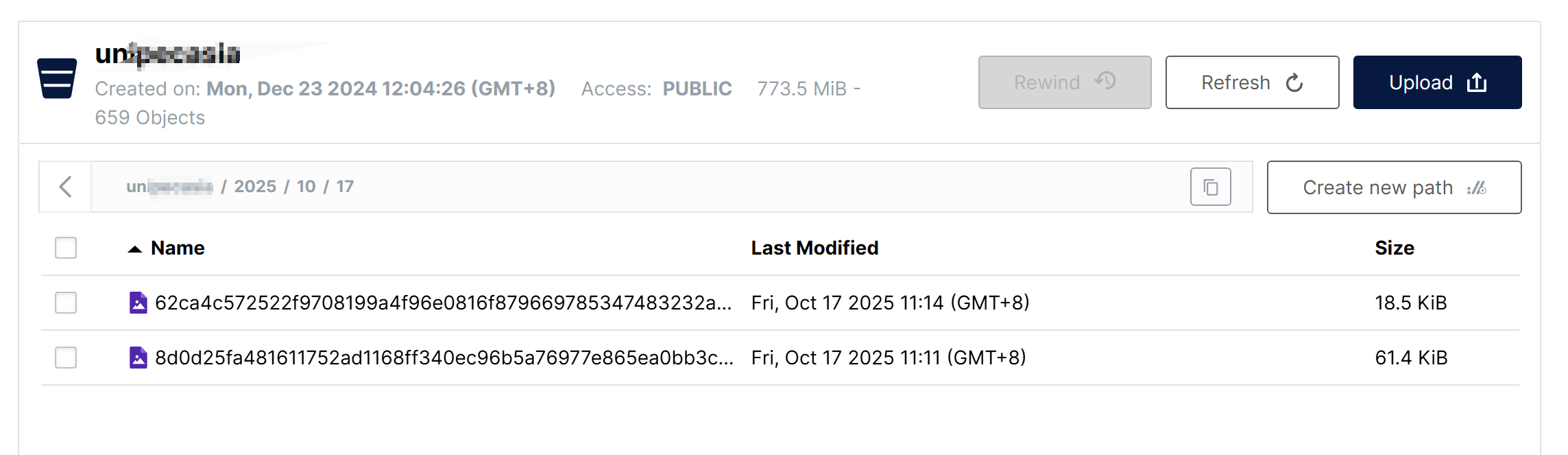
{    "code": 0,    "data": "2025/10/20/62ca4c572522f9708199a4f96e0816f879669785347483232a8fcfd085267dc5.PNG",    "msg": "",    "total": null}

文件在MinIO中会按照年月日分级存储

3.备份Shell脚本

编写以下Shell脚本,调用MinIO客户端命令mc拷贝文件,并定时调用脚本实现每天进行备份

#!/bin/bash# MinIO 备份脚本 YEAR=$(date +%Y)MONTH=$(date +%m)DAY=$(date +%d)# 配置变量MINIO_ALIAS="myminio"BUCKET_NAME="u******ia"BACKUP_BASE_DIR="/opt/backup"LOG_DIR="/var/log/minio_backup"DATE_SUFFIX=$(date +%Y-%m-%d)-backBACKUP_PATH="${BACKUP_BASE_DIR}/${DATE_SUFFIX}"# 创建必要的目录mkdir -p "${BACKUP_PATH}"mkdir -p "${LOG_DIR}"# 日志文件LOG_FILE="${LOG_DIR}/backup_$(date +%Y%m%d).log"# 函数:记录日志log_message() {    echo "$(date '+%Y-%m-%d %H:%M:%S') - $1" | tee -a "$LOG_FILE"}# 函数:错误处理error_exit() {    log_message "错误: $1"    exit 1}# 开始备份log_message "=== 开始 MinIO 备份 ==="log_message "备份源: ${MINIO_ALIAS}/${BUCKET_NAME}"log_message "备份目标: ${BACKUP_PATH}"# 检查 mc 命令是否存在if ! command -v /opt/mc &> /dev/null; then    error_exit "mc 命令未找到,请确保 MinIO Client 已安装"fi# 检查备份目录是否可写if [ ! -w "${BACKUP_BASE_DIR}" ]; then    error_exit "备份目录 ${BACKUP_BASE_DIR} 不可写"fi# 执行备份log_message "开始复制数据..."/opt/mc cp "${MINIO_ALIAS}/${BUCKET_NAME}/${YEAR}/${MONTH}/${DAY}" "${BACKUP_PATH}/" --recursive 2>&1 | tee -a "$LOG_FILE"# 检查备份结果if [ ${PIPESTATUS[0]} -eq 0 ]; then    log_message "备份成功完成"        # 显示备份统计信息    BACKUP_SIZE=$(du -sh "${BACKUP_PATH}" | cut -f1)    FILE_COUNT=$(find "${BACKUP_PATH}" -type f | wc -l)    log_message "备份大小: ${BACKUP_SIZE}"    log_message "文件数量: ${FILE_COUNT}"    log_message "备份位置: ${BACKUP_PATH}"else    error_exit "备份过程中出现错误"filog_message "=== 备份完成 ==="
  •  

使用Java实现一个DNS服务

有时,我们所在单位的电脑只允许上内网,外网被断掉了,如果想要同时上内外网,我们可以通过修改路由表,然后双网卡一机两网的方式来实现分流上网,例如网线连公司内网,用WiFi连接自己的手机热点,或者额外购买一个USB网卡插入电脑,同时连接公司的AP和自己手机热点。

但是这样会衍生出一个问题,有些公司的内部系统例如OA系统等,也是通过域名而不是难以记忆的IP地址来访问的,这些内部系统的域名不是注册商注册的,更不在公共DNS上,而是公司内网上使用的内网域名,使用公司自建的内网DNS服务器才能解析,解析出通常是一个本地局域网地址,在公网无法解析和访问,当接入公司内网,企业路由器会通过DHCP下发内网DNS给网卡,现在同时上内外网时,外网网卡也会获得运营商下发的外网DNS地址,操作系统会按照跃点数只选择某个网卡上获得的的DNS用作DNS解析,如果默认了内网网卡优先,且内网DNS只解析公司内网域名,同样会导致外网无法访问,如果内网DNS能解析外部域名,同样存在利用DNS屏蔽某些网站或服务(例如影视剧,游戏,向日葵远控等)甚至后台偷偷记录DNS解析记录的可能,因此为了保险起见,我们可以自己用代码实现一个DNS代理服务器来进行代理和分流,根据特定后缀等特征判断出内网域名,交给内网DNS解析,对于外网域名则直接选择一些公共DNS来解析(例如谷歌,阿里,114的DNS服务)

这里采用Java实现一个多线程的DNS代理服务器,对于内网域名直接通过内网DNS的UDP:53进行解析,对于外网域名则以加密的DOH(DNS Over Https)方式通过阿里云DNS进行解析,并解析DNS服务器返回的报文并打印日志。需要依赖dnsjava这个类库的支持,程序启动后,只需要将网卡DNS服务器地址和备用地址修改为127.0.0.1127.0.0.2即可实现DNS的分流。

<dependencies>    <!-- DNS 处理库 -->    <dependency>        <groupId>dnsjava</groupId>        <artifactId>dnsjava</artifactId>        <version>3.6.0</version>    </dependency>    <!-- HTTP 客户端(用于DoH请求) -->    <dependency>        <groupId>org.apache.httpcomponents.client5</groupId>        <artifactId>httpclient5</artifactId>        <version>5.3</version>    </dependency></dependencies>
package com.changelzj.dns;import org.apache.hc.core5.http.ContentType;import org.xbill.DNS.*;import org.apache.hc.client5.http.classic.methods.HttpPost;import org.apache.hc.client5.http.impl.classic.CloseableHttpClient;import org.apache.hc.client5.http.impl.classic.HttpClients;import org.apache.hc.core5.http.io.entity.ByteArrayEntity;import java.io.ByteArrayInputStream;import java.io.DataInputStream;import java.io.IOException;import java.net.DatagramPacket;import java.net.DatagramSocket;import java.net.InetAddress;import java.nio.charset.StandardCharsets;import java.time.Duration;import java.time.Instant;import java.util.ArrayList;import java.util.Arrays;import java.util.List;import java.util.concurrent.*;public class LoggedDnsServer {    /**      * 需要内网DNS才能解析的内网域名    */     private static final String[] INTERNAL_DOMAINS = {"p****c.com", "s******c.com"};    /**     * 内网NDS服务器IP地址     */    private static final String INTERNAL_DNS = "10.249.35.11";    private static final String DOH_URL = "https://223.5.5.5/dns-query";    private static final ExecutorService executor = new ThreadPoolExecutor(            Runtime.getRuntime().availableProcessors() * 2,            Runtime.getRuntime().availableProcessors() * 2,            60L,            TimeUnit.SECONDS,            new LinkedBlockingQueue<>(200),            new ThreadPoolExecutor.CallerRunsPolicy()    );    public static void main(String[] args) throws IOException {        DatagramSocket socket = new DatagramSocket(53);        System.out.println("Multi-threaded DNS Server with Logging started on port 53");        byte[] buffer = new byte[512];        while (true) {            DatagramPacket requestPacket = new DatagramPacket(buffer, buffer.length);            socket.receive(requestPacket);            byte[] requestData = new byte[requestPacket.getLength()];            System.arraycopy(requestPacket.getData(), 0, requestData, 0, requestPacket.getLength());            executor.submit(() -> {                Instant start = Instant.now();                String domain = "";                String method = "";                boolean success = false;                String ip = "";                try {                    Message query = new Message(requestData);                    domain = query.getQuestion().getName().toString(true).toLowerCase();                    byte[] responseData;                    if (isInternalDomain(domain)) {                        method = "Internal DNS (" + INTERNAL_DNS + ")";                        responseData = forwardToUdpDns(query, INTERNAL_DNS);                    } else {                        method = "Ali DNS DoH (" + DOH_URL + ")";                        responseData = forwardToDoh(query);                    }                    success = true;                    ip = parseDnsResponse(responseData).toString();                     DatagramPacket responsePacket = new DatagramPacket(                            responseData,                            responseData.length,                            requestPacket.getAddress(),                            requestPacket.getPort()                    );                    socket.send(responsePacket);                } catch (Exception e) {                    System.err.println("[ERROR] " + e.getMessage());                } finally {                    long ms = Duration.between(start, Instant.now()).toMillis();                    System.out.printf(                            "[%s] %s -> %s | %s | %s | %dms | %s  %n",                            requestPacket.getAddress().getHostAddress(),                            domain,                            method,                            success ? "OK" : "FAIL",                            ip,                            ms,                            Thread.currentThread().getName()                    );                }            });        }    }    private static boolean isInternalDomain(String domain) {        for (String suffix : INTERNAL_DOMAINS) {            if (domain.endsWith(suffix)) {                return true;            }        }        return false;    }    private static byte[] forwardToUdpDns(Message query, String dnsServer) throws IOException {        SimpleResolver resolver = new SimpleResolver(dnsServer);        resolver.setTCP(false);        resolver.setTimeout(3);        Message response = resolver.send(query);        return response.toWire();    }    private static byte[] forwardToDoh(Message query) throws IOException {        try (CloseableHttpClient client = HttpClients.createDefault()) {            HttpPost post = new HttpPost(DOH_URL);            post.setHeader("Content-Type", "application/dns-message");            post.setEntity(new ByteArrayEntity(query.toWire(), ContentType.create("application/dns-message")));            return client.execute(post, httpResponse -> {                try (java.io.InputStream in = httpResponse.getEntity().getContent();                     java.io.ByteArrayOutputStream bos = new java.io.ByteArrayOutputStream()) {                    byte[] buf = new byte[1024];                    int len;                    while ((len = in.read(buf)) != -1) {                        bos.write(buf, 0, len);                    }                    return bos.toByteArray();                }            });        }    }    public static List<String> parseDnsResponse(byte[] msg) throws Exception {        List<String> result = new ArrayList<>();        int pos = 0;        // 头部 12 字节        pos += 4; // ID + Flags        int qdCount = ((msg[pos] & 0xFF) << 8) | (msg[pos + 1] & 0xFF); pos += 2;        int anCount = ((msg[pos] & 0xFF) << 8) | (msg[pos + 1] & 0xFF); pos += 2;        int nsCount = ((msg[pos] & 0xFF) << 8) | (msg[pos + 1] & 0xFF); pos += 2;        int arCount = ((msg[pos] & 0xFF) << 8) | (msg[pos + 1] & 0xFF); pos += 2;        // 跳过 Question 区        for (int i = 0; i < qdCount; i++) {            // 读 QNAME(支持压缩指针)            pos = readName(msg, pos, null);            pos += 4; // QTYPE + QCLASS        }        int rrCount = anCount + nsCount + arCount;        for (int i = 0; i < rrCount; i++) {            pos = readName(msg, pos, null);            int type = ((msg[pos] & 0xFF) << 8) | (msg[pos + 1] & 0xFF); pos += 2;            pos += 2; // CLASS            pos += 4; // TTL            int rdlen = ((msg[pos] & 0xFF) << 8) | (msg[pos + 1] & 0xFF); pos += 2;            if (type == 1 && rdlen == 4) { // A                byte[] addr = Arrays.copyOfRange(msg, pos, pos + 4);                result.add(InetAddress.getByAddress(addr).getHostAddress());            } else if (type == 28 && rdlen == 16) { // AAAA                byte[] addr = Arrays.copyOfRange(msg, pos, pos + 16);                result.add(InetAddress.getByAddress(addr).getHostAddress());            }            pos += rdlen;        }        return result;    }    // 工具:读取域名(含压缩指针),返回新的 pos    private static int readName(byte[] msg, int pos, StringBuilder out) {        int jumpedPos = -1;        while (true) {            int len = msg[pos] & 0xFF;            if ((len & 0xC0) == 0xC0) { // 压缩                int ptr = ((len & 0x3F) << 8) | (msg[pos + 1] & 0xFF);                if (jumpedPos == -1) jumpedPos = pos + 2;                pos = ptr;                continue;            }            pos++;            if (len == 0) break;            if (out != null) {                if (out.length() > 0) out.append('.');                out.append(new String(msg, pos, len, StandardCharsets.ISO_8859_1));            }            pos += len;        }        return jumpedPos != -1 ? jumpedPos : pos;    }}
  •  

简单理解AI智能体

一、智能体是什么

文章的开头,先来举一个身边最简单的例子,比如字节推出的云雀是大模型,而豆包和Coze就是智能体,豆包是一个实现了对话功能的智能体,而Coze是一个可以实现工作流编排的智能体。

1986年,智能体(AIAgent、人工智能代理)的概念最早由被誉为“AI之父”的马文·明斯基(Marvin Minsky)在《意识社会》(The society of Mind)中提出。

明斯基定义的智能体的核心要素:

  • 要素1:分布式智能体集合
  • 要素2:层级协作机制
  • 要素3:无中央控制

但是,明斯基对智能体的定义和现代的智能体定义有很大区别,直到2023年6月,OpenAl的元老翁丽莲在个人博客(https://lilianweng.github.io/posts/2023-06-23-agent/)中首次提出了现代AI Agent架构:智能体(AI Agent)是一种能够自主行动、感知环境、 做出决策并与环境交互的计算机系统或实体,通常依赖大型语言模型作为其核心决策和处理单元,具备独立思考、调用工具去逐步完成给定目标的能力。

二、智能体的核心要素

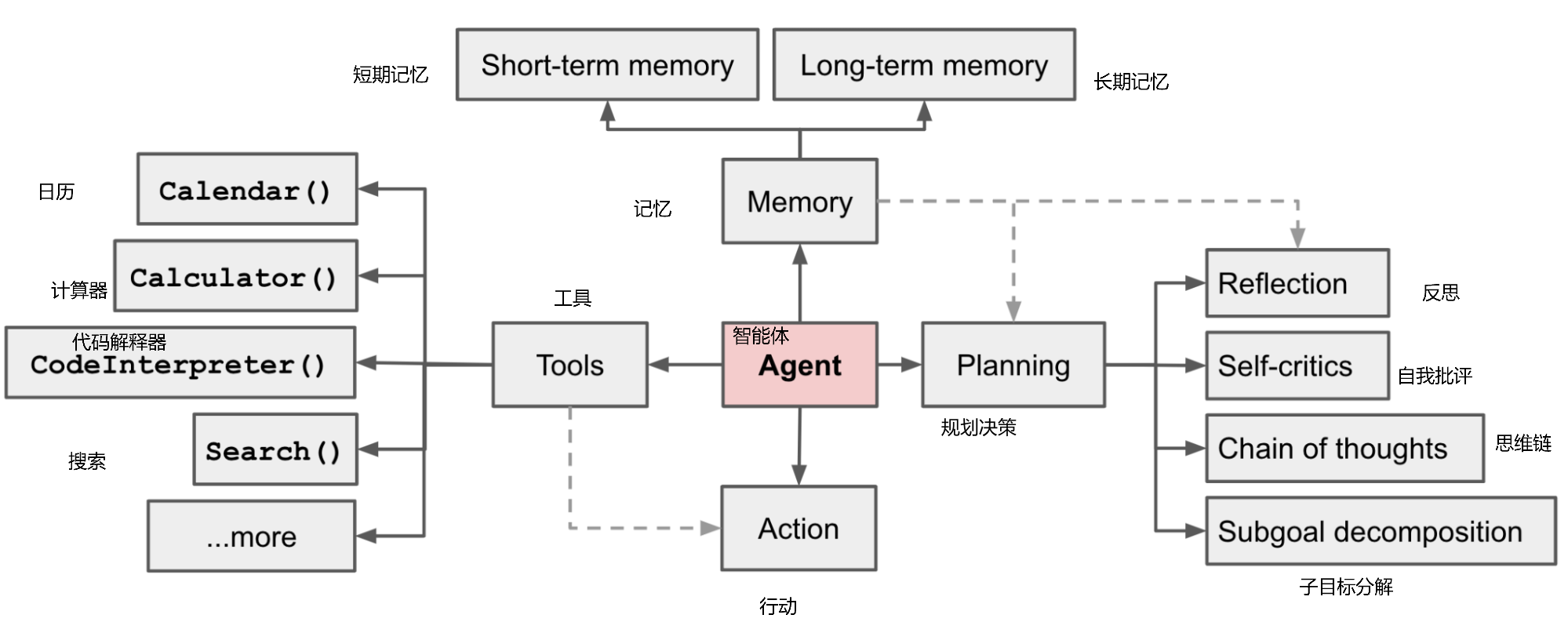
智能体有以下核心要素:

  • 核心要素1: 大模型(LLM)

    大模型作为“大脑”: 提供推理、规划和知识理解能力,是AIAgent的决策中枢。

  • 核心要素2: 记忆(Memory)

    • 长期记忆: 可以横跨多个任务或时间周期,可存储并调用核心知识,非即时任务。可以通过模型参数微调(固化知识),知识图谱(结构化语义网络)或向量数据库(相似性检索)方式实现。

    • 短期记忆:存储单次对话周期的上下文信息,属于临时信息存储机制。受限于模型的上下文窗口长度。

  • 核心要素3: 工具使用(Tool Use)

    调用外部工具(如API、数据库)扩展能力边界。

  • 核心要素4: 规划决策(Planning)

    通过任务分解、反思与自省框架实现复杂任务处理。例如,利用思维链(chain of Thought)将目标拆解为子任务,并通过反馈优化策略。

  • 核心要素5: 行动(Action)

    实际执行决策的模块,涵盖软件接口操作(如自动订票)和物理交互(如机器人执行搬运)。比如:检索、推理、编程等。

三、智能体的运用

智能体在PC,手机以及自动驾驶等方面都有广泛的应用。在单一智能体的基础上,多个智能体之间可以交互写作。

参考

  1. 0代码0基础,小白搭建智能体&知识库,尚硅谷,2025-03-17
  •  

大模型和大模型应用

本文更新中

1.AI与大模型

AI,即人工智能(Artificial Intelligence),使机器能够像人类一样思考、学习和解决问题的技术

AI发展主要经历了三个阶段:

  1. 1950-1980,规则和符号AI的时代,基于逻辑和规则,使用符号表示知识和推理。依赖预定义的知识库和推理规则,应用于化学结构分析以及医学诊断
  2. 1980-2010,机器学习,基于数据,通过统计和优化方法训练模型,包括监督学习无监督学习和强化学习等子领域,应用于游戏,推荐引擎
  3. 2010-今,深度学习,模仿人脑的结构和功能,使用多层神经元网络处理复杂任务,例如卷积神经网络,应用于图像识别,自然语言处理

大模型中最常见的大语言模型(Large Language Models,LLM),就是采用了深度学习中的自然语言处理这一分支,在自然语言处理(Natural Language Processing,NLP)中,有一项关键技术叫Transformer,这是一种先进的神经网络模型,是现如今AI高速发展的最主要原因,我们所熟知的大语言模型,例如GPT、Deepseek底层都是采用Transformer神经网络模型

2.大模型应用的架构和技术方案

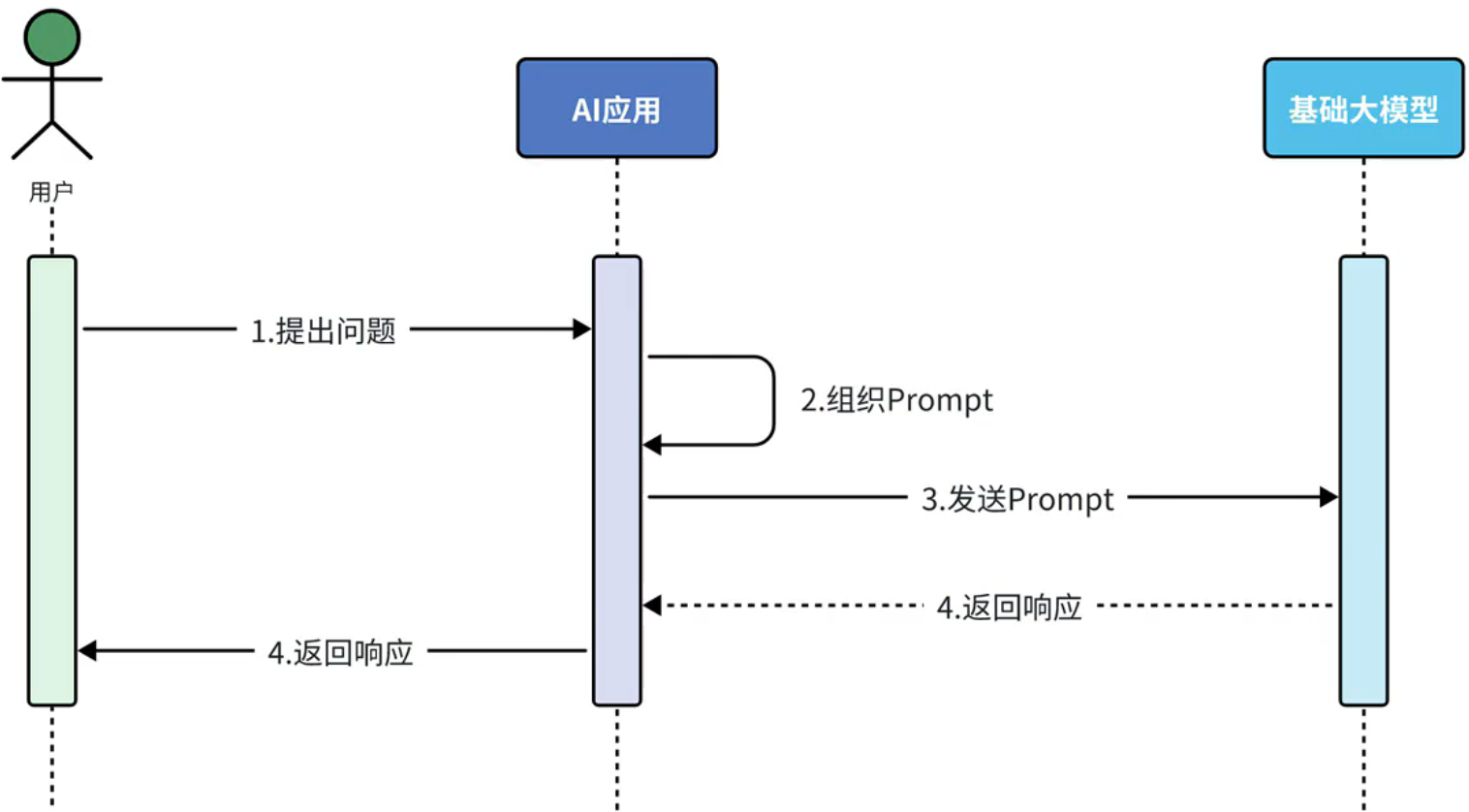
大模型应用,就是基于大模型的推理、分析、生成能力,结合传统编程能力,开发出的各种应用。

大模型对比传统应用,更加适合处理复杂模式和模糊问题,例如写诗,写文章,判断动物物种,音视频识别等,而传统应用更加擅长精确控制和需要高可靠性的场景,所以可以将传统应用和大模型相结合,两者就可以实现互相调用和增强

例如我们可以在数据库缓存和大模型的对话内容,每次调用大模型时一并发送,使大模型形成记忆

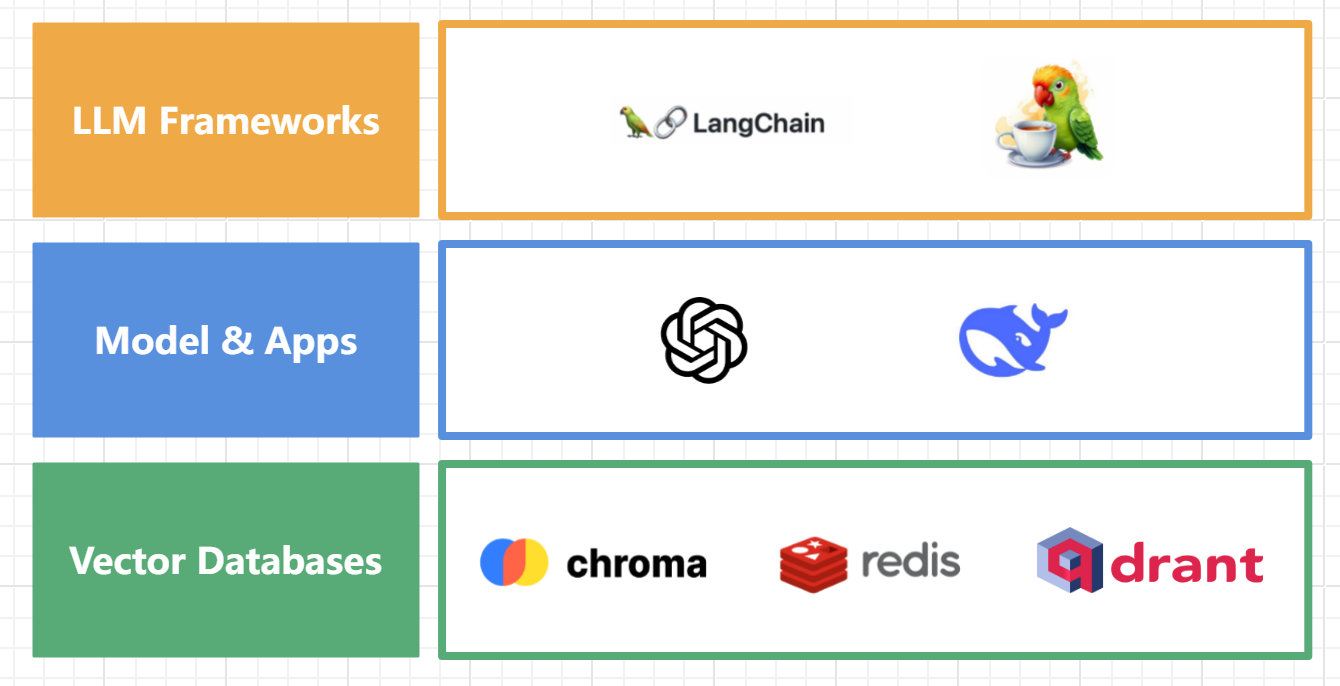
在架构上,大模型应用架构大致分为交互层,服务层,模型层和存储层:

按照技术方案划分,大模型应用可大致分为:

  • Prompt问答 利用大模型的推理能力,通过Prompt提问来完成业务,应用于文字摘要分析,舆情分析,AI对话等场景

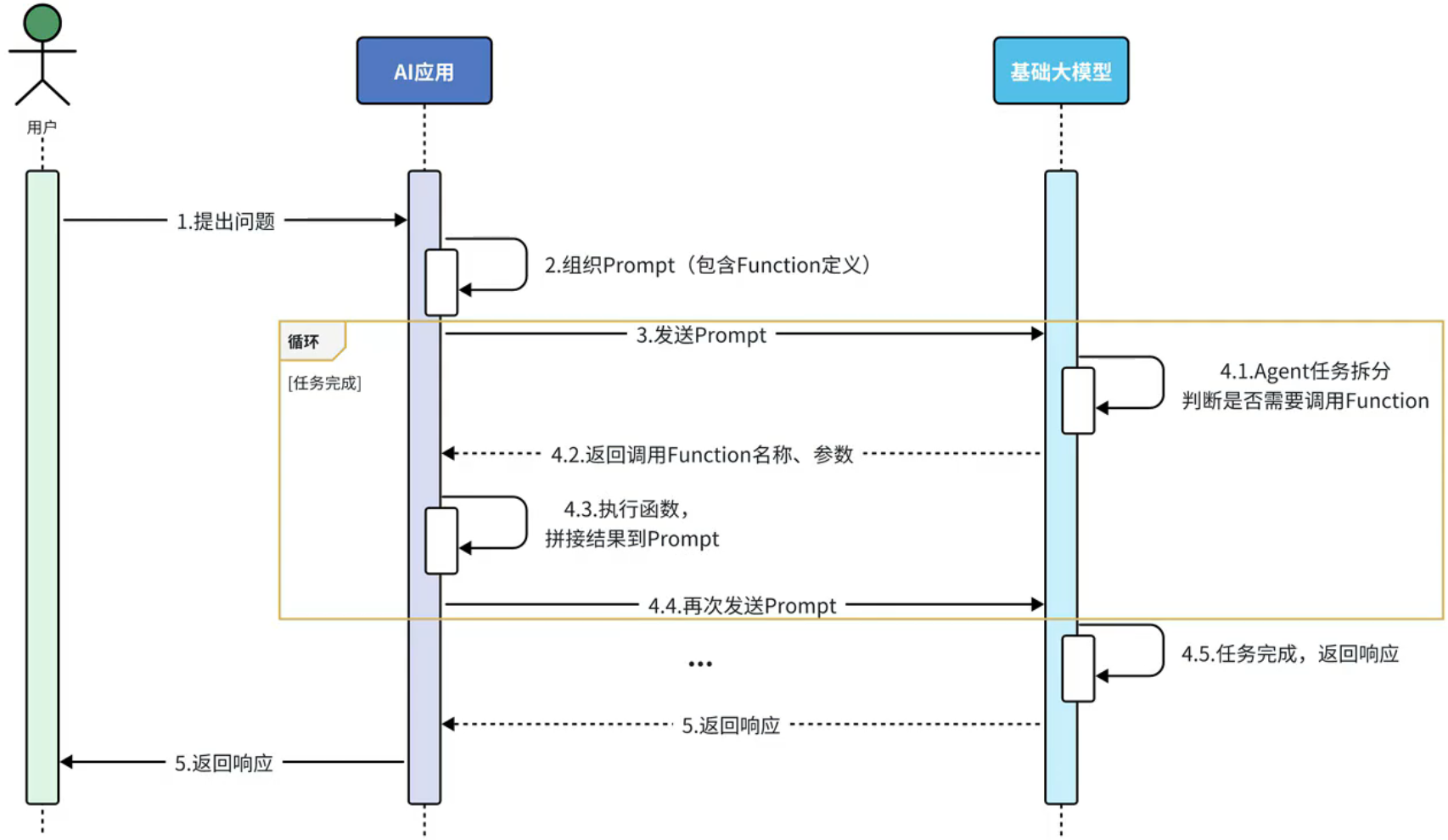
  • Agent + Function calling(智能体 AI拆解任务,通过将AI能力和业务端的能力相结合,通过调用业务端提供的接口实现复杂业务,大模型可以适时调用业务端提供的函数来获取信息来进一步做判断,可以应用于数据提取和聚合分析等,例如要用大模型来进行行程规划同时提供一个天气的function给大模型,来为大模型做行程规划提供天气信息。

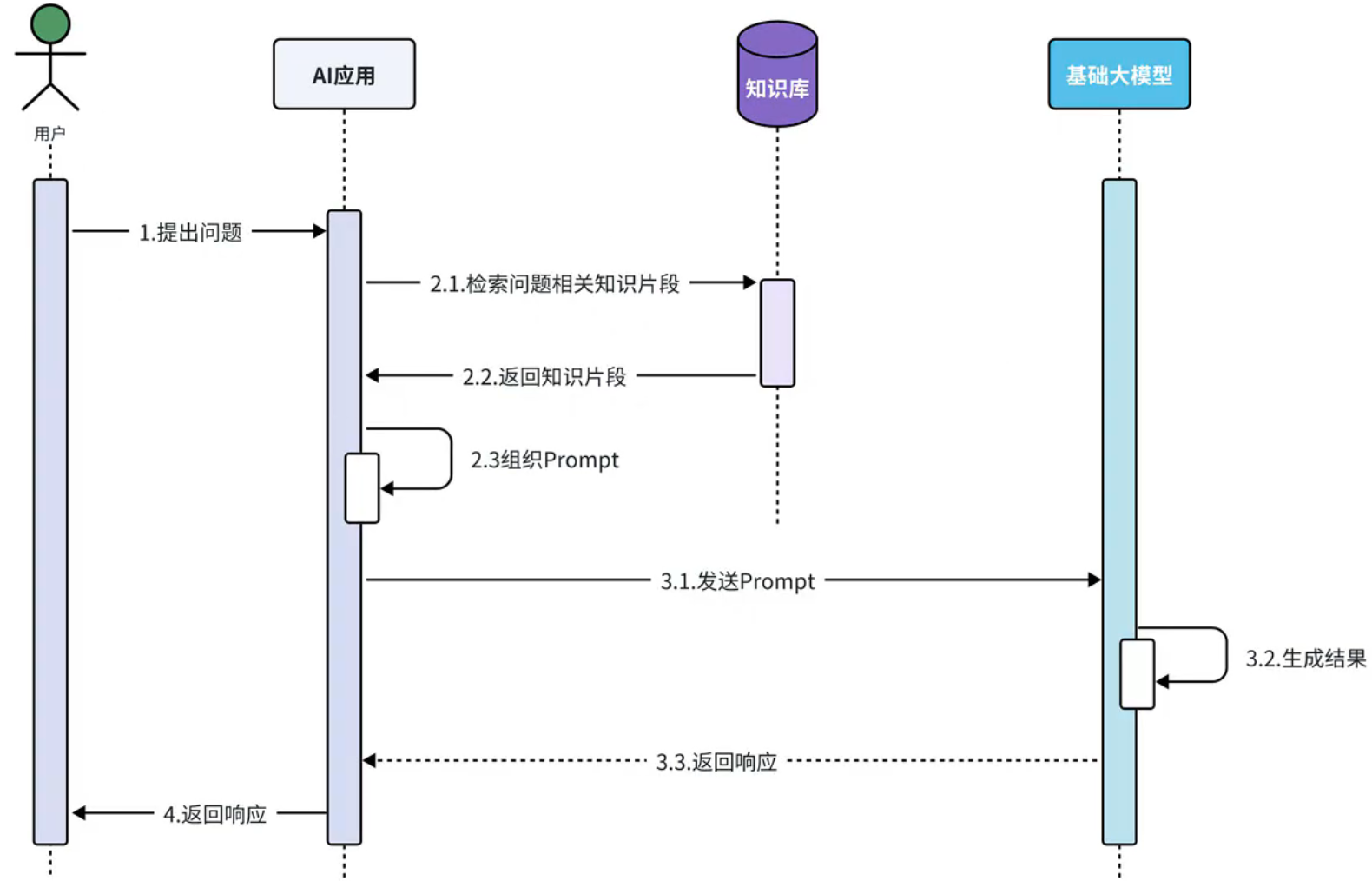
  • RAG(Retrieval Augmented Generation) 给大模型外挂一个知识库,让大模型基于知识库内容做推理和回答,因为大模型的训练语料可能与当前时间相比是落后的,且很多专业领域的知识并不公开,无法被用于训练,对大模型外挂一个私有的知识库可以弥补这种缺陷,这种模式下,首先要将文档切分写入知识库,当用户提问时,首先到知识库中加载获取有关的片段,然后和用户的提问包装成Prompt一块发送给大模型,由大模型来进行后续的回答

  • Fine-tuning(模型微调) 针对特有业务场景对基础大模型做数据训练和微调,以满足特定场景的需求,需要完全部署模型,难度和门槛较高

参考

  1. https://www.bilibili.com/video/BV1MtZnYtEB3
  •  

一个解析Excel2007的POI工具类

通过apache-poi解析读取excel2007表格中的文字和图片,数字按照字符形式读取,表格中的图片和文字都按照行和列顺序读取到二维数组中相应的位置上。

package com.util;import org.apache.poi.hssf.usermodel.HSSFSheet;import org.apache.poi.hssf.usermodel.HSSFWorkbook;import org.apache.poi.ooxml.POIXMLDocumentPart;import org.apache.poi.ss.usermodel.*;import org.apache.poi.xssf.usermodel.*;import org.openxmlformats.schemas.drawingml.x2006.spreadsheetDrawing.CTMarker;import java.io.ByteArrayInputStream;import java.io.IOException;import java.io.InputStream;import java.util.ArrayList;import java.util.HashMap;import java.util.List;import java.util.Map;public class POIUtil {    /**     * 读入excel2007文件     *     * @param file     * @throws IOException     */    public static List<String[]> readExcel(String fileName, byte[] bytes, int sheetNum) throws IOException {        // 获取excel文件的io流        InputStream is = new ByteArrayInputStream(bytes);        // 根据文件后缀名不同(xls和xlsx)获得不同的Workbook实现类对象        Workbook workbook =  new XSSFWorkbook(is);;        // 创建返回对象,把每行中的值作为一个数组,所有行作为一个集合返回        List<String[]> list = new ArrayList<String[]>();        if (workbook != null) {            // for (int sheetNum = 0; sheetNum < workbook.getNumberOfSheets(); sheetNum++) {            // 获得当前sheet工作表            Sheet sheet = workbook.getSheetAt(sheetNum);            // if (sheet == null) {            // continue;            // }            // 获得当前sheet的开始行            int firstRowNum = sheet.getFirstRowNum();            // 获得当前sheet的结束行            int lastRowNum = sheet.getLastRowNum();            // 循环除了第一行的所有行            for (int rowNum = firstRowNum + 0; rowNum <= lastRowNum; rowNum++) {                // 获得当前行                Row row = sheet.getRow(rowNum);                if (row == null || row.getPhysicalNumberOfCells()==0) {                    continue;                }                // 获得当前行的开始列                int firstCellNum = row.getFirstCellNum();                // 获得当前行的列数                int lastCellNum = row.getPhysicalNumberOfCells();                String[] cells = new String[row.getPhysicalNumberOfCells()];                // 循环当前行                for (int cellNum = firstCellNum; cellNum < lastCellNum; cellNum++) {                    Cell cell = row.getCell(cellNum);                    cells[cellNum] = getCellValue(cell);                }                list.add(cells);            }            // }            workbook.close();        }        return list;    }    private static String getCellValue(Cell cell) {        String cellValue = "";        if (cell == null) {            return cellValue;        }        // 把数字当成String来读,避免出现1读成1.0的情况        if (cell.getCellType() == CellType.NUMERIC) {            cell.setCellType(CellType.STRING);        }        // 判断数据的类型        switch (cell.getCellType()) {            case NUMERIC: // 数字                cellValue = String.valueOf(cell.getNumericCellValue());                break;            case STRING: // 字符串                cellValue = String.valueOf(cell.getStringCellValue());                break;            case BOOLEAN: // Boolean                cellValue = String.valueOf(cell.getBooleanCellValue());                break;            case FORMULA: // 公式                cellValue = String.valueOf(cell.getCellFormula());                break;            case BLANK: // 空值                cellValue = "";                break;            case ERROR: // 故障                cellValue = "非法字符";                break;            default:                cellValue = "未知类型";                break;        }        return cellValue;    }    public static Map<String, byte[]> getExcelPictures(String fileName, byte[] bytes, int sheetNum) throws IOException {        Map<String, byte[]> map = new HashMap<String, byte[]>();        // 获取excel文件的io流        InputStream is = new ByteArrayInputStream(bytes);        // 获得Workbook工作薄对象        Workbook workbook =  new XSSFWorkbook(is);;        XSSFSheet sheet = (XSSFSheet) workbook.getSheetAt(sheetNum);        List<POIXMLDocumentPart> list = sheet.getRelations();        for (POIXMLDocumentPart part : list) {            if (part instanceof XSSFDrawing) {                XSSFDrawing drawing = (XSSFDrawing) part;                List<XSSFShape> shapes = drawing.getShapes();                for (XSSFShape shape : shapes) {                    XSSFPicture picture = (XSSFPicture) shape;                    XSSFClientAnchor anchor = picture.getPreferredSize();                    CTMarker marker = anchor.getFrom();                    String key = marker.getRow() + "-" + marker.getCol();                    byte[] data = picture.getPictureData().getData();                    map.put(key, data);                }            }        }        return map;    }}
  •  

Java实现将数据导出为Word文档

我们在开发一些系统的时候,例如OA系统,经常能遇到将审批单数据导出为word和excel文档的需求,导出为excel是比较简单的,因为excel有单元格来供我们定位数据位置,但是word文档的格式不像表格那样可以轻松的定位,要想将数据导出为一些带有图片和表格的这种结构复杂的word文档该怎样实现呢。

poi-tl [1]是一款可以帮助我们实现这种功能的Java开源项目,它把POI和Freemarker相结合,可以基于我们绘制好的word文档模板来填充数据进去,然后生成新的word文档。poi-tl托管在GitHub:https://github.com/Sayi/poi-tl

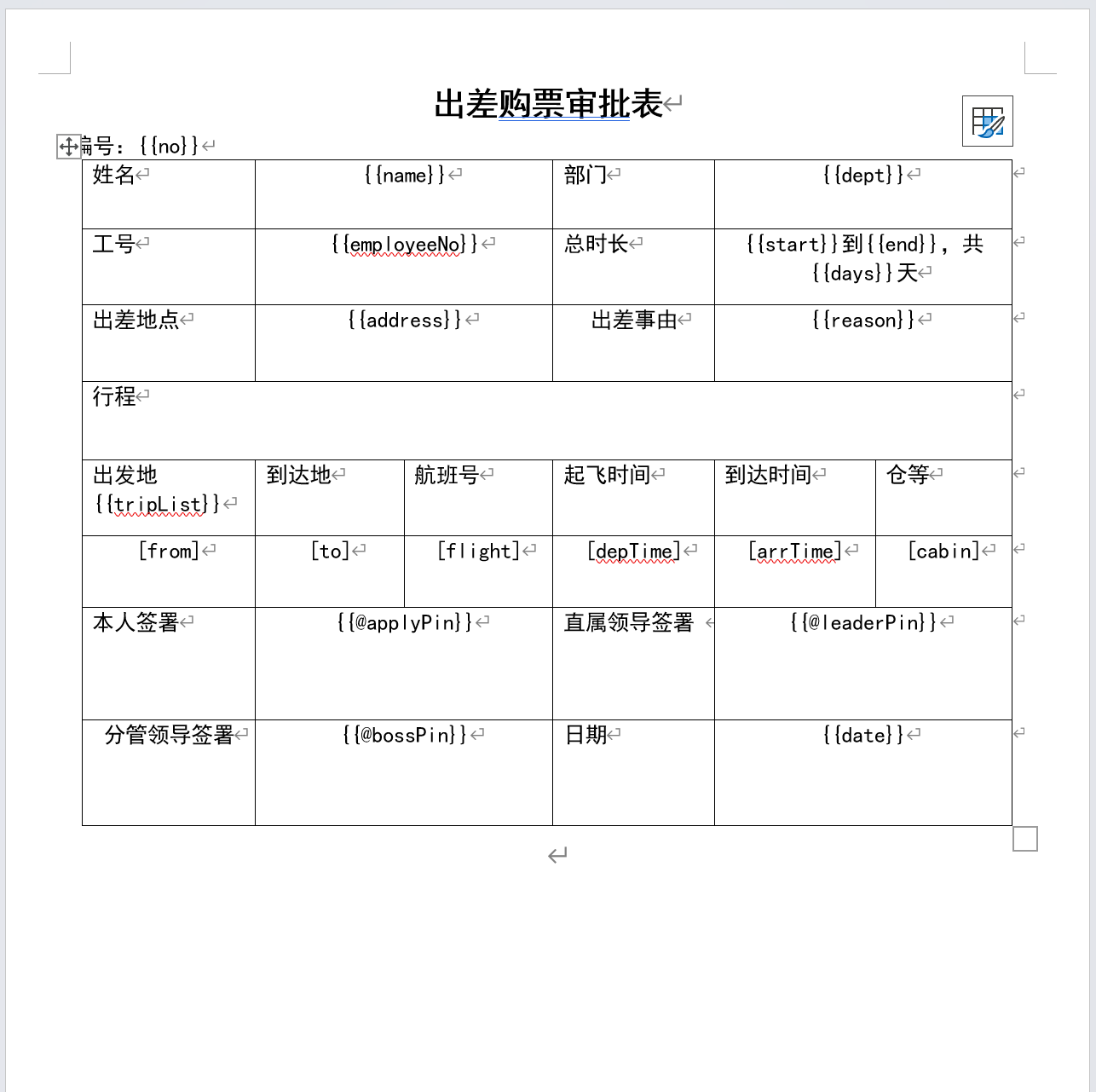
例如,我们要生成一个差旅行程单,首先要绘制这样的一个word文档模板,用{{name}}代表姓名进行占位,姓名就是普通文字类型,以此类推。tripList作为渲染行程表格的数据源的名字,是ArrayList集合类型,放在表格的表头,用[from]表示tripList集合中每个元素的from属性的值,渲染到当前行的某一列上,以此类推。最后的三个签署对应的是领导的签名笔迹图片,图片类型要用变量名前多一个@的形式{{@****Pin}}来表示

如果表格中某一列是图片,则表示为[@变量]

模板绘制好以后,开始使用poi-tl工具生成word文档,首先新建maven项目,引入poi-tl的依赖和需要的其他依赖,然后将这个绘制好的word模板文件放在工程的根目录

<?xml version="1.0" encoding="UTF-8"?><project xmlns="http://maven.apache.org/POM/4.0.0"         xmlns:xsi="http://www.w3.org/2001/XMLSchema-instance"         xsi:schemaLocation="http://maven.apache.org/POM/4.0.0 http://maven.apache.org/xsd/maven-4.0.0.xsd">    <modelVersion>4.0.0</modelVersion>    <groupId>org.example</groupId>    <artifactId>poi-tl</artifactId>    <version>1.0-SNAPSHOT</version>    <properties>        <maven.compiler.source>8</maven.compiler.source>        <maven.compiler.target>8</maven.compiler.target>        <project.build.sourceEncoding>UTF-8</project.build.sourceEncoding>    </properties>    <dependencies>        <dependency>            <groupId>com.deepoove</groupId>            <artifactId>poi-tl</artifactId>            <version>1.12.2</version>        </dependency>        <dependency>            <groupId>org.projectlombok</groupId>            <artifactId>lombok</artifactId>            <version>1.18.24</version>            <scope>provided</scope>        </dependency>    </dependencies></project>

然后,新建一个Entity类: org.example.TravelApplyExportVO

package org.example;import com.deepoove.poi.data.PictureRenderData;import lombok.AllArgsConstructor;import lombok.Data;import lombok.NoArgsConstructor;import java.util.ArrayList;import java.util.List;@Data@AllArgsConstructor@NoArgsConstructorpublic class TravelApplyExportVO {    private String no;    private String name;    private String dept;    private String employeeNo;    private String start;    private String end;    private String days;    private String address;    private String reason;    /**     * com.deepoove.poi.data.PictureRenderData 代表图片     */    private PictureRenderData applyPin;    private PictureRenderData bossPin;    private PictureRenderData leaderPin;    private String date;    /**     * 用于渲染表格的集合     */    private List<Route> tripList = new ArrayList<>();    @Data    @AllArgsConstructor    @NoArgsConstructor    public static class Route {        private String from;        private String to;        private String flight;        private String depTime;        private String arrTime;        private String cabin;    }}

新建测试类: org.example.Main,用poi-tl组件基于刚刚绘制的word模板生成一个差旅行程单

package org.example;import com.deepoove.poi.XWPFTemplate;import com.deepoove.poi.config.Configure;import com.deepoove.poi.data.PictureRenderData;import com.deepoove.poi.data.Pictures;import com.deepoove.poi.plugin.table.LoopRowTableRenderPolicy;import lombok.SneakyThrows;import java.nio.file.Files;import java.nio.file.Paths;import java.util.ArrayList;public class Main {    @SneakyThrows    public static void main(String[] args) {        TravelApplyExportVO vo = new TravelApplyExportVO();        vo.setNo("202500001");        vo.setName("lzj");        vo.setDept("技术部");        vo.setEmployeeNo("00000001");        vo.setStart("2025-01-01");        vo.setEnd("2025-02-01");        vo.setDays("30");        vo.setAddress("中国香港");        vo.setReason("系统维护");        // 在项目根路径读取笔迹图片,并设置大小        PictureRenderData data1 = Pictures.ofBytes(Files.readAllBytes(Paths.get("img2.png")))                .size(120, 60)                .create();        PictureRenderData data2 = Pictures.ofBytes(Files.readAllBytes(Paths.get("img.png")))                .size(120, 60)                .create();        PictureRenderData data3 = Pictures.ofBytes(Files.readAllBytes(Paths.get("img.png")))                .size(120, 60)                .create();        vo.setApplyPin(data1 );        vo.setBossPin( data2);        vo.setLeaderPin( data3);        vo.setDate("2025-01-10");        // 行程List,最终渲染到文档的表格中        vo.setTripList(new ArrayList<TravelApplyExportVO.Route>() {            {                add(new TravelApplyExportVO.Route("BJX","ZQZ","ZH5643","2025-01-01 15:00","2025-01-01 16:00","E"));                add(new TravelApplyExportVO.Route("ZQZ","CDE","JUH6532","2026-01-01 15:00","2025-12-01 16:00","A"));                add(new TravelApplyExportVO.Route("BJX","ZQZ","KJU0954","2027-01-01 15:00","2025-05-01 16:00","Q"));            }        });        LoopRowTableRenderPolicy policy = new LoopRowTableRenderPolicy();        // !!将tripList通过表格来渲染        Configure config = Configure.builder()                .bind("tripList", policy)                .build();        XWPFTemplate template = XWPFTemplate                .compile("模板.docx", config)                .render(vo);        template.writeAndClose(Files.newOutputStream(Paths.get("output.docx")));    }}

然后领导签名笔记图片素材img.png,img2.png也需要放进工程根目录下

都完成后,执行main()方法测试,程序运行结束后,将在根路径生成文件output.docx,打开就是我们想要的效果了。

参考

  •  

OA系统的天数该怎样计算

在开发一些OA系统的过程中,经常能遇到一个问题,就是时长计算,比如请假有请假的时长,出差有出差的时长,有的公司请假只能按照整天或小时为单位请假,这种都比较好处理,只要排除休息日节假日天数或排除下班非工作小时数直接相减即可,但是如果需求是按照半天为单位,OA系统该怎样计算总时长呢?

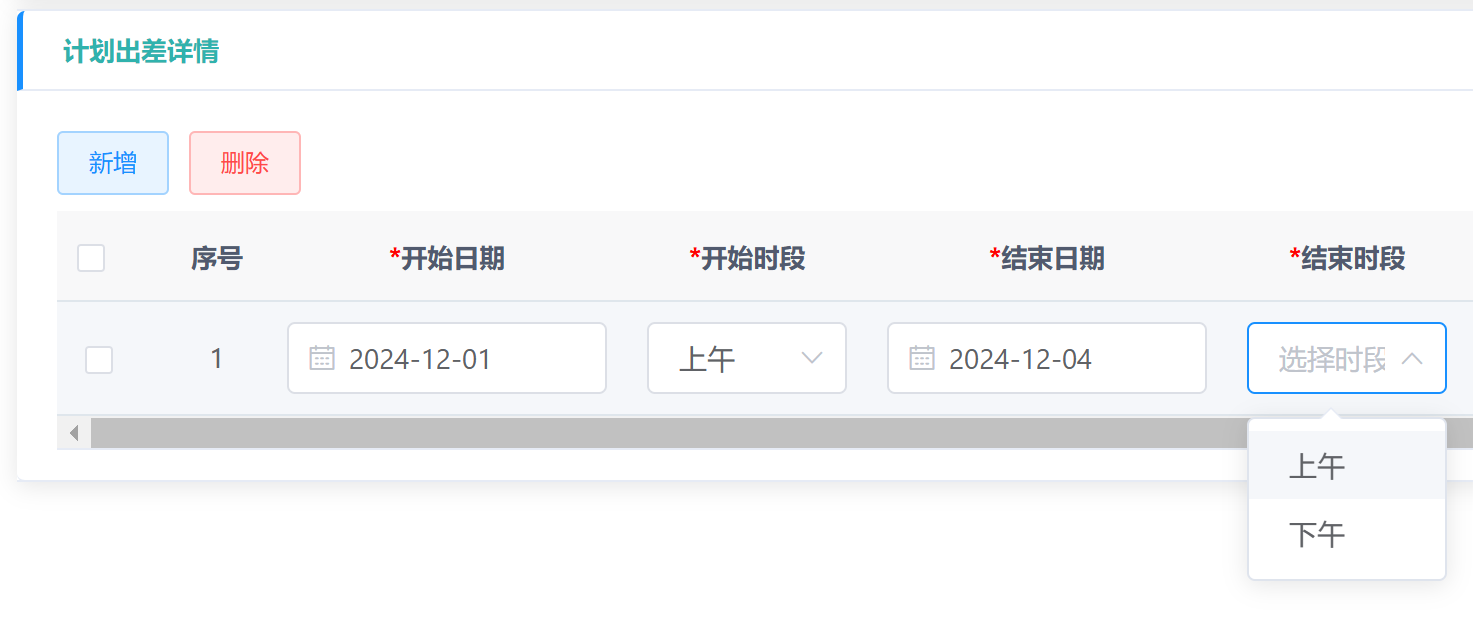
以半天为最小单位时,机械的加减有时可能无法和实际情况相符,例如我在OA系统提交休假审批,从1号上午到2号上午为假期,如果直接假定开始的小时都一样直接把日期时间简单相减,那么休假时间就是24小时构成的1天,但是实际上假期的构成是1号上午,1号下午,以及2号上午,按照工时的普遍计算逻辑就是1.5个工作日,OA系统应计算实际休假时长是1.5天,那这种场景下OA系统要怎样计算才准确呢,我把情况分为4种分别处理,分别计算休假一天,两天和三天的情况,进而推导到更长时间

1. 上午开始,上午结束

1天内的情况是0.5天,2天内的是1.5天,3天内是2.5天

2. 上午开始,下午结束

1天内的情况是1天,2天内的是2天,3天内是3天

3. 下午开始,下午结束

1天内的情况是0.5天,2天内的是1.5天,3天内是2.5天

4. 下午开始,上午结束

1天内不会有这种情况,2天内的是1天,3天内是2天

综上,计算的代码就是这样的:

public static void main(String[] args) {    System.out.println(test(            LocalDate.parse("2024-12-01"),            LocalDate.parse("2024-12-03"),            1,            1    ));}/** *  * @param start 开始日期 * @param end 结束日期 * @param startPeriod 开始 1上午2下午 * @param endPeriod 结束 1上午 2下午 * @return */public static double test(LocalDate start, LocalDate end, int startPeriod, int endPeriod) {    // 如果开始时间或结束时间为空,则返回 0 天    if (start == null || end == null) {        return 0.0; // 确保返回值类型一致    }    // 计算两个日期之间的整天数    double between = (double) java.time.temporal.ChronoUnit.DAYS.between(start, end);    //天数相减会把涉及的天数算少一天,所以要加回来    between ++;    // 根据时间段调整天数    if (startPeriod == 1) { // 开始是上午        if (endPeriod == 1) { // 结束是上午            between =  between - 0.5 ;        }    }    else if (startPeriod == 2) { // 开始是下午        if (endPeriod == 1) { // 结束是上午            between = between - 1;        }        else if (endPeriod == 2) { // 结束是下午            between = between - 0.5 ;        }    }    // 返回计算后的天数    return between;}

一些场景下,为了小数计算更加精确,可以使用java.math.BigDecimal进行计算

  •  

IPv4和IPv6

原文地址:https://www.rockylinux.cn/notes/rocky-linux-9-network-configuration.html
原文作者:木子
Rocky Linux 中文社区欢迎您 https://www.rockylinux.cn

IPv4 与 IPv6

在进行 IP 配置之前,我们延伸了解一下 IPv4 与 IPv6 。 IPv4(Internet Protocol version 4)和 IPv6(Internet Protocol version 6)是互联网上用于数据包交换的两个版本的网络层协议。它们是互联网协议套件的核心部分,负责在网络设备之间路由和传递数据。

IPv4

IPv4 是第四版互联网协议,自 1981 年以来一直被广泛使用。IPv4 的特点包括: 地址空间: IPv4 使用 32 位地址,这意味着它可以支持大约 42 亿个独特的 IP 地址。 地址表示: IPv4 地址通常以点分十进制格式表示,例如 192.168.1.1。 地址配置: IPv4 地址可以手动配置(静态)或通过动态主机配置协议(DHCP)自动分配。 分片: IPv4 允许在传输过程中对数据包进行分片,这可以由发送端、接收端或中间路由器处理。 由于互联网的快速增长,IPv4 地址已经耗尽,这促使了对更广泛地址空间协议的需求。 在 IPv4 地址空间中,地址分为公网 IP、私有 IP 和 CGN(Carrier Grade NAT)地址。以下是详细区分:

公网 IP 地址

公网 IP 地址是全球唯一的,可以在整个互联网中进行通信的 IP 地址。它们不属于下列提到的私有 IP 和 CGN 地址的范围。所以,除了以下私有 IP、CGN 地址以及保留地址和特殊用途地址(如多播地址、环回地址等),其他的都属于公网 IP。

私有 IP 地址

私有 IP 地址用于局域网(LAN)内部通信,是不会在互联网中进行路由的。这些地址范围由 IANA(Internet Assigned Numbers Authority)分配:

  1. 10.0.0.0 到 10.255.255.255
  2. 172.16.0.0 到 172.31.255.255
  3. 192.168.0.0 到 192.168.255.255

CGN (Carrier Grade NAT) 地址

CGN 地址也称为共享地址空间,用于 ISP 提供的 NAT 方案,以减少 IPv4 地址的消耗。以下是该范围:

  1. 100.64.0.0 到 100.127.255.255

这些地址也不会在全球互联网中进行路由,用于解决多个用户共享一个公共 IP 地址的需求(Tailscale 用的这个地址段)。

其他特殊地址

还有一些保留和特殊用途的地址,例如:

  • 环回地址: 127.0.0.1
  • 广播地址: 255.255.255.255
  • 多播地址: 224.0.0.0 到 239.255.255.255

IPv6

IPv6 是互联网协议的最新版本,旨在解决 IPv4 地址耗尽的问题,并引入了一些新的特性和改进。IPv6 的特点包括:

  • 地址空间: IPv6 使用 128 位地址,极大地扩展了地址空间,可以支持近乎无限数量的独特 IP 地址。
  • 地址表示: IPv6 地址通常以冒号分隔的十六进制格式表示,例如 2001:0db8:85a3:0000:0000:8a 2 e:0370:7334。
  • 地址配置: IPv6 地址可以通过多种方式配置,包括静态配置、状态无关地址自动配置(SLAAC)和动态主机配置协议版本 6(DHCPv 6)。
  • 无分片: IPv6 设计时取消了路由器的分片功能,要求发送端执行路径最大传输单元(PMTU)发现,并发送适合路径上最小链路 MTU 的数据包。 在 IPv6 中,没有对应 IPv4 的私有 IP 和公网 IP 的概念,但有类似的机制来实现内网和公网的区别与应用。以下是一些重要的 IPv6 地址类型和其用途:

全球单播地址(Global Unicast Address)

全球单播地址就是 IPv6中用于在全球范围内进行通信的唯一地址,类似于 IPv4的公网 IP。其地址范围一般是以 2000::/3 开头。

唯一本地地址(Unique Local Address, ULA)

唯一本地地址在某种程度上类似于 IPv4的私有 IP 地址,用于局域网通信,不会在全球互联网中进行路由。其地址范围是 FC00::/7,也可以细分为以下两个范围:

  • 随机分配的 ULA: FD00::/8,通用情况下会使用这个范围,通过随机生成的方式保证在局部网络内的唯一性。
  • 原始分配的 ULA: FC00::/8,目前未正式广泛使用。

链路本地地址(Link-Local Address)

这些地址只能用于单个网络链路的节点之间,不能路由到其他链路。所有 IPv6 接口在启动时都会自动生成一个链路本地地址以支持邻居发现协议。其地址范围是 FE80::/10

不管是 Linux、macOS 还是 Windows 都会分配一个 Link-Local Address,以inet6 FE80::开头。

# Linux[root@localhost ~]# ifconfigens18: flags=4163<UP,BROADCAST,RUNNING,MULTICAST>  mtu 1500        inet 192.168.1.3  netmask 255.255.255.0  broadcast 192.168.1.255        inet6 fe80::486a:e224:31e4:d1fc  prefixlen 64  scopeid 0x20<link>        ether 52:ea:eb:77:3d:fe  txqueuelen 1000  (Ethernet)        RX packets 112410841  bytes 40294807433 (37.5 GiB)        RX errors 0  dropped 0  overruns 0  frame 0        TX packets 64910  bytes 24656852 (23.5 MiB)        TX errors 0  dropped 0 overruns 0  carrier 0  collisions 0 # macOS❯ ifconfigen0: flags=8863<UP,BROADCAST,SMART,RUNNING,SIMPLEX,MULTICAST> mtu 1500    options=400<CHANNEL_IO>    ether f8:28:19:6a:2b:0f    inet6 fe80::18cd:9189:ab4:ef40%en0 prefixlen 64 secured scopeid 0x6    inet 192.168.1.2 netmask 0xffffff00 broadcast 192.168.1.255    nd6 options=201<PERFORMNUD,DAD>    media: autoselect    status: active # WindowsPS C:\Users\muzi> ipconfigWindows IP 配置以太网适配器 以太网:    连接特定的 DNS 后缀 . . . . . . . :   本地链接 IPv6 地址. . . . . . . . : fe80::530b:7d8a:998a:f3f5%16   IPv4 地址 . . . . . . . . . . . . : 192.168.1.1   子网掩码  . . . . . . . . . . . . : 255.255.255.0   默认网关. . . . . . . . . . . . . : 192.168.1.254

其他类型地址

还有一些其他特殊用途的地址,比如:

  • 多播地址: FF00::/8,用于多播通信。
  • 组播地址: FF00::/8,用于组播通信。

IPv4 与 IPv6 之间的主要区别

  • 地址长度: IPv4 是 32 位,IPv6 是 128 位。
  • 地址表示法: IPv4 使用点分十进制,而 IPv6 使用冒号分隔的十六进制。
  • 地址空间: IPv6 提供了比 IPv4 更广阔的地址空间。
  • NAT 转换: 消除 NAT 以将地址空间从 32 位扩展到 128 位。
  • IPSec 支持: 在 IPv6 中,IPSec 是核心特性的一部分,但同样也需要进行配置,比如采用 strongswan 等。
  • 数据包处理: IPv6 简化了数据包头部,以提高路由效率,并取消了路由器分片功能。
  • 自动配置: IPv6 支持更高级的自动配置能力。
  • 多播和广播: IPv6 支持多播,但不支持 IPv4 那样的网络广播。取而代之,IPv6 使用多播和邻居发现协议来实现网络上的设备发现和配置。

IPv4 与 IPv6 这些区别反映了互联网协议在安全性、效率、可扩展性方面的进步,同时也提出了新的挑战,例如迁移和兼容性问题。随着 IPv6 逐渐被广泛采用,这些挑战将得到解决。

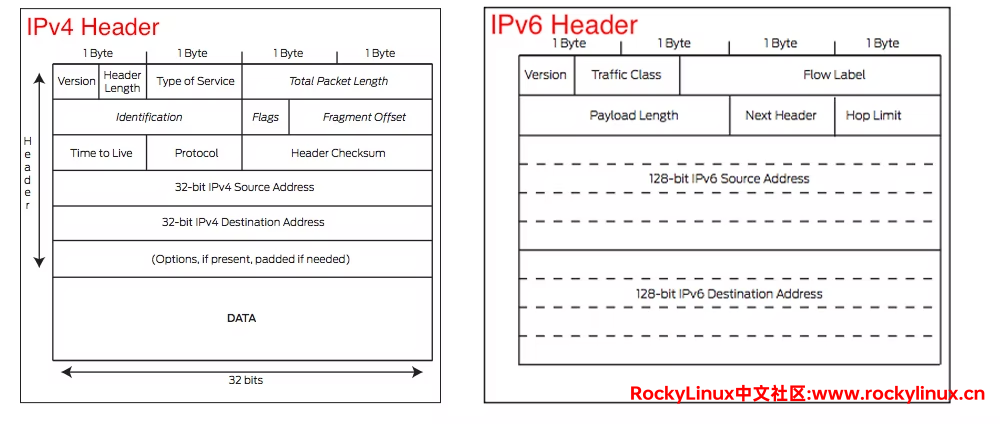
以下两图为 IPv4 与 IPv6 报文头对比:


  •  

使用GraalVM原生编译打包SpringBoot工程

1.GraalVM

GraalVM (https://www.graalvm.org/) 是一个高性能的JDK,旨在加速用Java和其他JVM语言编写的应用程序的执行,同时还提供JavaScript,python和许多其他流行语言的运行时。

GraalVM提供了两种运行Java应用程序的方式:

  1. 在hotspot jvm上使用graal即时编译器(JIT)
  2. 作为预先编译的本机可执行文件运行

GraalVM的多语言能力使得在单个应用程序中混合多种编程语言成为可能,同时消除了外部语言的调用成本。

2.Windows平台安装和配置GraalVM

Windows平台环境安装和配置比较复杂

2.1 安装Visual Studio

Visual Studio(特别是其中的 Visual C++ 工具)在 Windows 系统上提供了 C/C++ 编译器和相关工具链,它们是用来编译和链接本地代码的。当使用 GraalVM 在 Windows 上构建本地可执行文件时,需要依赖 Visual Studio 提供的这些编译工具来完成编译和链接的过程。

安装界面,勾选使用C++的桌面开发

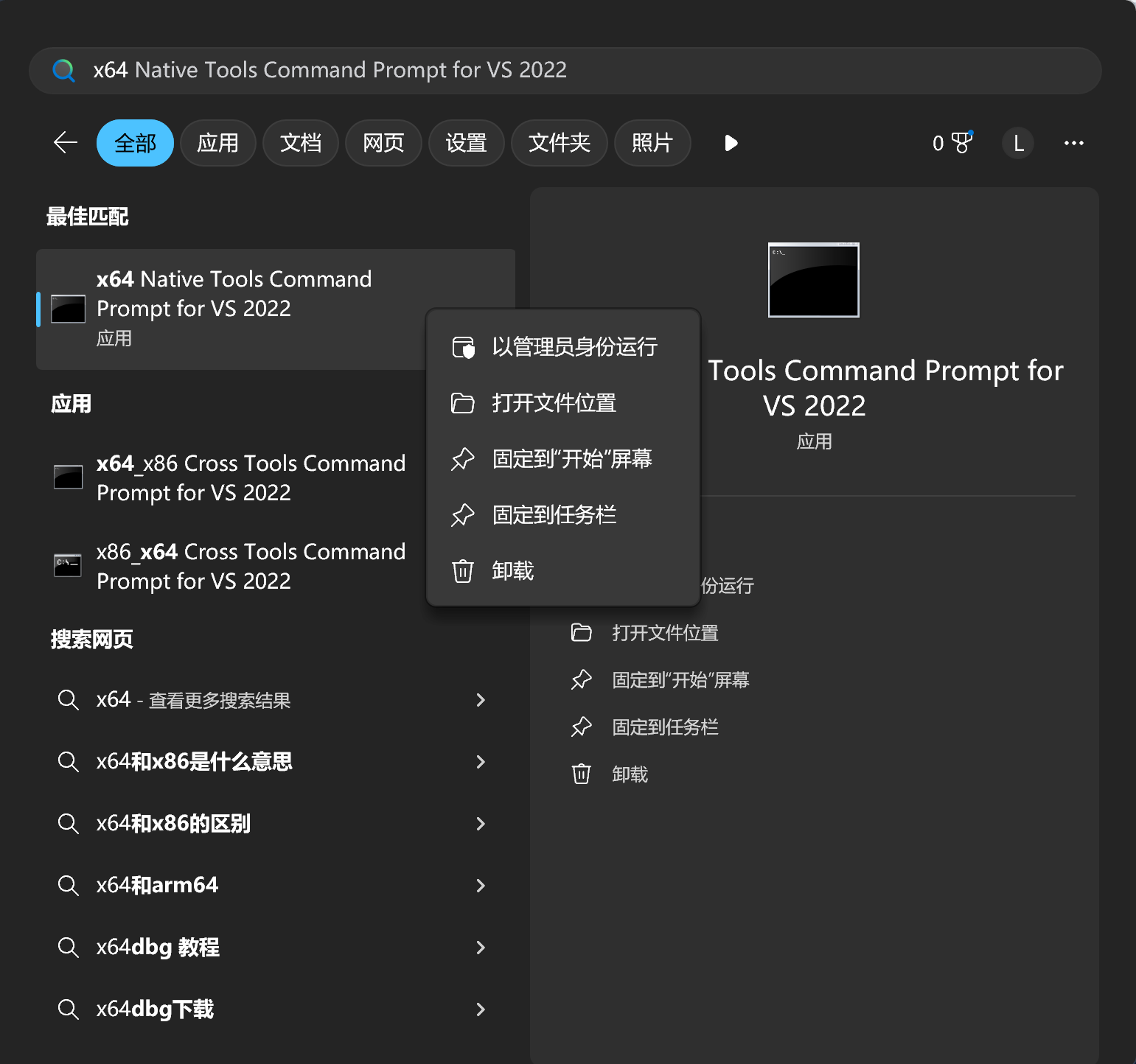
等待安装完成后,测试x64 Native Tools Command Prompt for VS 2022

以管理员身份测试打开x64 Native Tools Command Prompt for VS 2022

2.2 Windows安装GraalVM并配置

打开社区版GraalVM下载的GitHub页面
https://github.com/graalvm/graalvm-ce-builds/releases

以22.3.3版Java17为例,找到22.3.3版本,分别下载Windows平台的GraalVM graalvm-ce-java17-windows-amd64-22.3.3.zip和调用底层工具的原生镜像支持工具native-image-installable-svm-java17-windows-amd64-22.3.3.jar

下载地址:

  • graalvm-ce-java17-windows-amd64-22.3.3.zip

https://github.com/graalvm/graalvm-ce-builds/releases/download/vm-22.3.3/graalvm-ce-java17-windows-amd64-22.3.3.zip

  • native-image-installable-svm-java17-windows-amd64-22.3.3.jar

https://github.com/graalvm/graalvm-ce-builds/releases/download/vm-22.3.3/native-image-installable-svm-java17-windows-amd64-22.3.3.jar

设置环境变量

将GraalVM压缩包解压到F:\graalvm-ce-java17-22.3.3,然后设置环境变量JAVA_HOMEF:\graalvm-ce-java17-22.3.3,设置环境变量PATH新增%JAVA_HOME%/bin

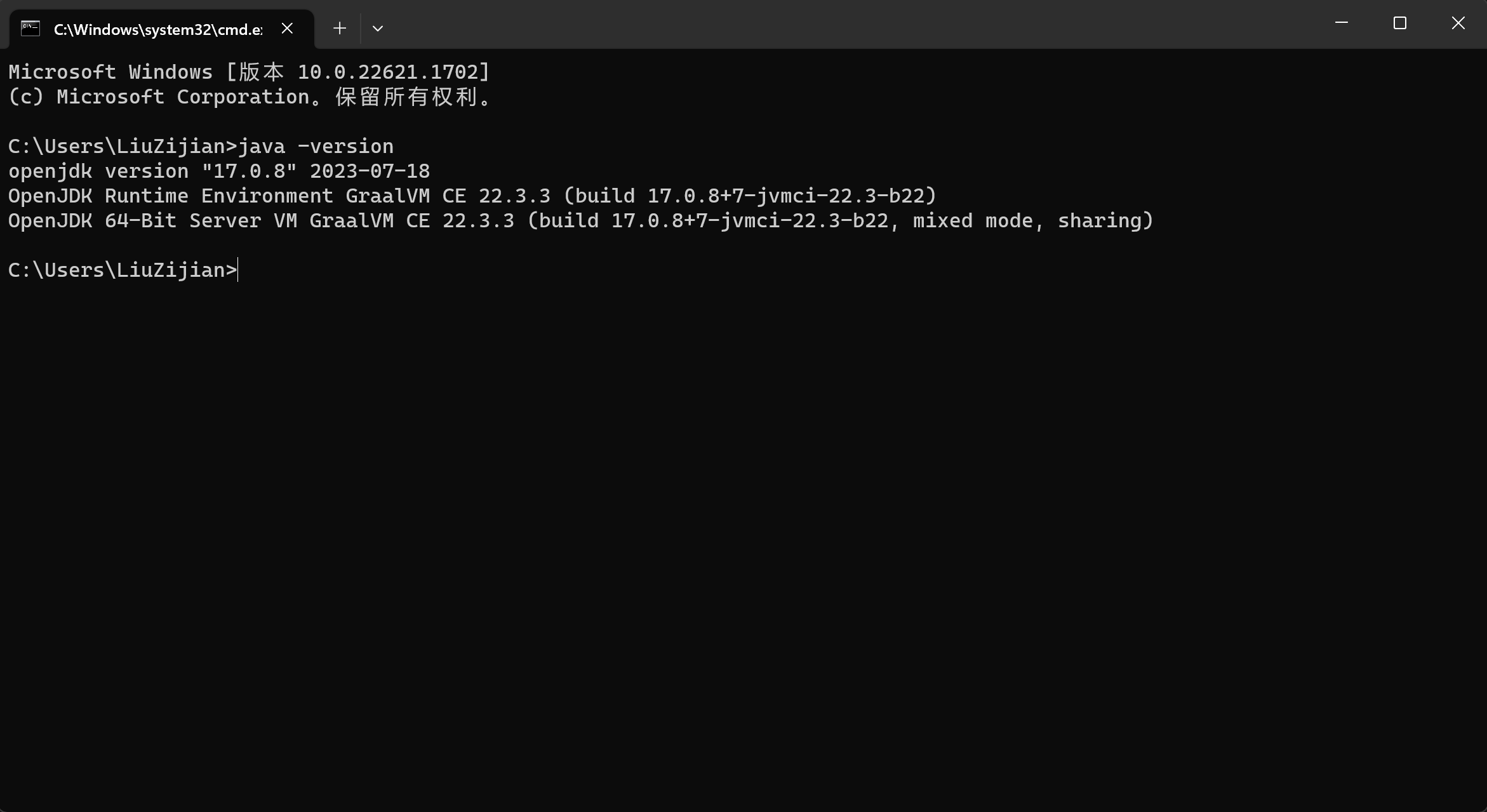
检查环境变量生效

java -version

安装native-image

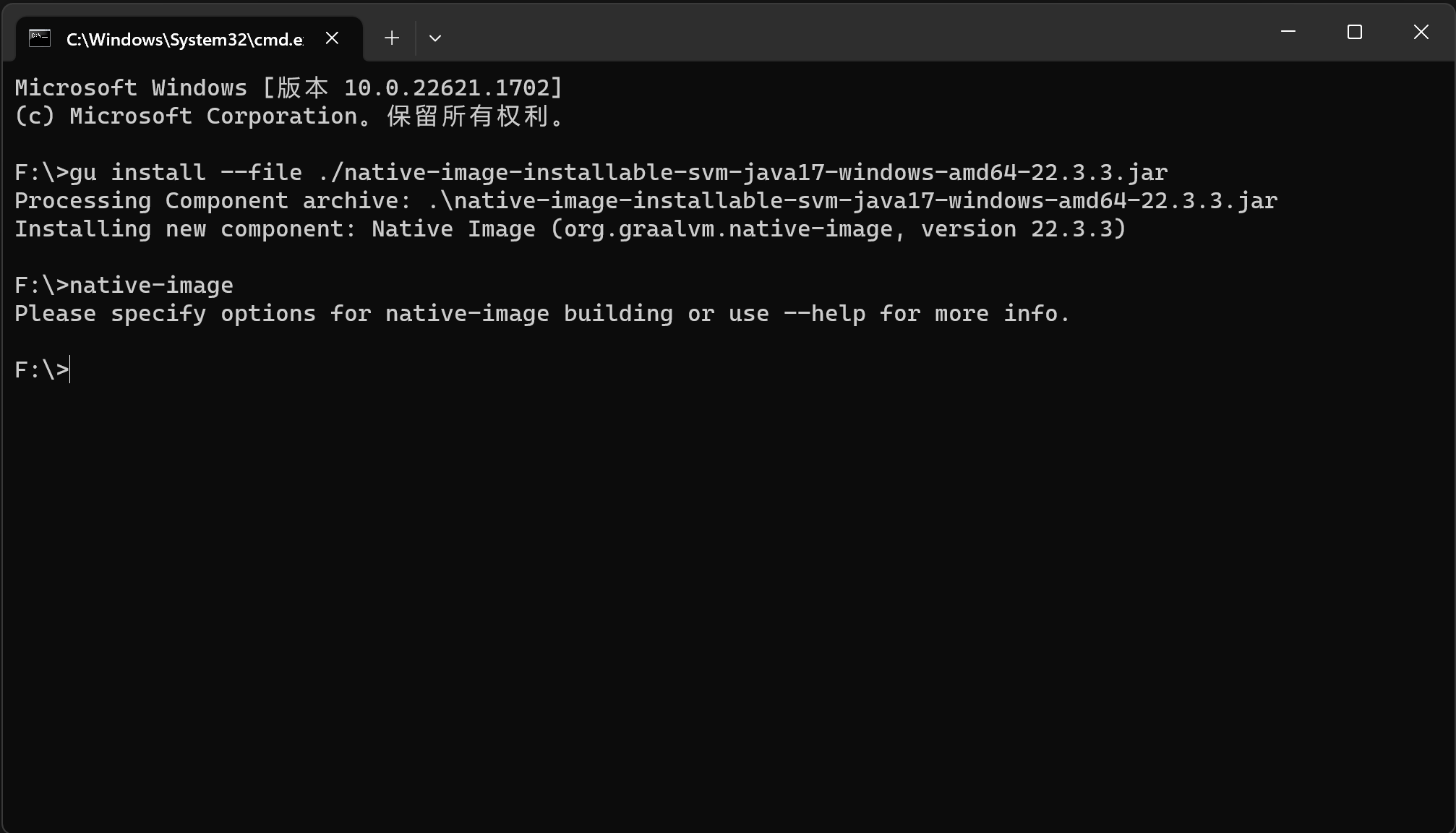
在jar包目录打开cmd窗口,输入命令,完成安装

gu install --file ./native-image-installable-svm-java17-windows-amd64-22.3.3.jar

输入命令,测试是否安装成功

native-image

至此,Windows平台GraalVM和支持将应用打包成本地镜像的工具安装配置完成。

2.3 新建简单项目测试编译打包

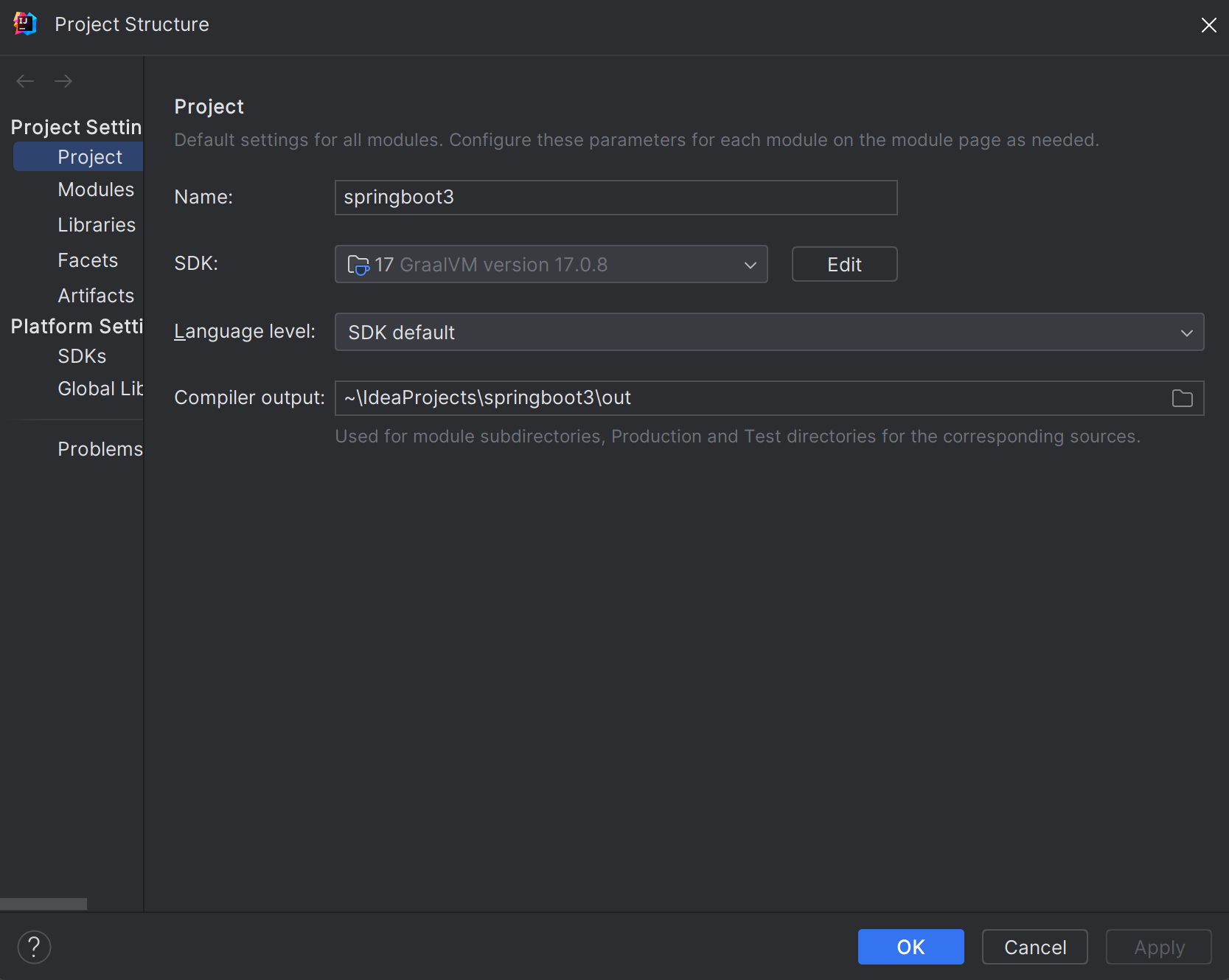
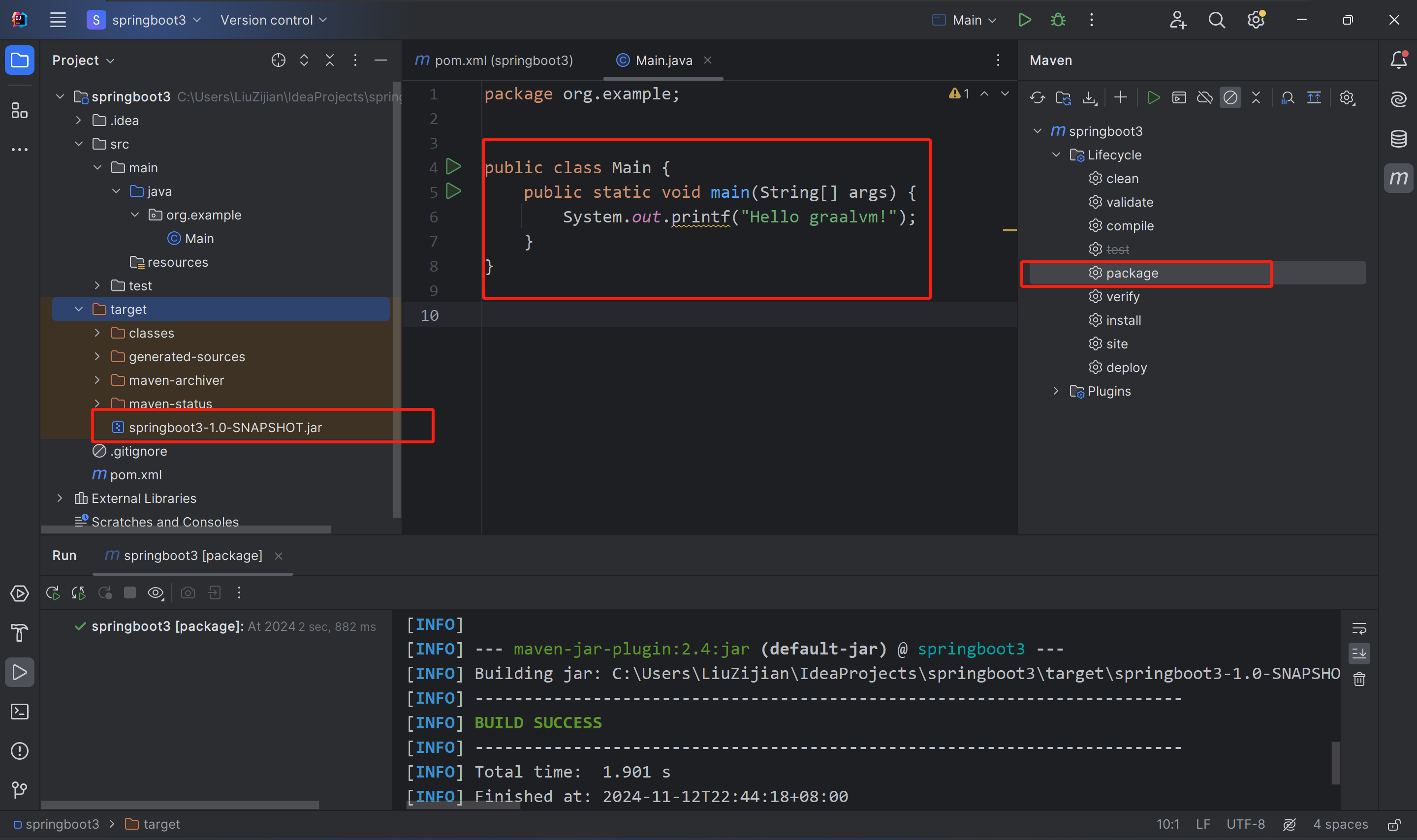
打开IDEA,新建项目springboot3,JDK选择安装的graalvm-ce-java17,然后先编写一段非常简单的Java代码,然后将其编译为原生.exe可执行文件

public class Main {    public static void main(String[] args) {        System.out.printf("hello graalvm!");    }}

用Maven将项目打包为jar包

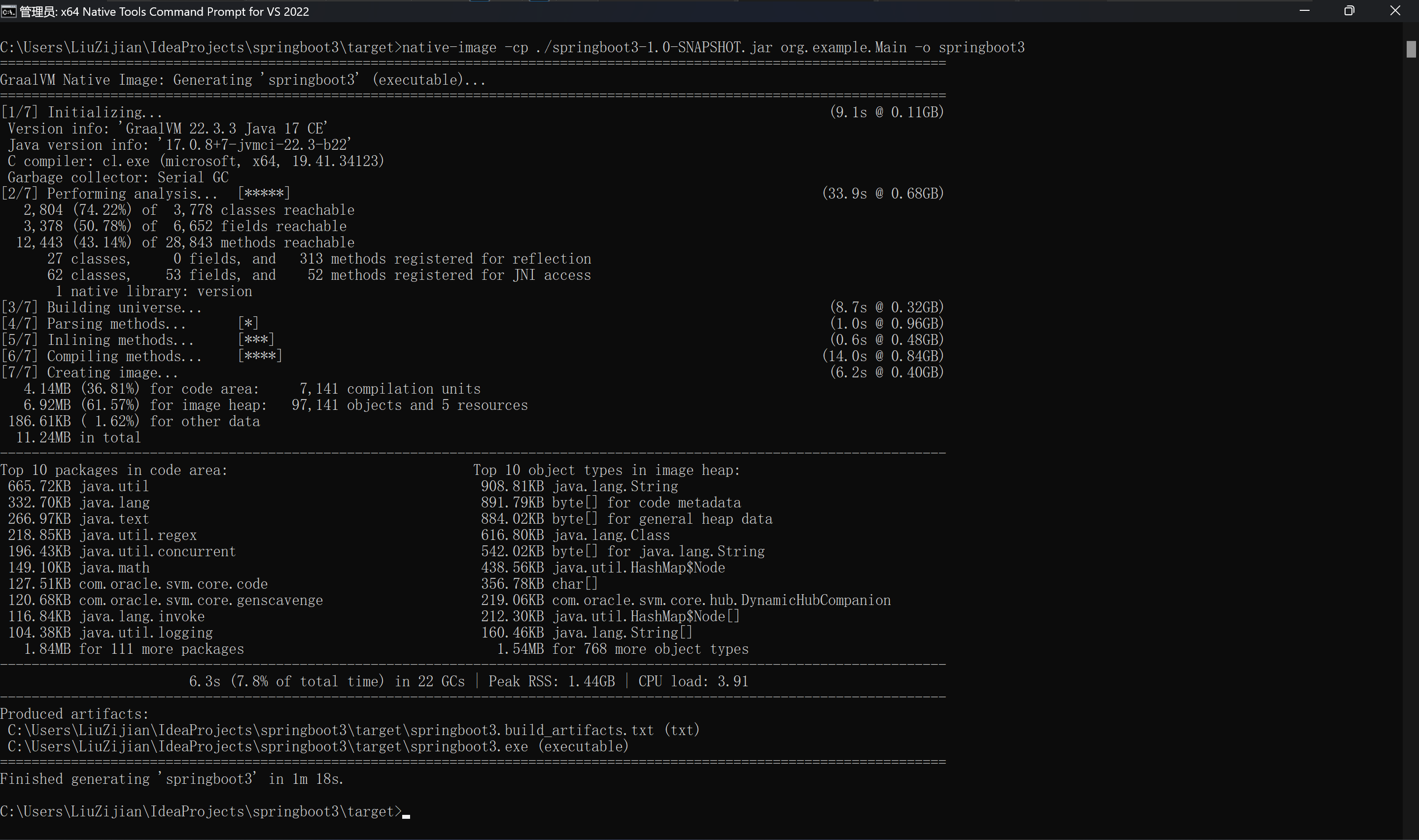
打开x64 Native Tools Command Prompt for VS 2022工具,使用底层能力运行native-image工具,将class编译为.exe。

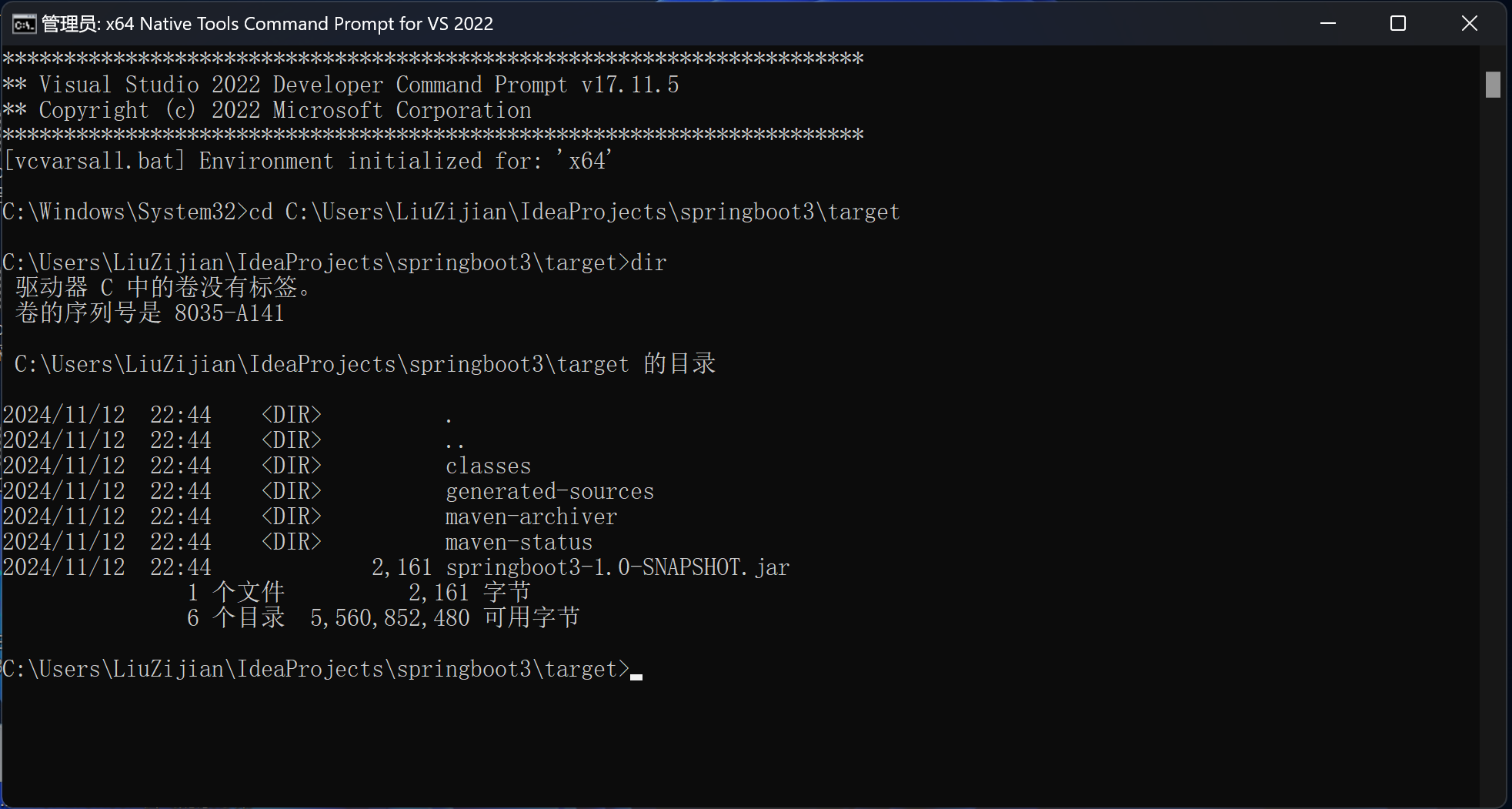
以管理员身份打开x64 Native Tools Command Prompt for VS 2022,并CD切换到jar包所在target目录,然后执行命令

-cp 编译
-o 目标.exe文件名称

native-image -cp ./springboot3-1.0-SNAPSHOT.jar org.example.Main -o springboot3

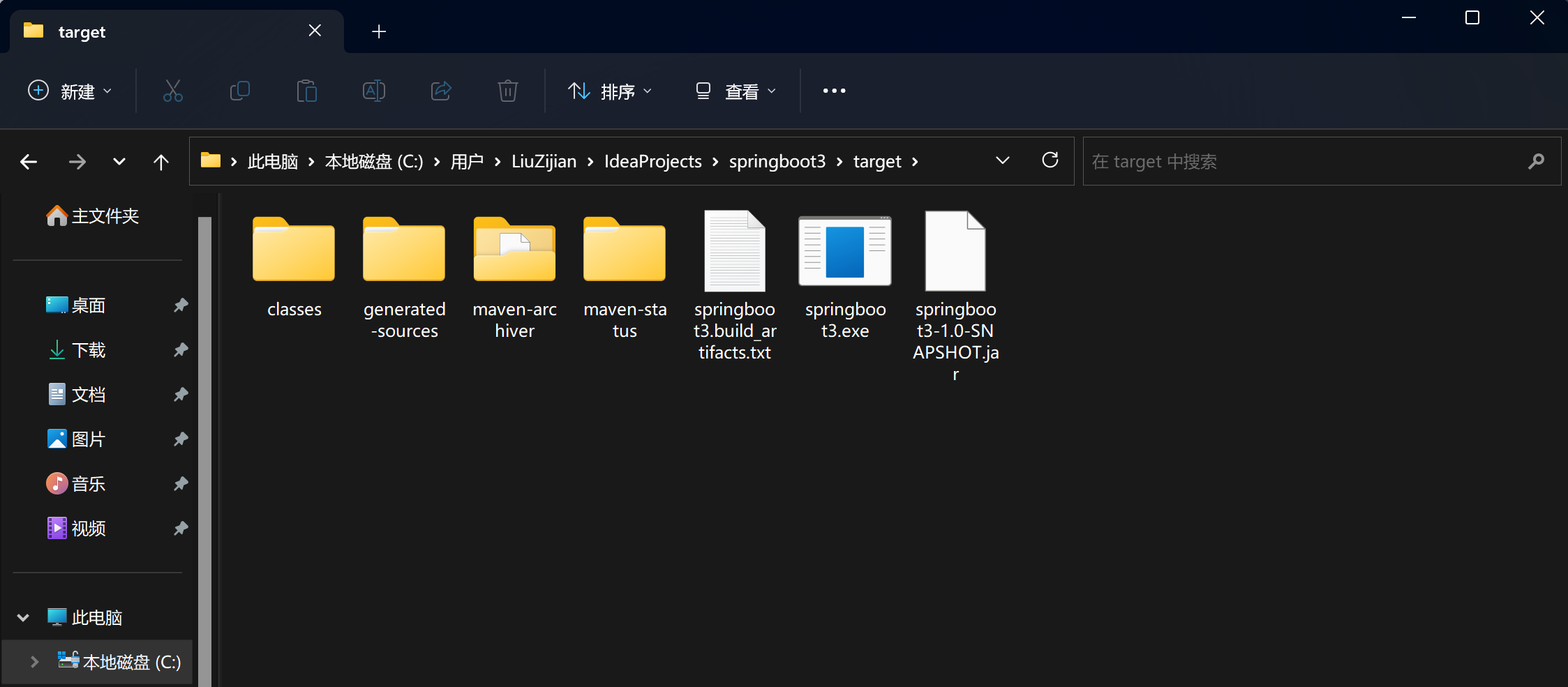
编译完成,生成Windows平台的.exe可执行文件

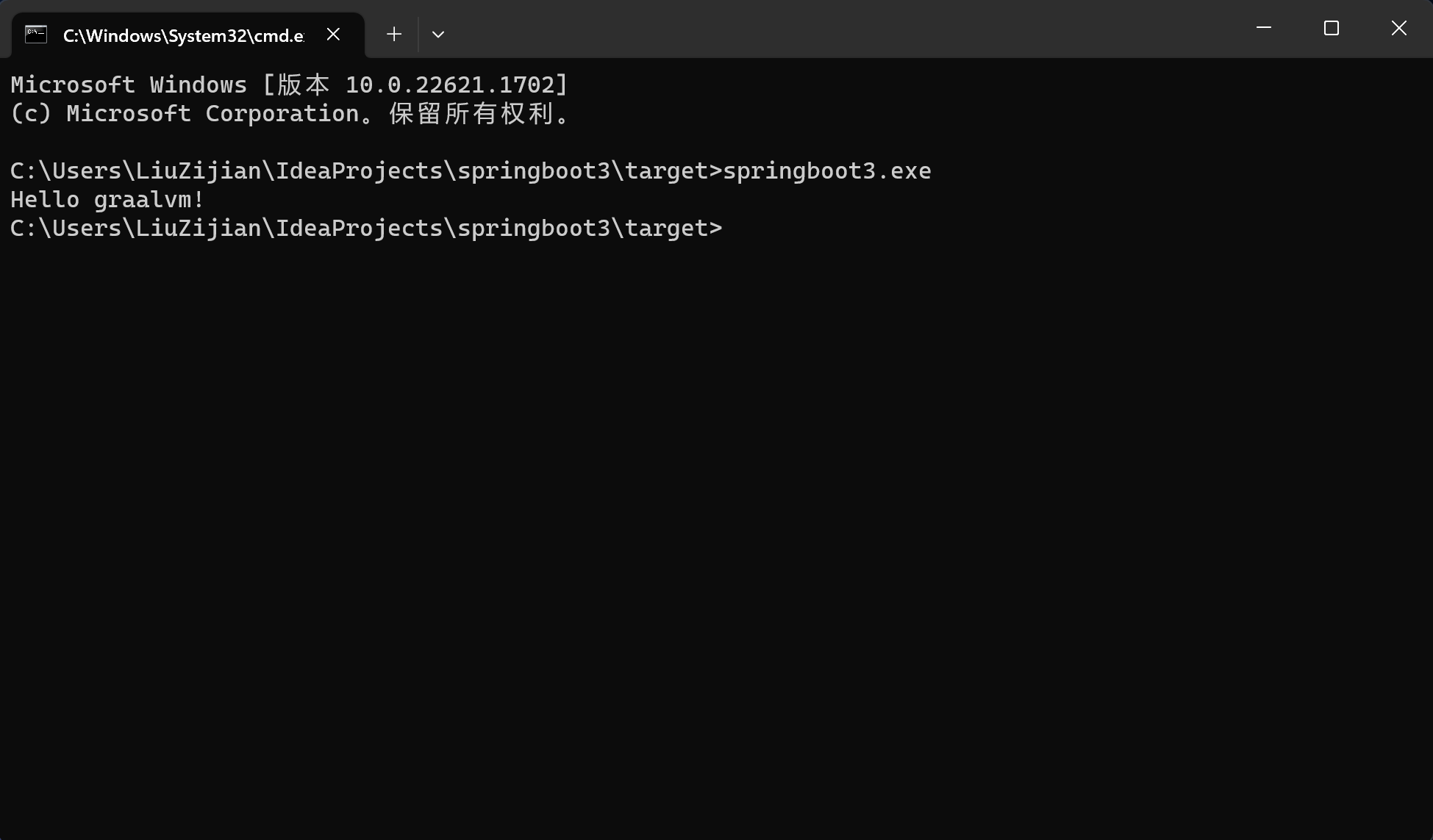
打开CMD,执行exe文件,输出代码运行结果,和Java虚拟机解释执行结果相同

2.4 新建SpringBoot3项目测试编译打包

首先要在Windows下配置三个环境变量,每个人环境和位置不同,需要自己按照自己的实际情况新增或修改。

1.path

path环境变量新增以下路径

F:\Program Files\Microsoft Visual Studio\2022\Community\VC\Tools\MSVC\14.41.34120\bin\Hostx64\x64

2.lib

新建lib环境变量,并将以下路径配置进去,之间用英文分号;间隔,以下位置目录均为VS创建

F:\Program Files\Microsoft Visual Studio\2022\Community\VC\Tools\MSVC\14.41.34120\lib\x64F:\Windows Kits\10\Lib\10.0.22621.0\ucrt\x64F:\Windows Kits\10\Lib\10.0.22621.0\um\x64

3.INCLUDE(大写)

新建INCLUDE环境变量,并将以下路径配置进去,之间用英文分号;间隔,以下位置目录均为VS创建

F:\Program Files\Microsoft Visual Studio\2022\Community\VC\Tools\MSVC\14.41.34120\includeF:\Windows Kits\10\Include\10.0.22621.0\sharedF:\Windows Kits\10\Include\10.0.22621.0\ucrtF:\Windows Kits\10\Include\10.0.22621.0\umF:\Windows Kits\10\Include\10.0.22621.0\winrt

! ! !环境变量配置好后,一定要重新打开CMD窗口编译打包,使用Intellij IDEA的,一定也要重启IDEA。

接下来,编写一个简单的SpringBoot应用,并编译打包为原生.exe文件

pom.xml

<?xml version="1.0" encoding="UTF-8"?><project xmlns="http://maven.apache.org/POM/4.0.0"         xmlns:xsi="http://www.w3.org/2001/XMLSchema-instance"         xsi:schemaLocation="http://maven.apache.org/POM/4.0.0 http://maven.apache.org/xsd/maven-4.0.0.xsd">    <modelVersion>4.0.0</modelVersion>    <parent>        <groupId>org.springframework.boot</groupId>        <artifactId>spring-boot-starter-parent</artifactId>        <version>3.0.6</version>    </parent>    <groupId>org.example</groupId>    <artifactId>springboot3</artifactId>    <version>1.0-SNAPSHOT</version>    <properties>        <maven.compiler.source>17</maven.compiler.source>        <maven.compiler.target>17</maven.compiler.target>        <project.build.sourceEncoding>UTF-8</project.build.sourceEncoding>    </properties>    <dependencies>        <dependency>            <groupId>org.springframework.boot</groupId>            <artifactId>spring-boot-starter-web</artifactId>        </dependency>    </dependencies>    <build>        <plugins>            <plugin>                <groupId>org.graalvm.buildtools</groupId>                <artifactId>native-maven-plugin</artifactId>            </plugin>            <plugin>                <groupId>org.springframework.boot</groupId>                <artifactId>spring-boot-maven-plugin</artifactId>            </plugin>        </plugins>    </build></project>

org.example.controller.TestController

package org.example.controller;import org.springframework.web.bind.annotation.GetMapping;import org.springframework.web.bind.annotation.RequestMapping;import org.springframework.web.bind.annotation.RestController;@RestController@RequestMapping("test")public class TestController {    @GetMapping("hello")    public String hello(String s) {        return "hello " + s;    }}

org.example.Main

package org.example;import org.springframework.boot.SpringApplication;import org.springframework.boot.autoconfigure.SpringBootApplication;@SpringBootApplicationpublic class Main {    public static void main(String[] args) {        SpringApplication.run(Main.class);    }}

application.yml

server:  port: 8081

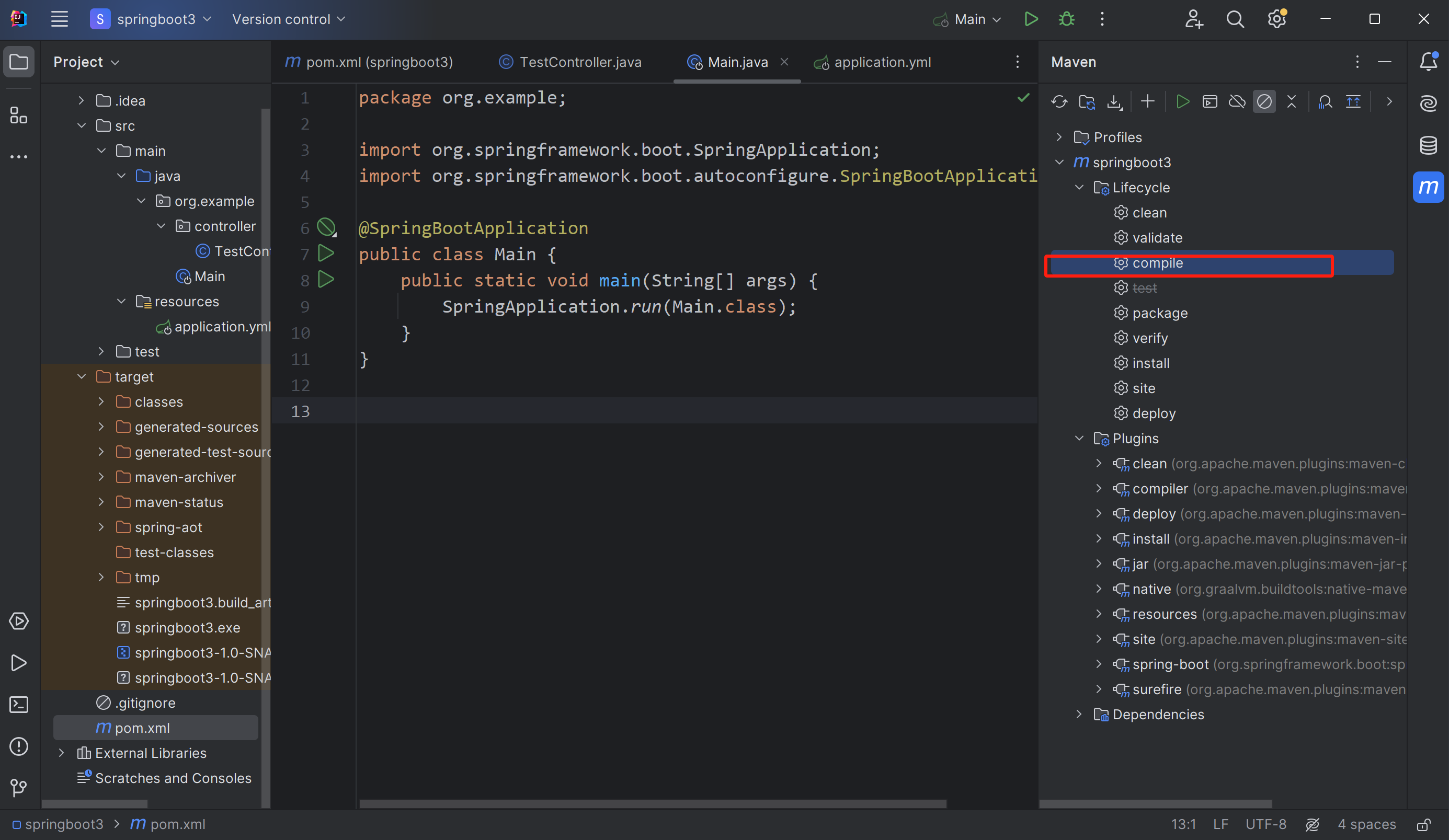
接下来先用普通的编译命令将代码编译为.class文件。

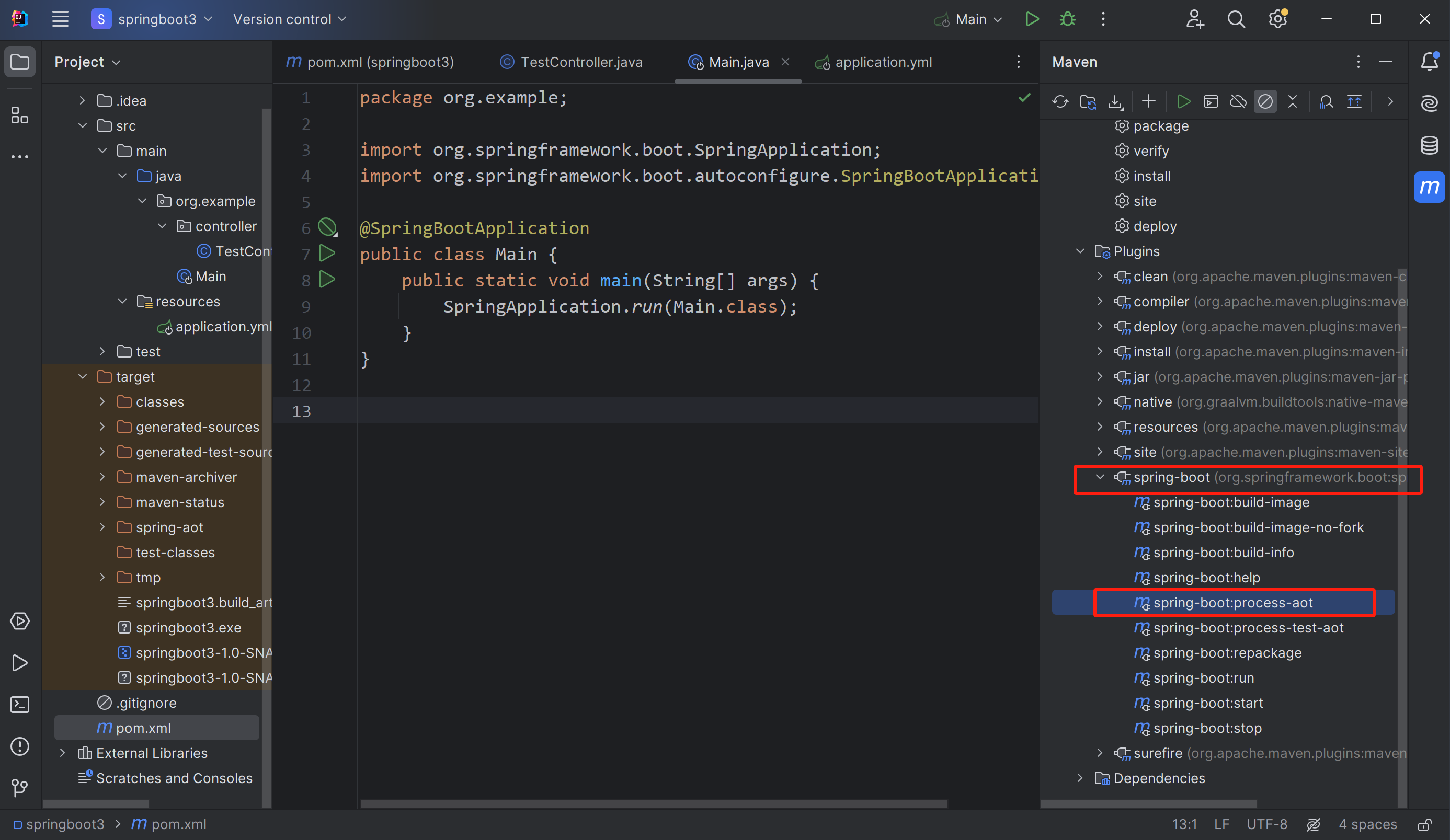
然后,执行spring-bootprocess-aot插件,进行编译前的前置处理。

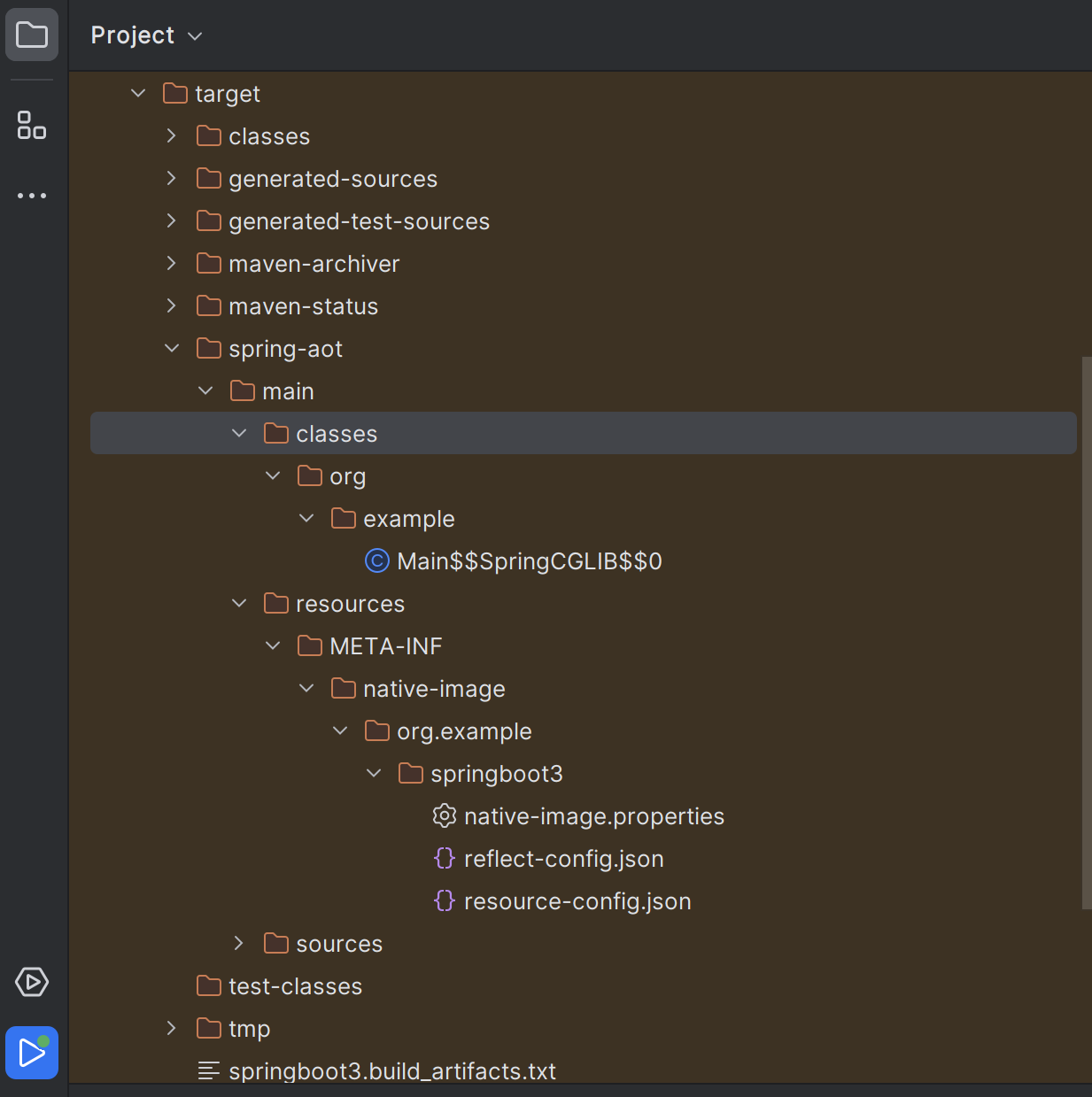
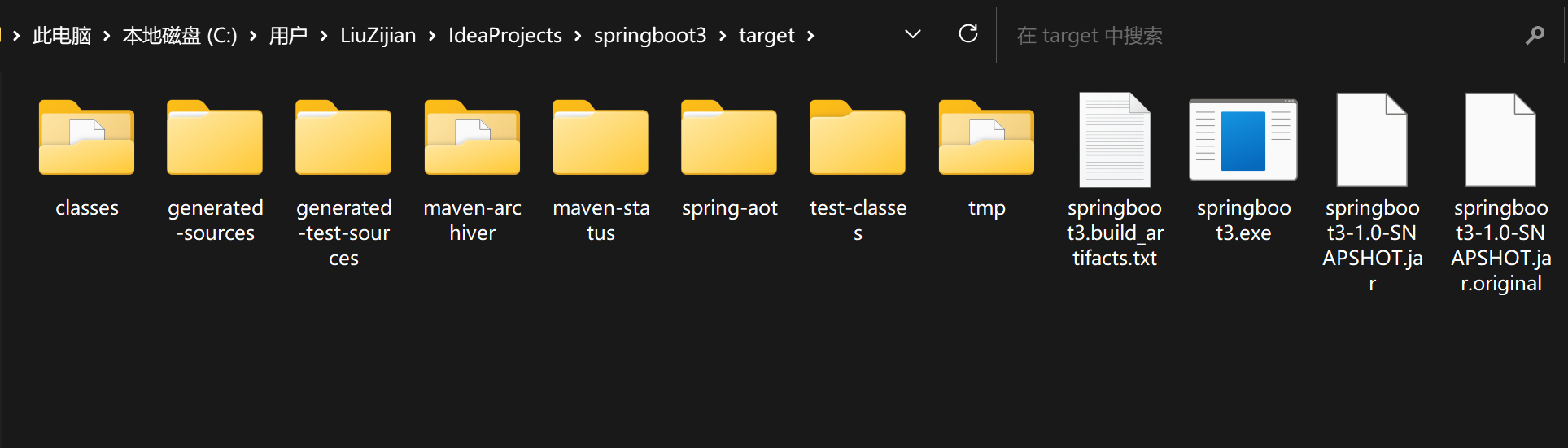
前置处理完成后,target目录下生成了一些AOT编译相关的文件,用于指定主类的位置等

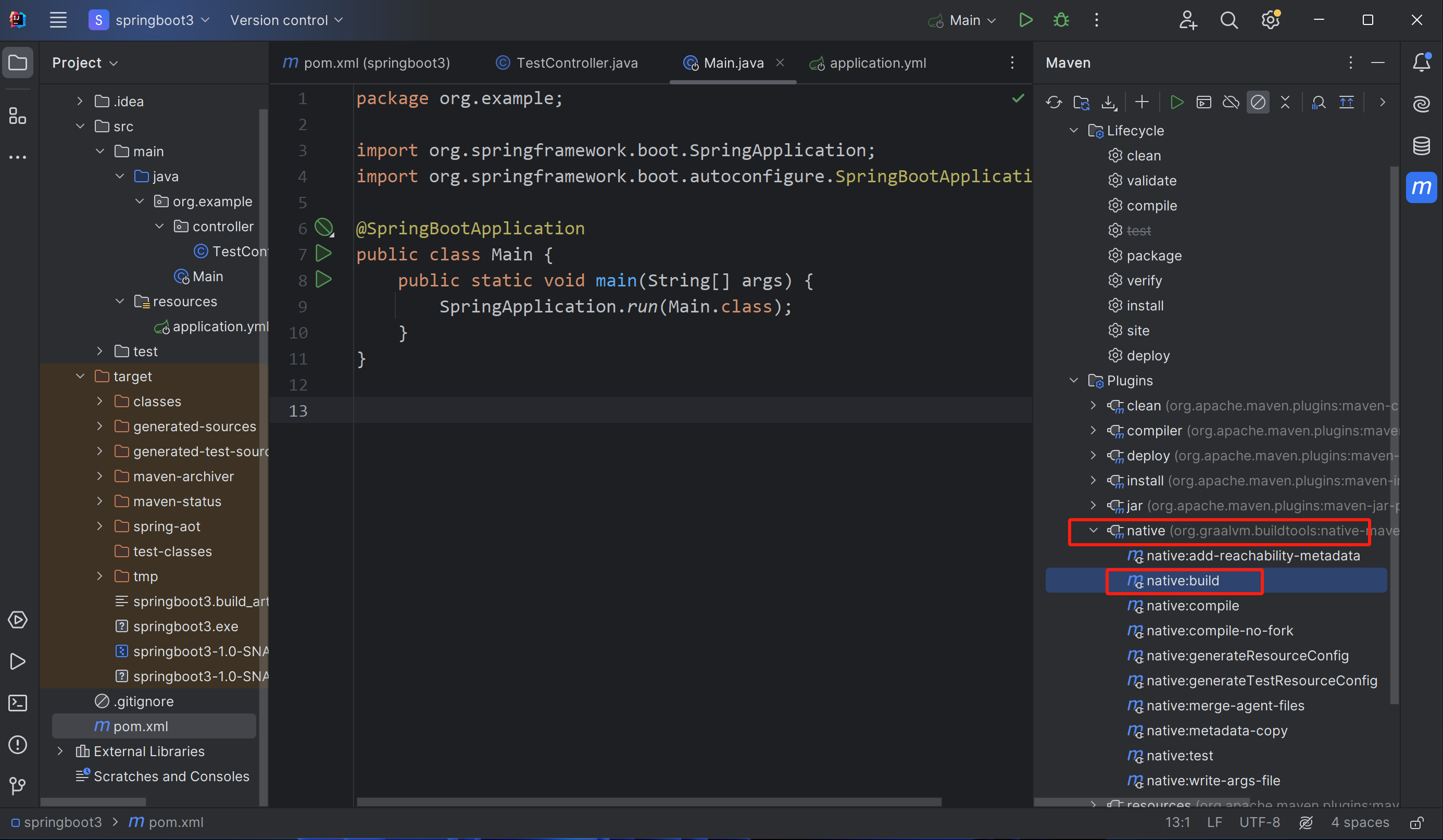
最后,运行native插件的build启动native-image,调用VS工具链将工程编译为二进制.exe文件

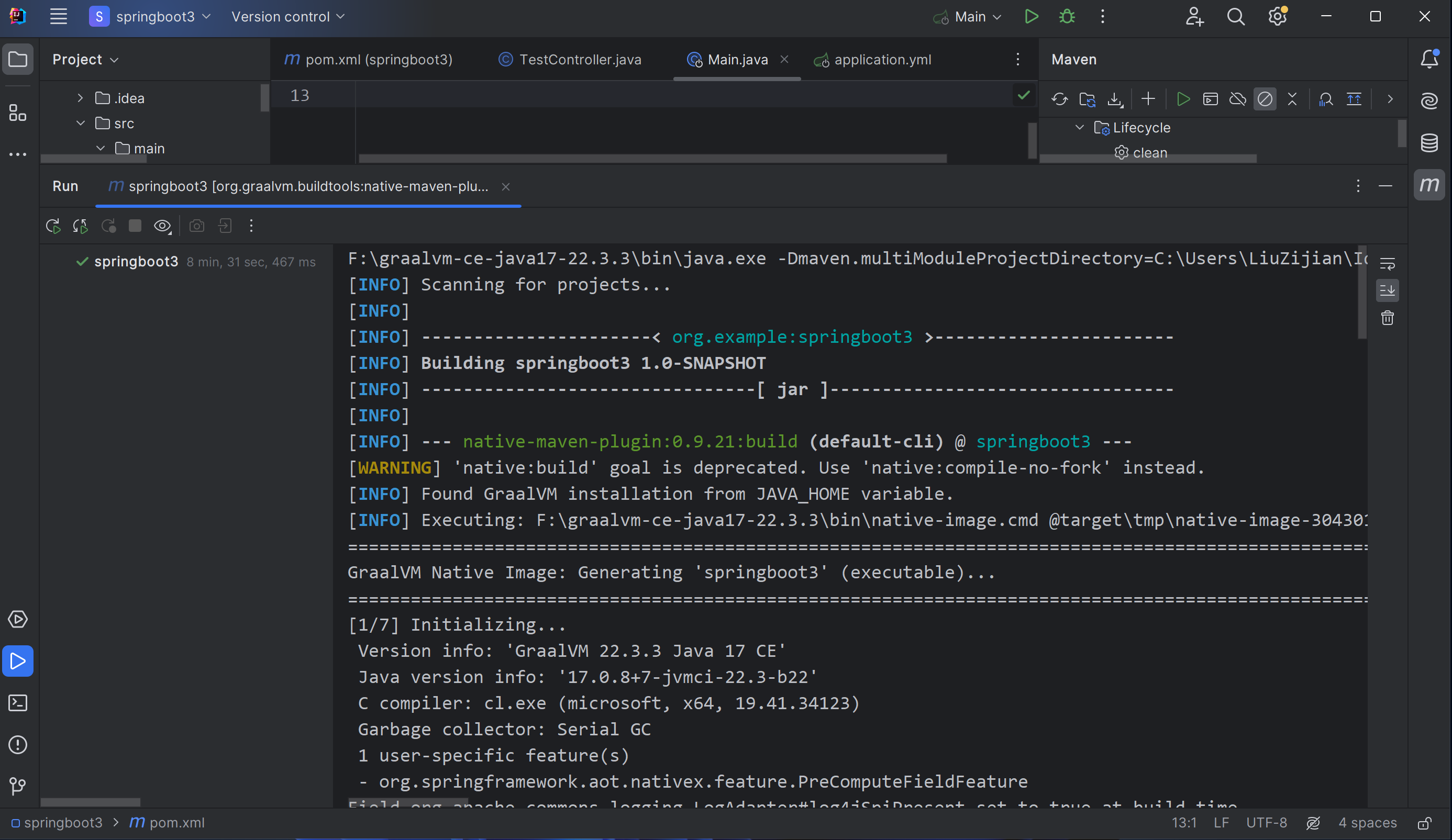
开始编译后等待编译完成


我的IDEA输出:

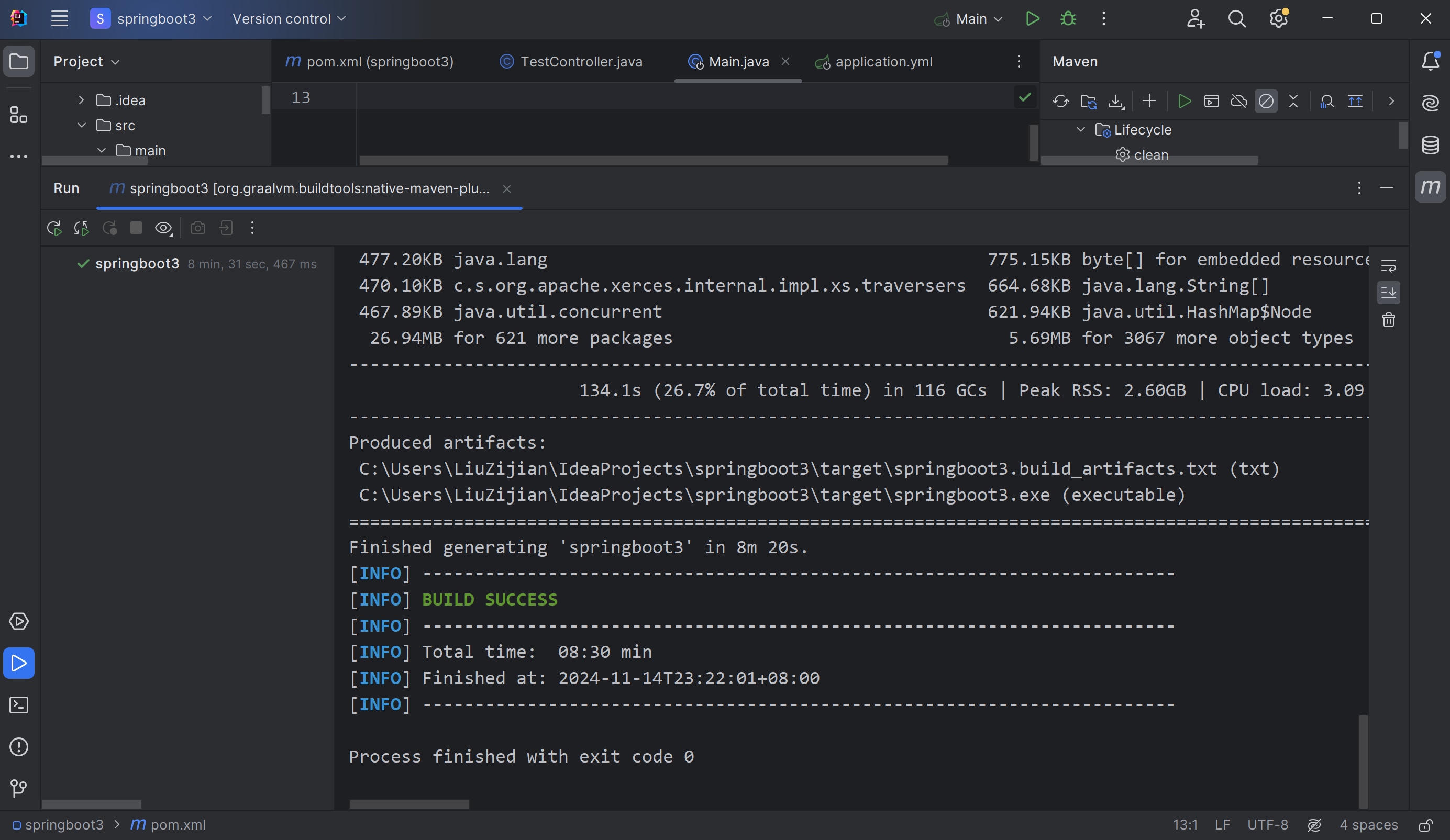
[INFO] Scanning for projects...[INFO] [INFO] ----------------------< org.example:springboot3 >-----------------------[INFO] Building springboot3 1.0-SNAPSHOT[INFO] --------------------------------[ jar ]---------------------------------[INFO] [INFO] --- native-maven-plugin:0.9.21:build (default-cli) @ springboot3 ---[WARNING] 'native:build' goal is deprecated. Use 'native:compile-no-fork' instead.[INFO] Found GraalVM installation from JAVA_HOME variable.[INFO] Executing: F:\graalvm-ce-java17-22.3.3\bin\native-image.cmd @target\tmp\native-image-3043011469918092793.args========================================================================================================================GraalVM Native Image: Generating 'springboot3' (executable)...========================================================================================================================[1/7] Initializing...                                                                                   (21.0s @ 0.17GB) Version info: 'GraalVM 22.3.3 Java 17 CE' Java version info: '17.0.8+7-jvmci-22.3-b22' C compiler: cl.exe (microsoft, x64, 19.41.34123) Garbage collector: Serial GC 1 user-specific feature(s) - org.springframework.aot.nativex.feature.PreComputeFieldFeatureField org.apache.commons.logging.LogAdapter#log4jSpiPresent set to true at build timeField org.apache.commons.logging.LogAdapter#log4jSlf4jProviderPresent set to true at build timeField org.apache.commons.logging.LogAdapter#slf4jSpiPresent set to true at build timeField org.apache.commons.logging.LogAdapter#slf4jApiPresent set to true at build timeField org.springframework.core.NativeDetector#imageCode set to true at build timeField org.springframework.core.KotlinDetector#kotlinPresent set to false at build timeField org.springframework.core.KotlinDetector#kotlinReflectPresent set to false at build timeField org.springframework.format.support.DefaultFormattingConversionService#jsr354Present set to false at build timeField org.springframework.cglib.core.AbstractClassGenerator#imageCode set to true at build timeField org.springframework.boot.logging.log4j2.Log4J2LoggingSystem$Factory#PRESENT set to false at build timeField org.springframework.web.servlet.config.annotation.WebMvcConfigurationSupport#romePresent set to false at build timeField org.springframework.web.servlet.config.annotation.WebMvcConfigurationSupport#jaxb2Present set to false at build timeField org.springframework.web.servlet.config.annotation.WebMvcConfigurationSupport#jackson2Present set to true at build timeField org.springframework.web.servlet.config.annotation.WebMvcConfigurationSupport#jackson2XmlPresent set to false at build timeField org.springframework.web.servlet.config.annotation.WebMvcConfigurationSupport#jackson2SmilePresent set to false at build timeField org.springframework.web.servlet.config.annotation.WebMvcConfigurationSupport#jackson2CborPresent set to false at build timeField org.springframework.web.servlet.config.annotation.WebMvcConfigurationSupport#gsonPresent set to false at build timeField org.springframework.web.servlet.config.annotation.WebMvcConfigurationSupport#jsonbPresent set to false at build timeField org.springframework.web.servlet.config.annotation.WebMvcConfigurationSupport#kotlinSerializationCborPresent set to false at build timeField org.springframework.web.servlet.config.annotation.WebMvcConfigurationSupport#kotlinSerializationJsonPresent set to false at build timeField org.springframework.web.servlet.config.annotation.WebMvcConfigurationSupport#kotlinSerializationProtobufPresent set to false at build timeField org.springframework.boot.logging.java.JavaLoggingSystem$Factory#PRESENT set to true at build timeField org.springframework.boot.logging.logback.LogbackLoggingSystem$Factory#PRESENT set to true at build timeField org.springframework.http.converter.json.Jackson2ObjectMapperBuilder#jackson2XmlPresent set to false at build timeField org.springframework.web.servlet.view.InternalResourceViewResolver#jstlPresent set to false at build timeField org.springframework.web.context.support.StandardServletEnvironment#jndiPresent set to true at build timeField org.springframework.boot.logging.logback.LogbackLoggingSystemProperties#JBOSS_LOGGING_PRESENT set to false at build timeField org.springframework.web.context.support.WebApplicationContextUtils#jsfPresent set to false at build timeField org.springframework.web.context.request.RequestContextHolder#jsfPresent set to false at build timeField org.springframework.context.event.ApplicationListenerMethodAdapter#reactiveStreamsPresent set to false at build timeField org.springframework.http.converter.support.AllEncompassingFormHttpMessageConverter#jaxb2Present set to false at build timeField org.springframework.http.converter.support.AllEncompassingFormHttpMessageConverter#jackson2Present set to true at build timeField org.springframework.http.converter.support.AllEncompassingFormHttpMessageConverter#jackson2XmlPresent set to false at build timeField org.springframework.http.converter.support.AllEncompassingFormHttpMessageConverter#jackson2SmilePresent set to false at build timeField org.springframework.http.converter.support.AllEncompassingFormHttpMessageConverter#gsonPresent set to false at build timeField org.springframework.http.converter.support.AllEncompassingFormHttpMessageConverter#jsonbPresent set to false at build timeField org.springframework.http.converter.support.AllEncompassingFormHttpMessageConverter#kotlinSerializationCborPresent set to false at build timeField org.springframework.http.converter.support.AllEncompassingFormHttpMessageConverter#kotlinSerializationJsonPresent set to false at build timeField org.springframework.http.converter.support.AllEncompassingFormHttpMessageConverter#kotlinSerializationProtobufPresent set to false at build timeField org.springframework.core.ReactiveAdapterRegistry#reactorPresent set to false at build timeField org.springframework.core.ReactiveAdapterRegistry#rxjava3Present set to false at build timeField org.springframework.core.ReactiveAdapterRegistry#kotlinCoroutinesPresent set to false at build timeField org.springframework.core.ReactiveAdapterRegistry#mutinyPresent set to false at build timeField org.springframework.web.client.RestTemplate#romePresent set to false at build timeField org.springframework.web.client.RestTemplate#jaxb2Present set to false at build timeField org.springframework.web.client.RestTemplate#jackson2Present set to true at build timeField org.springframework.web.client.RestTemplate#jackson2XmlPresent set to false at build timeField org.springframework.web.client.RestTemplate#jackson2SmilePresent set to false at build timeField org.springframework.web.client.RestTemplate#jackson2CborPresent set to false at build timeField org.springframework.web.client.RestTemplate#gsonPresent set to false at build timeField org.springframework.web.client.RestTemplate#jsonbPresent set to false at build timeField org.springframework.web.client.RestTemplate#kotlinSerializationCborPresent set to false at build timeField org.springframework.web.client.RestTemplate#kotlinSerializationJsonPresent set to false at build timeField org.springframework.web.client.RestTemplate#kotlinSerializationProtobufPresent set to false at build timeField org.springframework.boot.autoconfigure.web.format.WebConversionService#JSR_354_PRESENT set to false at build timeSLF4J: No SLF4J providers were found.SLF4J: Defaulting to no-operation (NOP) logger implementationSLF4J: See https://www.slf4j.org/codes.html#noProviders for further details.Field org.springframework.web.servlet.mvc.method.annotation.ReactiveTypeHandler#isContextPropagationPresent set to false at build timeField org.springframework.web.servlet.support.RequestContext#jstlPresent set to false at build time[2/7] Performing analysis...  [**********]                                                              (98.5s @ 1.27GB)  15,315 (92.75%) of 16,513 classes reachable  24,931 (67.59%) of 36,886 fields reachable  73,546 (62.21%) of 118,224 methods reachable     802 classes,   244 fields, and 4,549 methods registered for reflection      83 classes,    78 fields, and    68 methods registered for JNI access       5 native libraries: crypt32, ncrypt, psapi, version, winhttp[3/7] Building universe...                                                                               (9.2s @ 1.48GB)[4/7] Parsing methods...      [**]                                                                       (3.0s @ 1.71GB)[5/7] Inlining methods...     [***]                                                                      (2.1s @ 1.75GB)[6/7] Compiling methods...    [*********]                                                               (92.6s @ 1.80GB)[7/7] Creating image...                                                                                (162.3s @ 1.29GB)  34.44MB (52.32%) for code area:    48,187 compilation units  30.94MB (47.01%) for image heap:  354,772 objects and 118 resources 445.88KB ( 0.66%) for other data  65.81MB in total------------------------------------------------------------------------------------------------------------------------Top 10 packages in code area:                               Top 10 object types in image heap:   1.64MB sun.security.ssl                                     7.33MB byte[] for code metadata   1.05MB java.util                                            3.64MB java.lang.Class 835.67KB java.lang.invoke                                     3.41MB java.lang.String 725.04KB com.sun.crypto.provider                              2.87MB byte[] for general heap data 560.78KB org.apache.catalina.core                             2.83MB byte[] for java.lang.String 527.20KB org.apache.tomcat.util.net                           1.29MB com.oracle.svm.core.hub.DynamicHubCompanion 495.45KB org.apache.coyote.http2                            880.07KB byte[] for reflection metadata 477.20KB java.lang                                          775.15KB byte[] for embedded resources 470.10KB c.s.org.apache.xerces.internal.impl.xs.traversers  664.68KB java.lang.String[] 467.89KB java.util.concurrent                               621.94KB java.util.HashMap$Node  26.94MB for 621 more packages                                5.69MB for 3067 more object types------------------------------------------------------------------------------------------------------------------------                      134.1s (26.7% of total time) in 116 GCs | Peak RSS: 2.60GB | CPU load: 3.09------------------------------------------------------------------------------------------------------------------------Produced artifacts: C:\Users\LiuZijian\IdeaProjects\springboot3\target\springboot3.build_artifacts.txt (txt) C:\Users\LiuZijian\IdeaProjects\springboot3\target\springboot3.exe (executable)========================================================================================================================Finished generating 'springboot3' in 8m 20s.[INFO] ------------------------------------------------------------------------[INFO] BUILD SUCCESS[INFO] ------------------------------------------------------------------------[INFO] Total time:  08:30 min[INFO] Finished at: 2024-11-14T23:22:01+08:00[INFO] ------------------------------------------------------------------------Process finished with exit code 0

编译完成,得到.exe文件

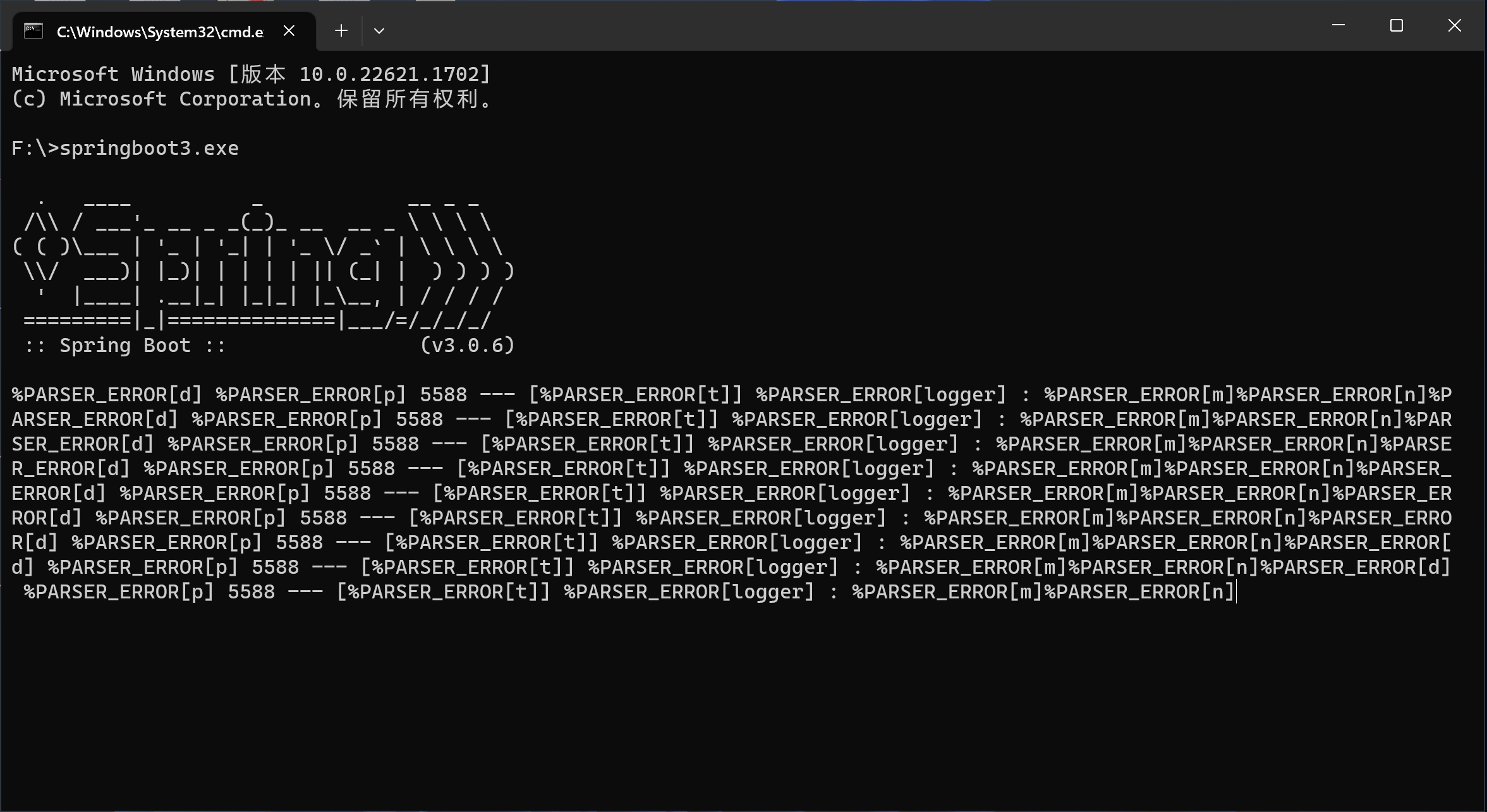
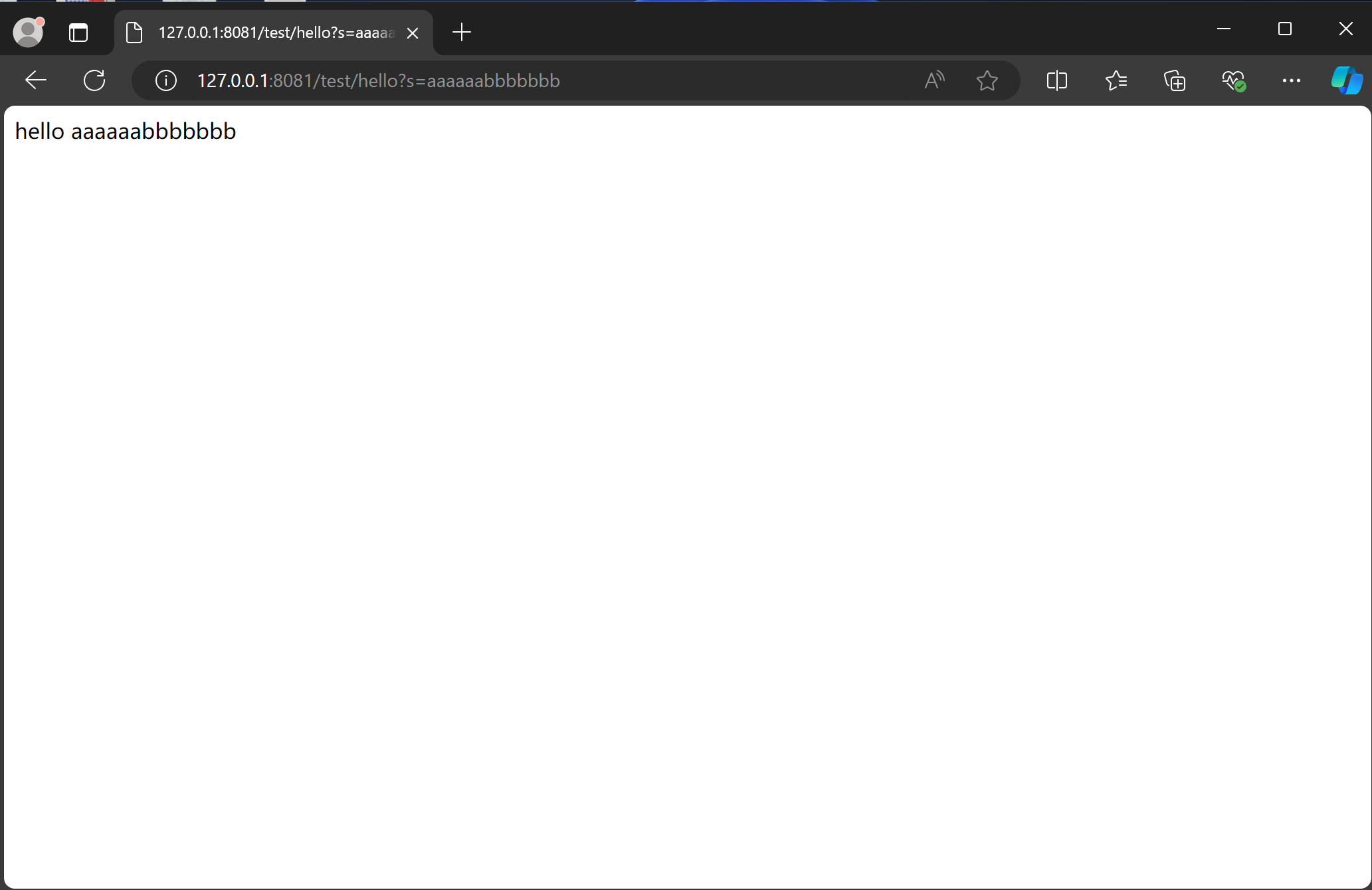
运行编译成的.exe文件并测试

.exe文件很快启动,并可以正常处理http请求,虽然命令窗口打印存在问题,但是接口是能调通的,文章写到这已经很晚了,故这个问题先留着后续有空解决…

3.linux平台安装和配置GraalVM

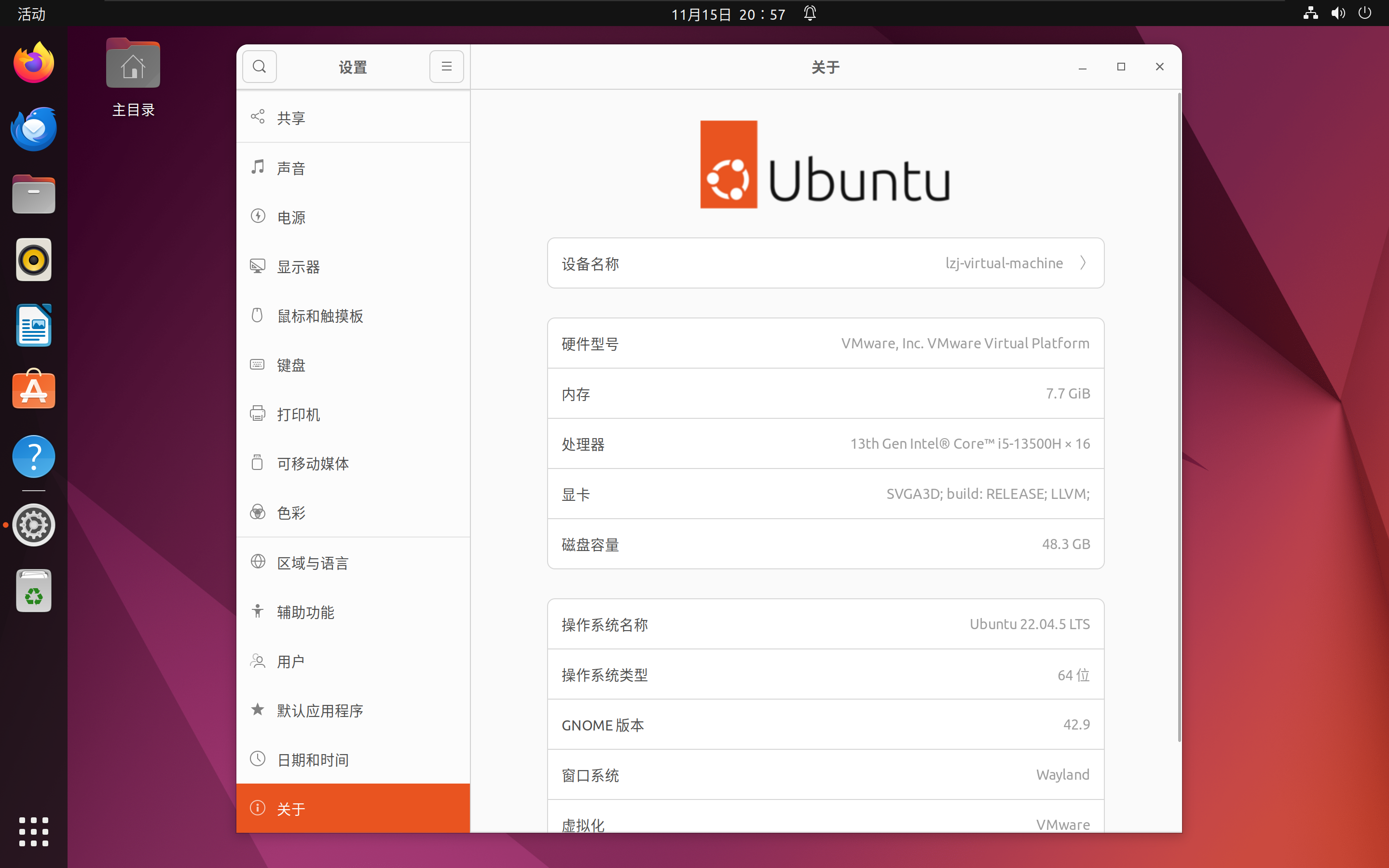
Linux平台安装和配置GraalVM,我使用Ubuntu22进行测试

3.1 安装Linux编译工具链

编译native-image,需要安装Linux下的编译环境

sudo apt-get install build-essential libz-dev zlib1g-dev

! tips: 如果是redhat系列linux,可能需要这样安装

sudo yum install -y gcc glibc glibc-devel zlib-devel

3.2 Linux下载安装GraalVM

接下来,和Windows系统一样,下载GraalVMnative-image的Linux x64版本,我在这里还是选择和Windows一样的22.3.3版本。

下载地址仍然是 https://github.com/graalvm/graalvm-ce-builds/releases

  • graalvm-ce-java17-linux-amd64-22.3.3.tar.gz

https://github.com/graalvm/graalvm-ce-builds/releases/download/vm-22.3.3/graalvm-ce-java17-linux-amd64-22.3.3.tar.gz

  • native-image-installable-svm-java17-linux-amd64-22.3.3.jar

https://github.com/graalvm/graalvm-ce-builds/releases/download/vm-22.3.3/native-image-installable-svm-java17-linux-amd64-22.3.3.jar

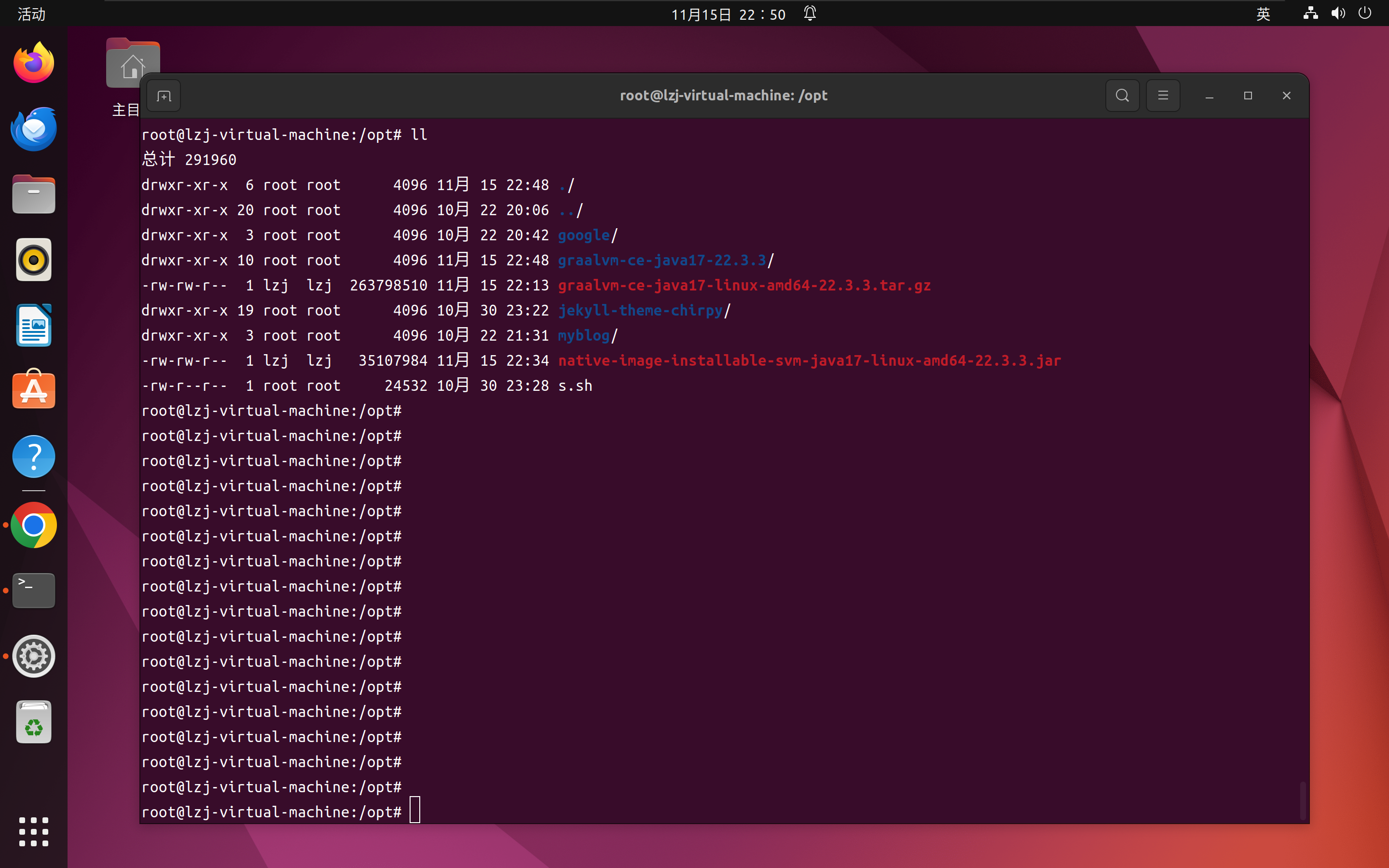
将下载好的两个文件移动到/opt目录下,解压graalvm-ce-java17-linux-amd64-22.3.3.tar.gz到路径/opt并设置环境变量

解压到/opt

tar -zxvf ./graalvm-ce-java17-linux-amd64-22.3.3.tar.gz

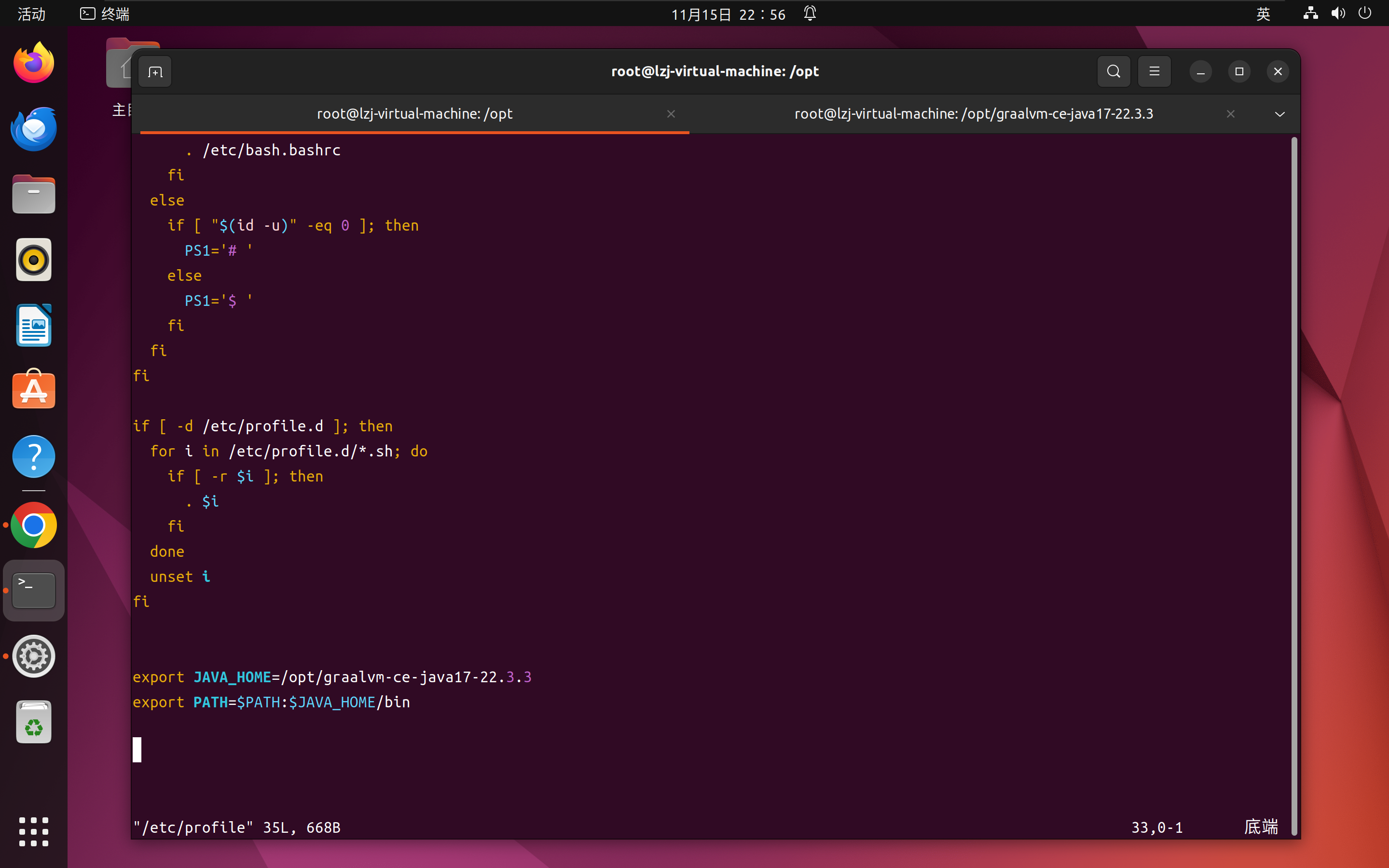
打开/etc/profile设置环境变量

vim /etc/profile

将下面两句放在文件最末尾

export JAVA_HOME=/opt/graalvm-ce-java17-22.3.3export PATH=$PATH:$JAVA_HOME/bin

刷新,使环境变量生效

source /etc/profile

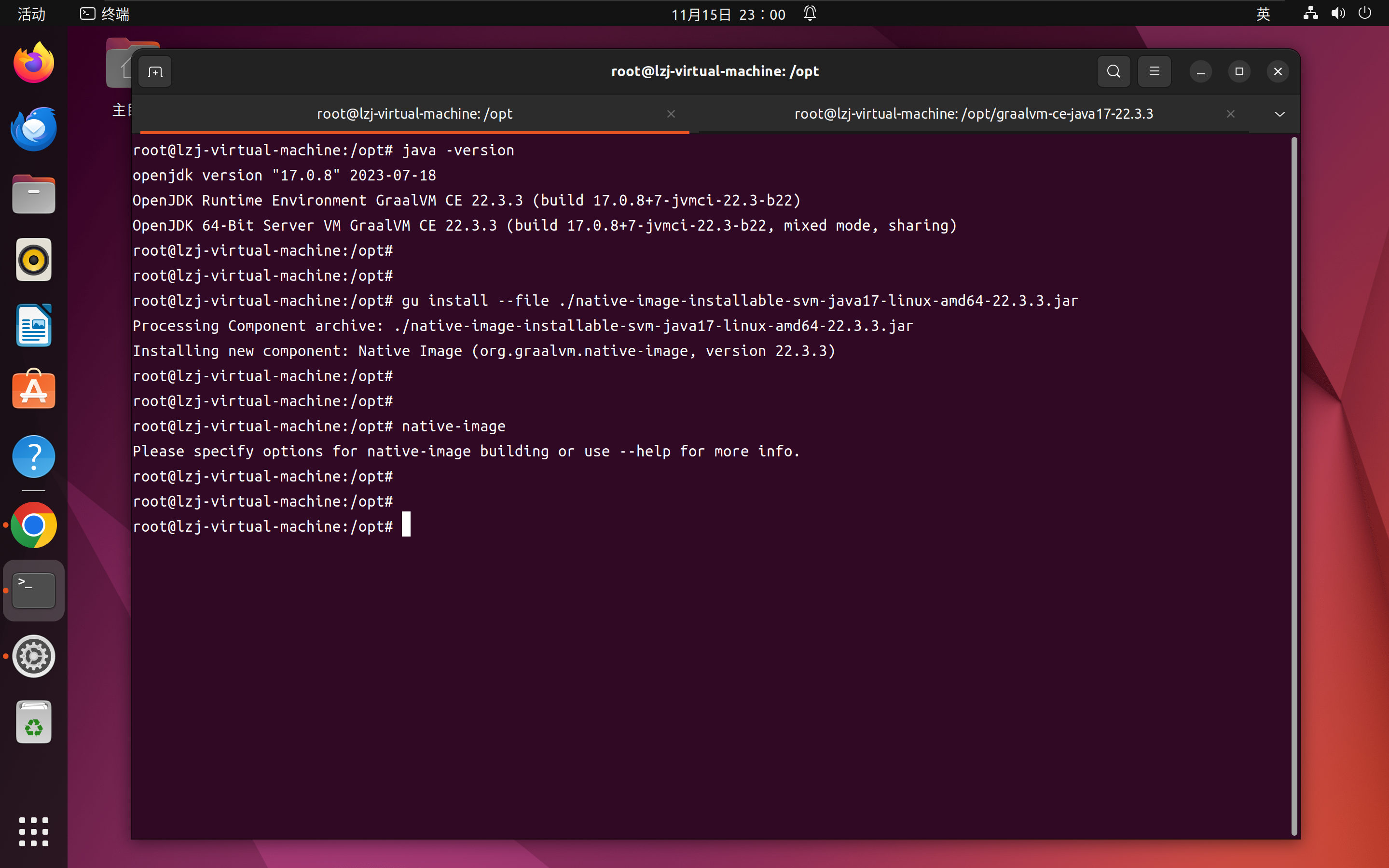
返回/opt目录,安装native-image.jar原生镜像打包工具包,命令和Windows之前安装的命令完全相同

cd /optgu install --file ./native-image-installable-svm-java17-linux-amd64-22.3.3.jar

验证JAVA_HOME变量是否生效,native-image.jar是否正确安装

java -versionnative-image

3.3 编译打包SpringBoot项目

首先需要安装Linux环境的maven,并设置好环境变量,然后将工程源码拷贝到/opt目录下,然后依次执行maven命令。

先用普通的编译命令将代码编译为.class文件

mvn run compile

然后,执行spring-bootprocess-aot插件,进行编译前的前置处理

mvn spring-boot:process-aot

开始编译,运行native插件的build启动native-image,调用Linux底层工具链将工程编译为Linux平台的二进制文件

mvn  native:build

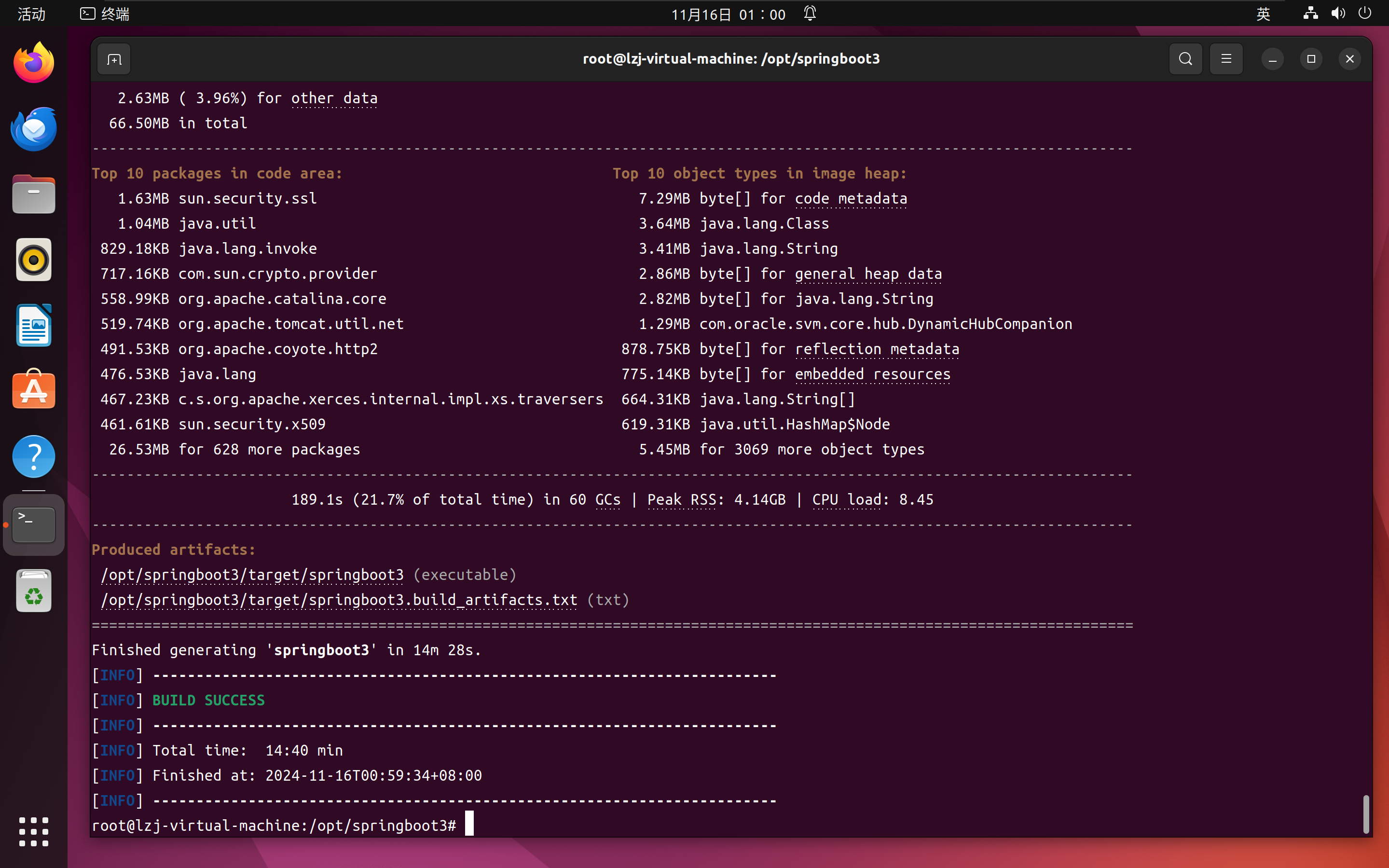
终端输出

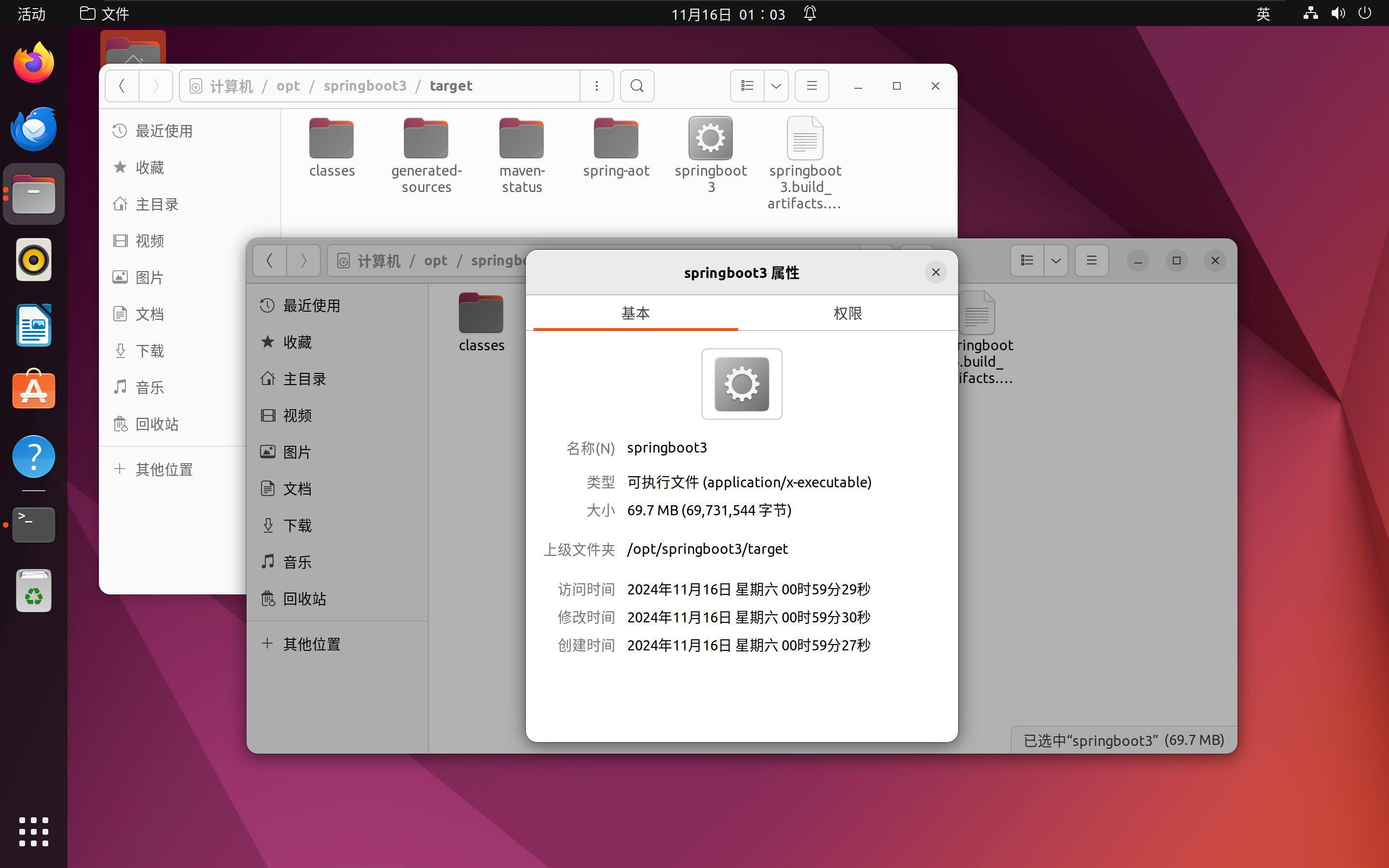
root@lzj-virtual-machine:/opt/springboot3# mvn  native:build[INFO] Scanning for projects...[INFO] [INFO] ----------------------< org.example:springboot3 >-----------------------[INFO] Building springboot3 1.0-SNAPSHOT[INFO]   from pom.xml[INFO] --------------------------------[ jar ]---------------------------------[INFO] [INFO] --- native:0.9.21:build (default-cli) @ springboot3 ---[WARNING] 'native:build' goal is deprecated. Use 'native:compile-no-fork' instead.[INFO] Found GraalVM installation from JAVA_HOME variable.[INFO] Executing: /opt/graalvm-ce-java17-22.3.3/bin/native-image -cp /opt/springboot3/target/classes:/root/.m2/repository/org/springframework/boot/spring-boot-starter/3.0.6/spring-boot-starter-3.0.6.jar:/root/.m2/repository/ch/qos/logback/logback-classic/1.4.7/logback-classic-1.4.7.jar:/root/.m2/repository/org/slf4j/slf4j-api/2.0.7/slf4j-api-2.0.7.jar:/root/.m2/repository/io/micrometer/micrometer-observation/1.10.6/micrometer-observation-1.10.6.jar:/root/.m2/repository/org/springframework/spring-expression/6.0.8/spring-expression-6.0.8.jar:/root/.m2/repository/ch/qos/logback/logback-core/1.4.7/logback-core-1.4.7.jar:/root/.m2/repository/org/springframework/spring-webmvc/6.0.8/spring-webmvc-6.0.8.jar:/root/.m2/repository/org/springframework/boot/spring-boot/3.0.6/spring-boot-3.0.6.jar:/root/.m2/repository/org/springframework/boot/spring-boot-starter-logging/3.0.6/spring-boot-starter-logging-3.0.6.jar:/root/.m2/repository/org/springframework/boot/spring-boot-starter-json/3.0.6/spring-boot-starter-json-3.0.6.jar:/root/.m2/repository/com/fasterxml/jackson/datatype/jackson-datatype-jsr310/2.14.2/jackson-datatype-jsr310-2.14.2.jar:/root/.m2/repository/org/springframework/spring-aop/6.0.8/spring-aop-6.0.8.jar:/root/.m2/repository/jakarta/annotation/jakarta.annotation-api/2.1.1/jakarta.annotation-api-2.1.1.jar:/root/.m2/repository/org/apache/tomcat/embed/tomcat-embed-websocket/10.1.8/tomcat-embed-websocket-10.1.8.jar:/root/.m2/repository/org/springframework/spring-context/6.0.8/spring-context-6.0.8.jar:/root/.m2/repository/org/slf4j/jul-to-slf4j/2.0.7/jul-to-slf4j-2.0.7.jar:/root/.m2/repository/com/fasterxml/jackson/core/jackson-databind/2.14.2/jackson-databind-2.14.2.jar:/root/.m2/repository/com/fasterxml/jackson/datatype/jackson-datatype-jdk8/2.14.2/jackson-datatype-jdk8-2.14.2.jar:/root/.m2/repository/org/springframework/boot/spring-boot-autoconfigure/3.0.6/spring-boot-autoconfigure-3.0.6.jar:/root/.m2/repository/org/apache/tomcat/embed/tomcat-embed-el/10.1.8/tomcat-embed-el-10.1.8.jar:/root/.m2/repository/io/micrometer/micrometer-commons/1.10.6/micrometer-commons-1.10.6.jar:/root/.m2/repository/org/apache/logging/log4j/log4j-api/2.19.0/log4j-api-2.19.0.jar:/root/.m2/repository/org/springframework/spring-web/6.0.8/spring-web-6.0.8.jar:/root/.m2/repository/com/fasterxml/jackson/module/jackson-module-parameter-names/2.14.2/jackson-module-parameter-names-2.14.2.jar:/root/.m2/repository/org/apache/logging/log4j/log4j-to-slf4j/2.19.0/log4j-to-slf4j-2.19.0.jar:/root/.m2/repository/org/apache/tomcat/embed/tomcat-embed-core/10.1.8/tomcat-embed-core-10.1.8.jar:/root/.m2/repository/org/springframework/spring-core/6.0.8/spring-core-6.0.8.jar:/root/.m2/repository/com/fasterxml/jackson/core/jackson-annotations/2.14.2/jackson-annotations-2.14.2.jar:/root/.m2/repository/org/yaml/snakeyaml/1.33/snakeyaml-1.33.jar:/root/.m2/repository/com/fasterxml/jackson/core/jackson-core/2.14.2/jackson-core-2.14.2.jar:/root/.m2/repository/org/springframework/boot/spring-boot-starter-web/3.0.6/spring-boot-starter-web-3.0.6.jar:/root/.m2/repository/org/springframework/boot/spring-boot-starter-tomcat/3.0.6/spring-boot-starter-tomcat-3.0.6.jar:/root/.m2/repository/org/springframework/spring-jcl/6.0.8/spring-jcl-6.0.8.jar:/root/.m2/repository/org/springframework/spring-beans/6.0.8/spring-beans-6.0.8.jar --no-fallback -H:Path=/opt/springboot3/target -H:Name=springboot3========================================================================================================================GraalVM Native Image: Generating 'springboot3' (executable)...========================================================================================================================[1/7] Initializing...                                                                                   (38.9s @ 0.18GB) Version info: 'GraalVM 22.3.3 Java 17 CE' Java version info: '17.0.8+7-jvmci-22.3-b22' C compiler: gcc (linux, x86_64, 11.4.0) Garbage collector: Serial GC 1 user-specific feature(s) - org.springframework.aot.nativex.feature.PreComputeFieldFeatureField org.springframework.core.NativeDetector#imageCode set to true at build timeField org.apache.commons.logging.LogAdapter#log4jSpiPresent set to true at build timeField org.apache.commons.logging.LogAdapter#log4jSlf4jProviderPresent set to true at build timeField org.apache.commons.logging.LogAdapter#slf4jSpiPresent set to true at build timeField org.apache.commons.logging.LogAdapter#slf4jApiPresent set to true at build timeField org.springframework.core.KotlinDetector#kotlinPresent set to false at build timeField org.springframework.core.KotlinDetector#kotlinReflectPresent set to false at build timeField org.springframework.cglib.core.AbstractClassGenerator#imageCode set to true at build timeField org.springframework.format.support.DefaultFormattingConversionService#jsr354Present set to false at build timeField org.springframework.boot.logging.logback.LogbackLoggingSystem$Factory#PRESENT set to true at build timeField org.springframework.web.servlet.view.InternalResourceViewResolver#jstlPresent set to false at build timeField org.springframework.web.servlet.config.annotation.WebMvcConfigurationSupport#romePresent set to false at build timeField org.springframework.web.servlet.config.annotation.WebMvcConfigurationSupport#jaxb2Present set to false at build timeField org.springframework.web.servlet.config.annotation.WebMvcConfigurationSupport#jackson2Present set to true at build timeField org.springframework.web.servlet.config.annotation.WebMvcConfigurationSupport#jackson2XmlPresent set to false at build timeField org.springframework.web.servlet.config.annotation.WebMvcConfigurationSupport#jackson2SmilePresent set to false at build timeField org.springframework.web.servlet.config.annotation.WebMvcConfigurationSupport#jackson2CborPresent set to false at build timeField org.springframework.web.servlet.config.annotation.WebMvcConfigurationSupport#gsonPresent set to false at build timeField org.springframework.web.servlet.config.annotation.WebMvcConfigurationSupport#jsonbPresent set to false at build timeField org.springframework.web.servlet.config.annotation.WebMvcConfigurationSupport#kotlinSerializationCborPresent set to false at build timeField org.springframework.web.servlet.config.annotation.WebMvcConfigurationSupport#kotlinSerializationJsonPresent set to false at build timeField org.springframework.web.servlet.config.annotation.WebMvcConfigurationSupport#kotlinSerializationProtobufPresent set to false at build timeField org.springframework.boot.logging.log4j2.Log4J2LoggingSystem$Factory#PRESENT set to false at build timeField org.springframework.boot.logging.java.JavaLoggingSystem$Factory#PRESENT set to true at build timeField org.springframework.http.converter.json.Jackson2ObjectMapperBuilder#jackson2XmlPresent set to false at build timeField org.springframework.web.context.support.StandardServletEnvironment#jndiPresent set to true at build timeField org.springframework.web.context.support.WebApplicationContextUtils#jsfPresent set to false at build timeField org.springframework.web.context.request.RequestContextHolder#jsfPresent set to false at build timeField org.springframework.boot.logging.logback.LogbackLoggingSystemProperties#JBOSS_LOGGING_PRESENT set to false at build timeField org.springframework.context.event.ApplicationListenerMethodAdapter#reactiveStreamsPresent set to false at build timeField org.springframework.http.converter.support.AllEncompassingFormHttpMessageConverter#jaxb2Present set to false at build timeField org.springframework.http.converter.support.AllEncompassingFormHttpMessageConverter#jackson2Present set to true at build timeField org.springframework.http.converter.support.AllEncompassingFormHttpMessageConverter#jackson2XmlPresent set to false at build timeField org.springframework.http.converter.support.AllEncompassingFormHttpMessageConverter#jackson2SmilePresent set to false at build timeField org.springframework.http.converter.support.AllEncompassingFormHttpMessageConverter#gsonPresent set to false at build timeField org.springframework.http.converter.support.AllEncompassingFormHttpMessageConverter#jsonbPresent set to false at build timeField org.springframework.http.converter.support.AllEncompassingFormHttpMessageConverter#kotlinSerializationCborPresent set to false at build timeField org.springframework.http.converter.support.AllEncompassingFormHttpMessageConverter#kotlinSerializationJsonPresent set to false at build timeField org.springframework.http.converter.support.AllEncompassingFormHttpMessageConverter#kotlinSerializationProtobufPresent set to false at build timeField org.springframework.web.client.RestTemplate#romePresent set to false at build timeField org.springframework.web.client.RestTemplate#jaxb2Present set to false at build timeField org.springframework.web.client.RestTemplate#jackson2Present set to true at build timeField org.springframework.web.client.RestTemplate#jackson2XmlPresent set to false at build timeField org.springframework.web.client.RestTemplate#jackson2SmilePresent set to false at build timeField org.springframework.web.client.RestTemplate#jackson2CborPresent set to false at build timeField org.springframework.web.client.RestTemplate#gsonPresent set to false at build timeField org.springframework.web.client.RestTemplate#jsonbPresent set to false at build timeField org.springframework.web.client.RestTemplate#kotlinSerializationCborPresent set to false at build timeField org.springframework.web.client.RestTemplate#kotlinSerializationJsonPresent set to false at build timeField org.springframework.web.client.RestTemplate#kotlinSerializationProtobufPresent set to false at build timeField org.springframework.core.ReactiveAdapterRegistry#reactorPresent set to false at build timeField org.springframework.core.ReactiveAdapterRegistry#rxjava3Present set to false at build timeField org.springframework.core.ReactiveAdapterRegistry#kotlinCoroutinesPresent set to false at build timeField org.springframework.core.ReactiveAdapterRegistry#mutinyPresent set to false at build timeField org.springframework.boot.autoconfigure.web.format.WebConversionService#JSR_354_PRESENT set to false at build timeSLF4J: No SLF4J providers were found.SLF4J: Defaulting to no-operation (NOP) logger implementationSLF4J: See https://www.slf4j.org/codes.html#noProviders for further details.Field org.springframework.web.servlet.mvc.method.annotation.ReactiveTypeHandler#isContextPropagationPresent set to false at build timeField org.springframework.web.servlet.support.RequestContext#jstlPresent set to false at build time[2/7] Performing analysis...  [*********]                                                              (450.4s @ 2.25GB)  15,331 (92.43%) of 16,586 classes reachable  24,926 (67.58%) of 36,883 fields reachable  73,471 (62.05%) of 118,406 methods reachable     784 classes,   246 fields, and 4,536 methods registered for reflection      64 classes,    70 fields, and    55 methods registered for JNI access       4 native libraries: dl, pthread, rt, z[3/7] Building universe...                                                                              (71.4s @ 1.81GB)[4/7] Parsing methods...      [*******]                                                                 (48.4s @ 1.67GB)[5/7] Inlining methods...     [***]                                                                     (18.7s @ 2.49GB)[6/7] Compiling methods...    [**********]                                                             (112.1s @ 2.00GB)[7/7] Creating image...                                                                                 (53.6s @ 2.85GB)  33.97MB (51.08%) for code area:    48,119 compilation units  29.90MB (44.97%) for image heap:  353,714 objects and 118 resources   2.63MB ( 3.96%) for other data  66.50MB in total------------------------------------------------------------------------------------------------------------------------Top 10 packages in code area:                               Top 10 object types in image heap:   1.63MB sun.security.ssl                                     7.29MB byte[] for code metadata   1.04MB java.util                                            3.64MB java.lang.Class 829.18KB java.lang.invoke                                     3.41MB java.lang.String 717.16KB com.sun.crypto.provider                              2.86MB byte[] for general heap data 558.99KB org.apache.catalina.core                             2.82MB byte[] for java.lang.String 519.74KB org.apache.tomcat.util.net                           1.29MB com.oracle.svm.core.hub.DynamicHubCompanion 491.53KB org.apache.coyote.http2                            878.75KB byte[] for reflection metadata 476.53KB java.lang                                          775.14KB byte[] for embedded resources 467.23KB c.s.org.apache.xerces.internal.impl.xs.traversers  664.31KB java.lang.String[] 461.61KB sun.security.x509                                  619.31KB java.util.HashMap$Node  26.53MB for 628 more packages                                5.45MB for 3069 more object types------------------------------------------------------------------------------------------------------------------------                       189.1s (21.7% of total time) in 60 GCs | Peak RSS: 4.14GB | CPU load: 8.45------------------------------------------------------------------------------------------------------------------------Produced artifacts: /opt/springboot3/target/springboot3 (executable) /opt/springboot3/target/springboot3.build_artifacts.txt (txt)========================================================================================================================Finished generating 'springboot3' in 14m 28s.[INFO] ------------------------------------------------------------------------[INFO] BUILD SUCCESS[INFO] ------------------------------------------------------------------------[INFO] Total time:  14:40 min[INFO] Finished at: 2024-11-16T00:59:34+08:00[INFO] ------------------------------------------------------------------------

编译打包完成

编译完成,得到Linux上的可执行文件

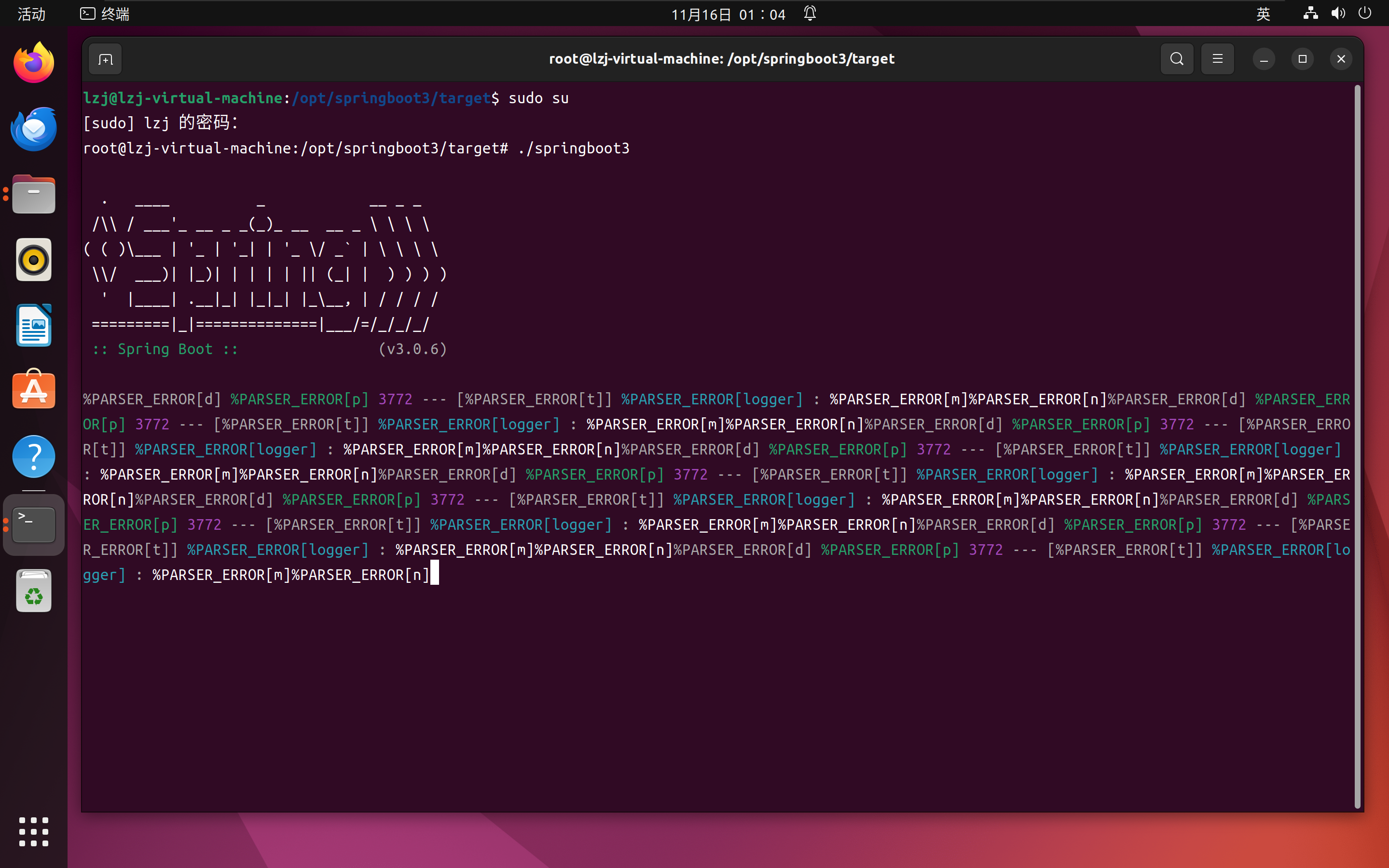
运行可执行文件,并打开浏览器访问测试,功能正常

至此,Linux平台上原生镜像编译就完成了。

4.注意事项

  1. 不是所有Java代码都支持原生编译打包,例如代码中含有反射创建对象,反射调用方法等操作会导致AOT损失动态能力,如果编译需要额外处理,需要提前告知GraalVM未来会反射调用哪些方法或构造器,例如springboot就提供了一些注解,保证AOT编译时功能正常,但不是所有框架都像Spring那样适配了AOT

  2. 配置文件不能放进可执行文件,也需要额外处理,可以在程序代码改为相对路径读取配置文件。

  •  

使用python将excel表格转换为SQL INSERT

import pandas as pd# 读取Excel文件file_path = 'D:/1.xlsx'  # 替换为你的文件路径sheet_name = '1'  # 替换为你的工作表名称table_name = 'your_table_name'  # 替换为你的数据库表名称# 使用pandas读取Excel数据df = pd.read_excel(file_path, sheet_name=sheet_name)# 获取表的列名columns = ', '.join(df.columns)# 将每行数据转换为SQL INSERT语句insert_statements = []for index, row in df.iterrows():    # 将每行数据转换为元组格式    values = ', '.join([f"'{str(value)}'" for value in row.values])    sql = f"INSERT INTO {table_name} ({columns}) VALUES ({values});"    insert_statements.append(sql)# 输出SQL INSERT语句for statement in insert_statements:    print(statement)
  •  

使用python压缩图片

  1. 首先Linux上面要安装一些软件包
yum install -y libjpeg-develyum install -y zlib-develyum install -y libjpeg libtiff freetype 
  1. 其次需要安装python的依赖
pip3 install tinifypip3 install Pillow
  1. 编写并运行以下代码
import osfrom PIL import Imageimport tinifyfrom concurrent.futures import ThreadPoolExecutor# 配置部分input_folder = '/img'  # 要压缩的图片文件夹whitelist = {'example1.jpg', 'important_image.png'}  # 白名单中的文件quality = 75  # 压缩质量def compress_image(img_path, quality):    """    压缩单张图片并覆盖原文件。        :param img_path: 图片路径    :param quality: 压缩质量    """    try:        img = Image.open(img_path)        img.save(img_path, optimize=True, quality=quality)        print(f"Compressed and saved in place: {img_path}")    except Exception as e:        print(f"Failed to compress {img_path}: {e}")def compress_images_in_place(input_folder, whitelist=None, quality=75):    """    使用 Pillow 压缩图片并覆盖原文件,支持白名单功能。使用多线程加速处理。        :param input_folder: 原始图片文件夹路径    :param whitelist: 白名单列表,包含不希望被压缩的图片文件名(可选)    :param quality: 压缩质量,默认75    """    if whitelist is None:        whitelist = set()    # 创建一个 ThreadPoolExecutor 来处理压缩任务    with ThreadPoolExecutor() as executor:        futures = []        for root, dirs, files in os.walk(input_folder):            for file in files:                if file in whitelist:                    print(f"Skipping (whitelisted): {file}")                    continue                if file.lower().endswith(('.jpg', '.jpeg', '.png')):                    img_path = os.path.join(root, file)                    futures.append(executor.submit(compress_image, img_path, quality))        # 等待所有任务完成        for future in futures:            future.result()# 调用压缩函数compress_images_in_place(input_folder, whitelist, quality)
  •